Best Text-to-Speech Software: 7 Free & Paid Tools for Commercial Use
[2026 Latest] 10 Best Text-to-Speech Software! Includes Free Commercial Tools
Sept. 27, 2026
![[2026 Latest] 10 Best Text-to-Speech Software! Includes Free Commercial Tools](https://storage.googleapis.com/ondoku3/image/20250516_tts-software-top10-2025-tmb_2026_930.webp)
What kind of text-to-speech software and services are available?

In this article, we will carefully select, compare, and introduce recommended text-to-speech software and services!
Text-to-speech software that converts text into audio can be used in various situations, such as video production, language study, and improving accessibility.
In particular, free text-to-speech software has significant advantages in terms of cost.
Furthermore, the number of high-quality text-to-speech services available for commercial use is increasing.
This time, we will provide a detailed explanation of the features and usability of each, ranging from browser-based types that require no installation to high-performance desktop types.
We will also introduce many free software options that can be used for commercial purposes.
After reading this article, you will surely find the text-to-speech software that is perfect for you.
【Free】Recommended AI Text-to-Speech Software You Can Use Right Away

If you are looking for text-to-speech software, we recommend "Ondoku".
"Ondoku" is an AI text-to-speech software (web service) that can be used for free from your browser.
You can use it right now with no installation required and simple operation.
Amazingly, "Ondoku" allows you to read up to 5,000 characters for free!
Moreover, commercial use is also OK for free (credit notation is required for the free version).
For converting text to speech, why not try "Ondoku" for free first?
What is Text-to-Speech Software? Basics and How to Choose from Free to Paid

First, we will briefly explain the basic knowledge of text-to-speech software!
Basics and Types of Text-to-Speech Software
Text-to-speech software refers to software that converts text into audio.
Text-to-speech technology is evolving rapidly; voices that were once mechanical can now be read with natural intonation and pronunciation due to the development of AI technology.
There are mainly two types of text-to-speech software: "browser-based" and "desktop-based."
The browser-based type features the ability to be used from a web browser without the need for installation.
It can read text with high-quality audio by utilizing AI engines in the cloud.
The desktop-based type is installed and used on a computer, offering the advantage of being usable even in offline environments.
Some are released as free software.
Additionally, some paid installation-type software features attractive character settings.
Browser-based or Desktop-based: Which is Recommended?
So, which is better: browser-based software or desktop-based software?
Browser-based text-to-speech software has the major advantage of being immediately available without installation.
Browser-based services like "Ondoku" can provide high-quality reading because they can use the latest AI speech synthesis engines regardless of PC performance.
Furthermore, since periodic updates are performed automatically, you can always use the latest features.
On the other hand, desktop-based text-to-speech software has the advantage of being usable in environments without an internet connection.
Another feature is that there is software specialized for specific purposes, such as reading out comments for video streaming.
Even among free software, there are high-performance options, but installation and setup can sometimes be time-consuming.
For beginners, those who want to use it easily, or those who want high-quality audio, the browser-based type is recommended. For those who prioritize offline use, want to use it for streaming comment reading, or want to use character voices, the desktop-based type is recommended.
What are the Differences Between Free and Paid? It's Recommended to Check About Commercial Use

The differences between free text-to-speech software and paid versions include functional limitations, audio quality, and whether commercial use is permitted.
Free text-to-speech software still possesses basic reading functions, but character limits or advanced adjustment functions may be restricted.
Regarding commercial use, some software permits it even in the free version, while others do not.
For example, "Ondoku" allows commercial use even in the free version by providing credit notation.
Paid text-to-speech software offers benefits such as access to more diverse voices, detailed adjustment functions, and the ability to use it commercially without credit notation.
If you want to use it for free, it is important to first carefully check the software's terms of use and understand the conditions for commercial use.
What are the Key Points When Choosing Text-to-Speech Software?
When choosing text-to-speech software for the first time, it is important to first clarify your purpose.
The optimal software varies depending on the purpose, such as creating video narrations, language learning, or improving accessibility.
Of course, ease of use is also important.
Text-to-speech software with an interface that can be operated intuitively is easier to continue using long-term than one with complex functions.
Naturalness of audio is also a key point; especially if natural Japanese intonation and pronunciation are required, it is best to choose software specialized for Japanese.
If you want to use it for free, it is also important to check the details of functional limitations and ensure they do not affect your intended use.
If you are considering commercial use, you need to choose software that allows commercial use even if it is free software.
【Free Options Available】10 Recommended Text-to-Speech Software
Now, let's introduce specifically which text-to-speech software is recommended!
1. Ondoku | High-Quality Speech Service Free to Use Right Away on a Browser
"Ondoku" is a text-to-speech service that can be used immediately from a browser without installation.
It can be used right now not only on a PC but also on iPhone/iPad (iOS) and Android smartphones!
It features natural audio utilizing the latest AI technology.
The variety of voices is also abundant; for example, in the case of Japanese, you can choose from 16 types of voices.
It is a text-to-speech service that can be used for free, but another feature is that commercial use, such as for monetizing videos or use in a company, is OK.

What you can do with Ondoku. About commercial use (business use) and prohibited items.
Commercial use (business use) is possible with Ondoku. Regardless of whether you are an individual or a corporation, use for the purpose of obtaining profit such as money directly or indirectly is commercial use. However, please note that Ondoku has established prohibited acts. This time, what you can and cannot do with Ondoku...
Since you can read up to 1,000 characters without registration and up to 5,000 characters after registration for free, it can handle long narration creation for free.
Operation is also very simple; just enter text and press the "Read" button.
Even first-time users can operate it intuitively.
Furthermore, because it supports 81 languages and regions including English, it is useful for creating foreign language content.
While it is a free web service, it can read with the highest quality audio, so it is also recommended for your first AI reading experience.
Of course, it is also ideal for professional narration purposes.
If you are undecided on text-to-speech software, why not experience "Ondoku" first?
2. A.I.VOICE | Japanese-Specialized Speech Synthesis Software Equipped with High-Quality AI Voices

A.I.VOICE is high-quality speech synthesis software developed by AI Inc.
It uses a speech synthesis engine called "AITalk," which can generate very natural Japanese speech.
The lineup includes many attractive character voices, such as "Yuzuki Yukari" and "Kotonoha Akane/Aoi," who are famous as "VOICEROID" characters.
It supports both Windows and Mac and is sold as paid software.
The emotional expression of the voice is rich, and because you can finely adjust the strength, pitch, and speed of the reading emotion, more natural conversation-style reading is possible.
Intonation and reading editing functions are also substantial, allowing technical terms and proper nouns to be read accurately.
The strengths are high naturalness, rich emotional expression, and high degree of freedom in parameter adjustment, making it ideal for narration and video production.
As for weaknesses, since it is paid software, initial investment is required, and there is the point that characters must be purchased separately.
Regarding commercial use, commercial use for individuals is basically possible by purchasing the product, but a separate commercial license is required for corporate use.
This software is recommended for those who want to create creative audio works or seek high-quality narration.
A.I.VOICE 2 Complete Guide! Detailed explanation of features, installation methods, and how to use the successor software to VOICEROID
Explaining the features and usage of A.I.VOICE 2, which features Kotonoha Akane/Aoi and Yuzuki Yukari, familiar from VOICEROID videos. Introducing everything from installation methods to audio export in detail.
3. CeVIO AI | Integrated Voice Creation Software Capable of Singing

CeVIO AI is voice creation software that develops both talk and singing.
"Talk Voices" for talking and "Song Voices" for singing are sold.
It is based on technology from Techno-Speech, a venture company from the Nagoya Institute of Technology, and is particularly excellent in natural Japanese intonation and expressiveness.
Character voices full of personality such as "Sato Sasara" and "Suzuki Tsuzumi" are popular and widely used in video and content production.
It is Windows-exclusive software and is sold as paid software.
By purchasing a "Song Voice," it is also possible to make the character sing.
Emotional parameter adjustment is very fine, and because emotional expressions such as joy, anger, and sadness can be adjusted numerically, audio with rich expressiveness can be created.
Regarding commercial use, use by individual creators is relatively flexible, but a separate license is required for corporate use or use in product sales.
This software is recommended for those who want to create audio content with rich expressiveness or those who want to try singing synthesis.

What is CeVIO AI? Detailed explanation of speech synthesis software features, usage, and commercial use
A complete guide to the AI singing synthesis software CeVIO AI. Explaining for beginners the features of popular characters like Sato Sasara and Suzuki Tsuzumi, purchase methods, and precautions for commercial use.
4. VOICEPEAK | High-Quality Speech Synthesis Editor with Intuitive Operation

VOICEPEAK is speech synthesis software characterized by intuitive operability.
A wide lineup from voices with character to voices for natural narration is developed.
In addition to Windows and Mac, it is one of the few desktop-type speech synthesis softwares that also supports Linux.
It has an excellent function for analyzing text context to add natural intonation, allowing high-quality audio to be generated without specialized knowledge.
The intuitive editor screen allows for visual editing of intonation, speed, volume, etc., making it designed to be easy for even beginners to handle.
Regarding commercial use conditions, commercial use rights are included in the basic license, but separate terms may apply to character voices.
This software is recommended for those who want to produce high-quality narration or perform speech synthesis across multiple platforms.
What is speech synthesis software VOICEPEAK? Detailed explanation of features and commercial use
Detailed explanation of what kind of features the speech synthesis software "VOICEPEAK" has. Also introducing commercial use terms, which often differ for each character.
5. SofTalk | Standard Desktop Reading Software with Simple Functions

SofTalk is a standard free software that has long been favored as a free reading software for Windows.
It specializes in a simple interface and basic functions, making it easy for beginners to use.
The speech synthesis engine allows selection from multiple engines such as the original speech synthesis engine, MikoVoice, and SAPI.
It used to support AquesTalk (the speech engine that became the basis for Yukkuri voices), but support has currently ended.
Simply by entering text, you can easily have it read aloud, and it also includes features such as automatically reading the contents of the clipboard.
The strengths are that it is very lightweight and operates comfortably even on low-spec PCs, and basic operations are simple and easy to understand.
As for weaknesses, it lacks the naturalness of audio compared to the latest AI, and because it includes abundant sound sources, the file size is over 300MB, which is very large for free software.
Regarding commercial use conditions, the software itself is free, but since the terms differ depending on the speech synthesis engine, you need to check the terms of the engine you use if you use it commercially.
This is a free reading software recommended for those who want basic reading functions or are looking for lightweight software.
6. Bouyomi-chan | Standard Text-to-Speech Software for Streaming

Bouyomi-chan is a free reading software used mainly for game streaming and live streaming, and features the distinctive voice known as "Yukkuri voice."
It uses an older version of the AquesTalk speech synthesis library, which has the major advantage of being available for commercial use even for free.
It is a lightweight free software for Windows, and because functions for linking with other software are substantial, it is often used in combination with streaming tools.
It is known as the standard software used for "Yukkuri Jikkyou" and "Yukkuri Kaisetsu" on sites like Nico Nico Douga and YouTube.
Linking with streaming software such as OBS is also possible, and it is widely used for reading YouTube stream comments.
Strengths include high connectivity with other software, support from a large community, and its unique, individualistic voice.
Weaknesses include the sound quality being mechanical and lacking naturalness, the requirement for installation, and support only for Windows.
Regarding commercial use conditions, because it uses an older version of AquesTalk, commercial use is possible for free, but we recommend checking the terms of use.
This reading software is recommended for those involved in game streaming, comment reading, or Yukkuri video production.
7. VOICEVOX | High-Quality Character Voice Generation Engine

VOICEVOX is a high-quality speech synthesis software developed as open-source, characterized by diverse character voices.
Reading is possible in the voices of popular characters such as "Zundamon," "Shikoku Metan," and "Kasukabe Tsumugi."
It is desktop-type software compatible with the three major OSs: Windows, Mac, and Linux.
It uses deep learning technology for speech synthesis, allowing for the generation of natural and high-quality audio.
Intonation adjustment and detailed setting of audio parameters are possible, and it also supports professional audio editing.
A version supporting GPU (graphics board) is also provided, allowing for faster processing on high-performance PCs.
Regarding commercial use conditions, the software itself is available for commercial use, but since terms differ for each character, you need to check the terms of use for the character you use.
This reading software is recommended for those who want to incorporate individualistic audio into creative activities or video production.

VOICEVOX Usage Complete Guide! Detailed explanation from features of the AI free speech synthesis software to commercial use
Detailed explanation from features of VOICEVOX to usage and precautions during commercial use. A complete guide to the free AI speech synthesis software that can read aloud in popular character voices such as Zundamon.
8. CoeFont | High-Quality AI Japanese Speech Synthesis Service

CoeFont is a paid Japanese speech synthesis service utilizing AI.
It is characterized by natural Japanese pronunciation and intonation, allowing reading with natural inflection close to a human narrator.
Diverse voices modeled after voice actors and actors are prepared, allowing you to choose a voice that suits your purpose.
Through unique AI technology, it also features the ability to automatically add appropriate intonation and pauses based on the context.
It also provides a function to create an AI voice based on your own voice, allowing for original audio creation.
Although there are limits on functions and character count, a free plan is also available.
This service is recommended for those who want to create professional Japanese narration or seek high-quality speech synthesis.
9. COEIROINK | Free Software Supporting Diverse Voice Models

COEIROINK is AI speech synthesis software developed mainly targeting creative activities.
It is desktop-type software compatible with Windows, Mac, and Linux, and requires installation.
In addition to official and authorized character voices, user-created voice models "MYCOE" can also be used.
Fine adjustments of intonation and emotional expression are possible, allowing for the creation of more expressive audio.
Since the download size is generally large, care regarding the network environment during installation is necessary.
Regarding commercial use conditions, commercial use is basically possible, but terms differ depending on the voice model used.
This is recommended for those who want to incorporate individualistic voices into creative activities or want to use diverse voice models.

What is COEIROINK? Thorough explanation of speech synthesis software features, usage, and commercial use
A complete guide to the features and usage of COEIROINK. Explaining in detail everything from how to introduce speech synthesis software to adding character voices and precautions for commercial use.
10. Yukumo! | Browser-based Yukkuri Voice Reading Service

Yukumo! is a browser-based reading service using the speech synthesis library "AquesTalk" from Aquest Co., Ltd.
Because it can be used directly from a browser without installation, you can start using it immediately from any device.
The biggest feature is that it can read with the distinctive voice known as "Yukkuri voice" (monotone voice).
It supports multiple engine versions such as AquesTalk1, AquesTalk2, and AquesTalk10, allowing for the selection of various voice qualities.
Text entry is simple; reading begins just by entering a sentence into the text box on the browser.
The read audio can also be downloaded and utilized in video editing and the like.
Strengths include the ability to use it easily without installation, being one of the few services where Yukkuri voices can be used from a browser, and operation being simple and easy for beginners to use.
As for weaknesses, the naturalness of the audio is mechanical compared to the latest AI technology, and there are limits on commercial use.
Regarding commercial use conditions, non-commercial use for individuals is free, but if used commercially, a separate commercial license for AquesTalk must be purchased.
This service is recommended for those who want to easily start creating videos like "Yukkuri Kaisetsu" or "Yukkuri Jikkyou" without installation.
【Free is OK】Detailed Explanation of Text-to-Speech Software Introduction and Setup Methods
As an example of how to use text-to-speech software, we will explain the reading method of "Ondoku"!
【Free】How to Start and Basic Settings for Browser-based "Ondoku"
"Ondoku" is a reading service that can be used right now simply by accessing it from a browser.
First, access the official website.
Enter or paste the text you want to read in the text input field.
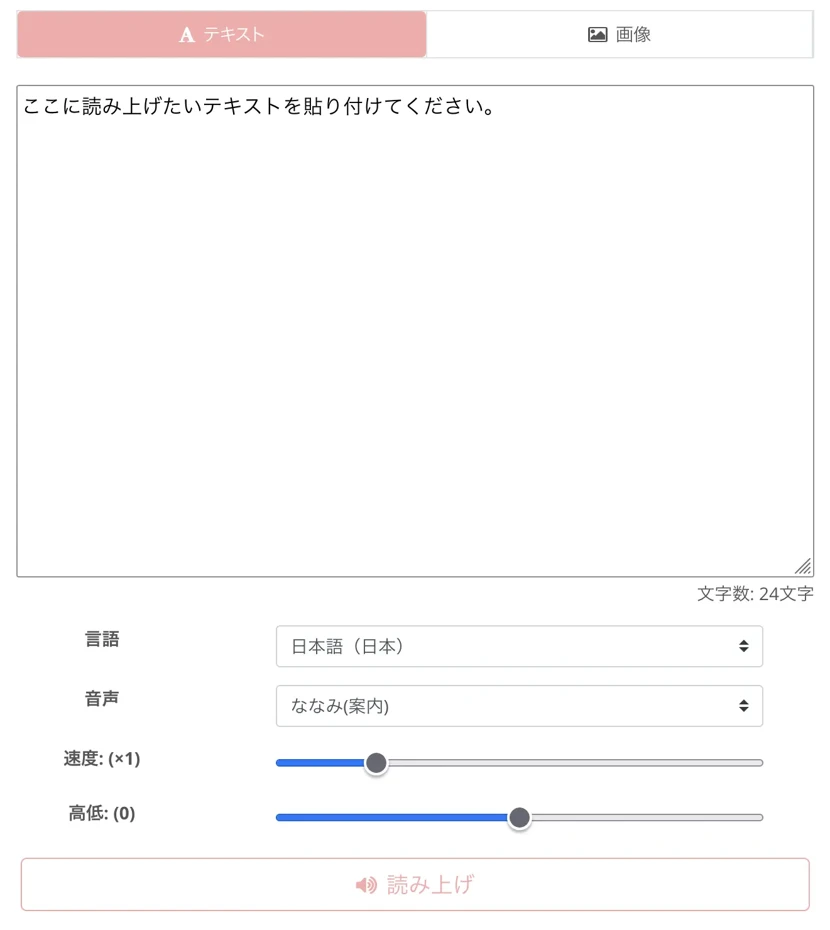
Choose your preferred voice from "Audio."
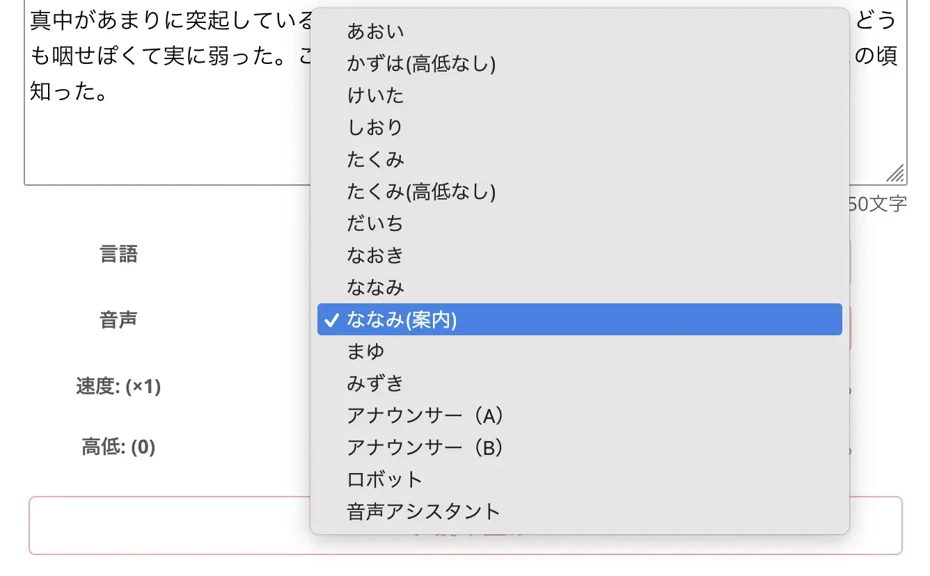
If necessary, you can also adjust the reading speed and pitch.

Once settings are complete, click the "Read" button.

High-quality audio will be played immediately.
The read audio can be saved in MP3 format with the "Download" button.
If you want to read longer texts, free registration will allow you to read up to 5,000 characters.
In this way, "Ondoku" can be used easily for free!
Why not also utilize "Ondoku" for creative activities, language learning, or business?
Tips and Setting Examples for Audio Customization

To improve the naturalness of text-to-speech software, appropriate setting adjustments are important.
First, adjust the reading speed according to the content and purpose.
For general explanations, use standard speed; for detailed explanations or important points, slightly slower speed makes it easier to convey.
In language learning, making it extremely slow, such as 0.3x, is also recommended.
Since Ondoku also allows you to adjust the pitch, setting it slightly higher when you want to give a character-like impression, or lower for a calm impression, is effective.
Even with free reading software, by being creative with these settings, you can create audio that is quite natural and easy to listen to.
How to Use on Smartphones and Precautions
When using text-to-speech software on a smartphone, browser-based services are the easiest.
"Ondoku" can be accessed from a smartphone browser and allows high-quality reading just like a PC.
Since many desktop-type softwares cannot be used on smartphones, browser-based types are recommended if you want to use them across platforms such as PC, smartphone, and tablet.
When using reading services on a smartphone, be careful about mobile data usage.
Using it in a Wi-Fi environment is recommended.
If you save the reading audio created on a smartphone in cloud storage, subsequent editing work on a PC will be smoother.
Recommended reading methods for iPhone and Android smartphones are also introduced on these pages.

8 recommended reading apps for iPhone/iPad! How to easily read text aloud on a smartphone?
Introducing recommended reading methods for iPhone and iPad (iOS). Explaining recommended web apps and reading apps that can be installed from the App Store.
![[2026 Latest Edition] 5 Recommended Reading Apps for Android Smartphones!](https://storage.googleapis.com/ondoku3/image/android-yomiage-app_tmb_2026_930.webp)
[2026 Latest Edition] 5 Recommended Reading Apps for Android Smartphones!
Introducing recommended reading apps usable on Android smartphones. Also explaining the reading functions pre-installed as standard on Android smartphones.
Techniques for Utilizing Text-to-Speech Software for Free

Create Audiobooks with Text-to-Speech Software
By using text-to-speech software, you can take in information not only visually but also aurally.
By converting long news articles or reports into audio using free reading software and listening to them during commuting or while doing housework, you can use your time effectively.
Even free services like "Ondoku" allow high-quality reading, making it possible to efficiently collect information by turning news articles or blog content into audio.
For those who want to increase their reading volume, the method of entering the content of e-books into reading software and converting it to audio is also effective.
With "Ondoku," anyone can easily create audiobooks.

【Free】Let's create audiobooks with speech synthesis! Summary of self-digitization methods using reading services
Detailed explanation of the flow and methods for creating audiobooks using free AI reading services and software, as well as recommended services and software.
By utilizing the speed adjustment function and gradually increasing playback speed once you get used to it, you can take in more information in a shorter time.
Those who feel tired from collecting information from digital content can continue information input while reducing eye strain by utilizing reading software.
Utilize Text-to-Speech Software for Refining and Proofreading Sentences
Text-to-speech software is also ideal for proofreading and refining sentences.
By listening to sentences you wrote with text-to-speech software, you can discover unnaturalness or errors that the eye might miss.
Using software that reads with natural intonation like "Ondoku" allows you to immediately find points where the rhythm or flow of the sentences feels off.
Sentences that are too long or confusing expressions can be noticed more quickly by listening to them being read than by looking at them.
It is also possible to check the clarity for the audience by listening to presentation materials or speech drafts with free reading software.
By reading them aloud again after correcting the sentences, you can finish with more refined writing.
Business documents and emails also become more accurate and easier to understand by checking them with reading software before sending.
Utilize Reading Audio for English and Foreign Language Pronunciation Practice and Shadowing
In foreign language learning, text-to-speech software becomes a powerful learning tool.
With a multilingual free service like "Ondoku", you can easily check pronunciation by reading the text of the language you are studying.
Reading software can also be utilized for shadowing practice (practicing pronouncing in the same way immediately after the audio).
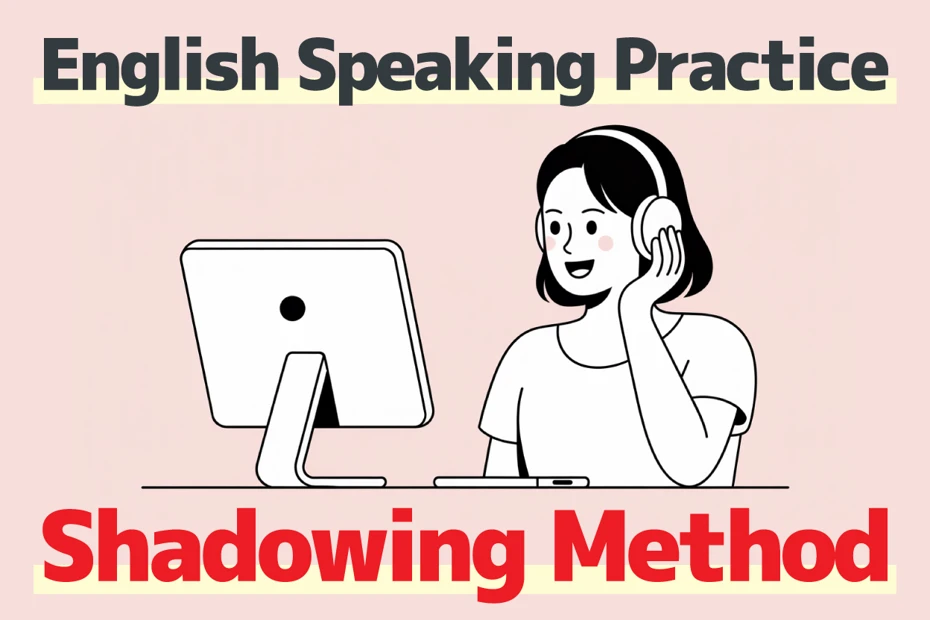
【Complete Guide】What is the method for English shadowing? Also explaining how to create materials for free!
Efficiently improve your English skills with shadowing! Explaining for beginners a learning method that simultaneously improves listening, pronunciation, and speaking. Also introducing methods for creating materials with free AI audio.
Just by mimicking the native pronunciation audio of AI reading software or services, you can rapidly improve your pronunciation.
Reading software and services are also ideal for listening reinforcement.
It is effective to start with simple sentences and step up gradually to more difficult content.
Because you can study with native pronunciation even with reading software that can be used for free, the efficiency of language learning from speaking to listening is greatly improved.
Utilize Text-to-Speech Software for Free in Presentations and Video Production
By utilizing text-to-speech software for presentations and video production, you can give a professional impression.
By using free services available for commercial use like "Ondoku", you can create high-quality narration audio without spending money.
In commentary videos on sites like YouTube, reading software is useful when you do not want to use your own voice or when you want to make the narration easier to hear.
In video production intended for commercial use, remember to check the terms of the free software you use and perform necessary credit notation.
Since we explain tips for producing video audio smoothly, please also check out this article!

How to quickly create narration for videos like YouTube with text-to-speech software. Tips and points
Explaining how to quickly create YouTube video narration with Ondoku. Clearly explaining everything from how to create a script to how to use Ondoku, adjusting for natural intonation, and tips for editing with video editing software. A must-see for those who want to streamline video production with text-to-speech software!
【FAQ】Troubleshooting and Frequently Asked Questions About Text-to-Speech Software

What to Do When Specific Words Are Not Read Correctly
If technical terms or proper nouns are not read correctly, there are several methods to deal with it.
First is the dictionary function.
By referring to this article and using the dictionary function, you can adjust the Japanese reading.

How to use Ondoku's dictionary function and precautions. Register adjusted intonations to make it more convenient
Ondoku has a "dictionary" function. We will introduce how to use the dictionary function and its details. We will also introduce small tricks to make it more convenient by registering adjusted intonations.
Additionally, you can handle it through efforts such as changing kanji to hiragana.
When foreign language words are mixed in, a key point is to try katakana notation instead of alphabet notation.
If symbols or special characters are included, reading will become smoother by removing or replacing them.
If it still cannot be read correctly, the method of paraphrasing into another expression is also effective.
How to Read Multiple Files at Once
If you want to read multiple text files continuously, the method differs depending on the software.
With browser-based services like "Ondoku", you can read them at once just by copying and pasting multiple texts into the text box.
If long-term reading is required, it becomes easier to manage if you process them by dividing them into multiple files at appropriate breaks.
Procedure for Saving and Exporting Audio
The method for saving read audio as a file differs depending on the software.
With "Ondoku", you can save in MP3 format just by clicking the "Download" button after reading.
With desktop-type software, you select functions such as "Export" or "Save Audio" from the menu.
Choose the audio file format to save according to the purpose.
For general purposes, the MP3 format has high versatility and a good balance of sound quality and size.
What Will Happen to Future Text-to-Speech Technology?
Due to evolution in AI technology, the quality of text-to-speech software will improve even further in the future.
More natural intonation and emotional expression will become possible, allowing for high-quality reading that cannot be distinguished from a human voice.
It is thought that high-quality speech synthesis will become common even in free services.
Furthermore, the accuracy of multilingual support will improve, and natural reading in more languages will be realized.
Rapidly advancing AI text-to-speech technology will surely increase in importance even more in various fields, such as improving accessibility and streamlining content production.
Why Not Experience the Text-to-Speech Software Perfect for You?
When choosing text-to-speech software, first clarify your own purpose.
It is also important to try free text-to-speech software to find the one best suited for your purpose.
For example, with a browser-based service like "Ondoku", it is possible to try it for free right now.
Why not actually experience for yourself the free software and services that can read with the latest AI?
■ AI voice synthesis software "Ondoku"
"Ondoku" is an online text-to-speech tool that can be used with no initial costs.
- Supports 81 languages and regions, including Japanese, English, Chinese, Korean, Spanish, French, and German
- Available from both PC and smartphone
- Suitable for business, education, entertainment, etc.
- No installation required, can be used immediately from your browser
- Supports reading from images
To use it, simply enter text or upload a file on the site. A natural-sounding audio file will be generated within seconds. You can use voice synthesis up to 5,000 characters for free, so please give it a try.

Text-to-speech software "Ondoku" can read out 5000 characters every month with AI voice for free.
You can easily download MP3s and commercial use is also possible.
If you sign up for free, you can convert up to 5,000 characters per month for free from text to speech.
Try Ondoku now.
HP:
ondoku3.com
Email: ondoku3.com@gmail.com
Email: ondoku3.com@gmail.com
Related posts
"Ondoku" is a Text-to-Speech service that anyone can use for free without installation. If you register for free, you can get up to 5000 characters for free each month. Register now for free
- What is Ondoku
- Start text-to-speech conversion
- Free registration
- Pricing
- Posts
- Try other free services
![[2026 Latest] 10 Best Text-to-Speech Software! Includes Free Commercial Tools](https://storage.googleapis.com/ondoku3/image/irodori-tts_tmb_140.webp)
![[2026 Latest] 10 Best Text-to-Speech Software! Includes Free Commercial Tools](https://storage.googleapis.com/ondoku3/image/tategaki-image-yomiage_howto_tmb_140.webp)
![[2026 Latest] 10 Best Text-to-Speech Software! Includes Free Commercial Tools](https://storage.googleapis.com/ondoku3/image/iphone-video-narration_tmb_140.webp)
![[2026 Latest] 10 Best Text-to-Speech Software! Includes Free Commercial Tools](https://storage.googleapis.com/ondoku3/image/chrome-reading-mode-pc_tmb_140.webp)
![[2026 Latest] 10 Best Text-to-Speech Software! Includes Free Commercial Tools](https://storage.googleapis.com/ondoku3/image/pdf-to-mp3-howto_tmb_140.webp)









