Best Text-to-Speech Software: 7 Free & Paid Tools for Commercial Use
15 Best Text-to-Speech Software (2026)! Free & Commercial Comparison
Sept. 27, 2026

I want to know more about text-to-speech software that converts text into audio!
In today's world of increasing digital content, there is a growing demand for text-to-speech software that converts text into audio.
In fact, the quality of reading has improved dramatically due to the development of AI.
More and more software can generate natural voices that sound as if a human is speaking.
In this article, we will explain in detail the features, usage, and points for choosing between different types of text-to-speech software, from free software to paid software that can read in character voices.
We also touch upon commercial use, so it is recommended for those considering its use in business.
Now, let's take a look at text-to-speech software and services in order.
6 Recommended Text-to-Speech Software You Can Use Instantly in a Web Browser
First, we will introduce text-to-speech software (text-to-speech services) that can be used online from a web browser.
1. Ondoku: Free Reading with High-Quality AI! Recommended Reading Web Service

"Ondoku" is a text-to-speech software (web service) that utilizes the latest AI technology and can be easily used from a browser.
Its appeal lies in its intuitive operability, allowing you to generate high-quality audio simply by entering text without requiring installation.
Because you can choose from a wide variety of voices, you can have text read aloud in the optimal voice for your application.
The biggest feature is that it can be used for free!
Even with the free version, you can read up to 1,000 characters without registration, and up to 5,000 characters after registration.
Commercial use is also possible (credit notation is required for free use), so it can be utilized for video production and business purposes.
It is packed with substantial features that you wouldn't expect for free, such as multilingual support for 81 languages and regions.
It is accessible not only from PCs but also from iPhone/iPad (iOS) and Android smartphones, making it convenient to generate audio of the same quality on any device.
If you are unsure about how to read text aloud, why not try using "Ondoku" first?
2. Yukumo!: Read Aloud with Yukkuri Voice from Your Browser

"Yukumo!" is a rare software (web service) that allows you to use "Yukkuri Voice" (monotone voice) from your browser.
Its characteristic feature is the ability to use the speech synthesis library "AquesTalk" by Aquest Co., Ltd. without installation.
With simple operability, you can read text aloud just by entering text and pressing a button.
It supports multiple versions of AquesTalk, allowing you to select various unique voice qualities.
The read-aloud audio can also be downloaded in MP3 format and used for video editing and more.
It can be used for free for non-commercial use, but a license purchase is required for commercial use.
It is the ideal software for those who want to start creating "Yukkuri commentary" or "Yukkuri play-by-play" videos easily without installation.
3. TTSFree: Simple Online Text-to-Speech Software
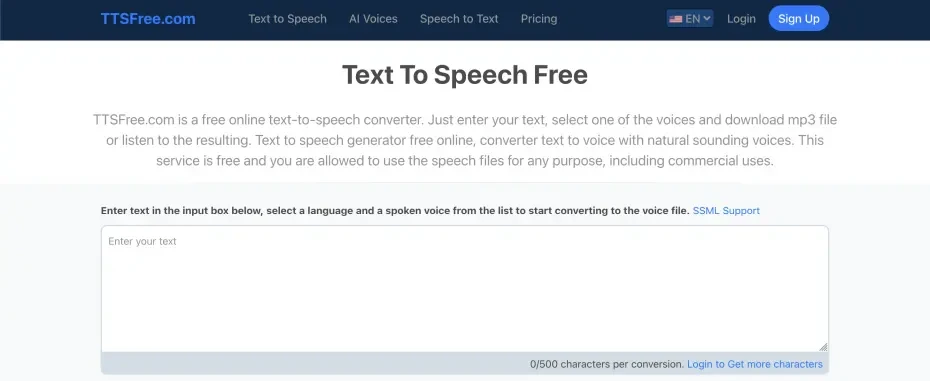
TTSFree is a browser-based free text-to-speech software characterized by its simple interface.
Its appeal lies in its ease of use, allowing you to start reading text immediately without complex settings.
It supports major languages including English and Japanese, and uses speech engines optimized for each language.
Generated audio can be downloaded in MP3 format and used for video production or presentation materials.
It is convenient in that it also supports the reading of long texts.
It is a recommended text-to-speech software for beginners seeking simple functions and intuitive operation.
4. ttsMP3.com: Multilingual Online Text-to-Speech Software

ttsMP3.com is a multilingual browser-based text-to-speech software covering the world's major languages.
It uses the Amazon Polly speech engine, enabling reading with natural intonation and pronunciation.
You can choose the optimal voice for your application from a wide range of voice qualities, including male voices, female voices, and children's voices.
The read-aloud audio can be downloaded in MP3 format, and file management is easy.
The free version has a character limit per use, but it is sufficient for use within a practical range.
It is a high-performance software that also supports SSML (Speech Synthesis Markup Language) tags, allowing for fine pronunciation adjustments.
It is recommended for those who handle international content or need multilingual read-aloud audio.
5. TTSMaker: Feature-Rich Web-Based Text-to-Speech Software
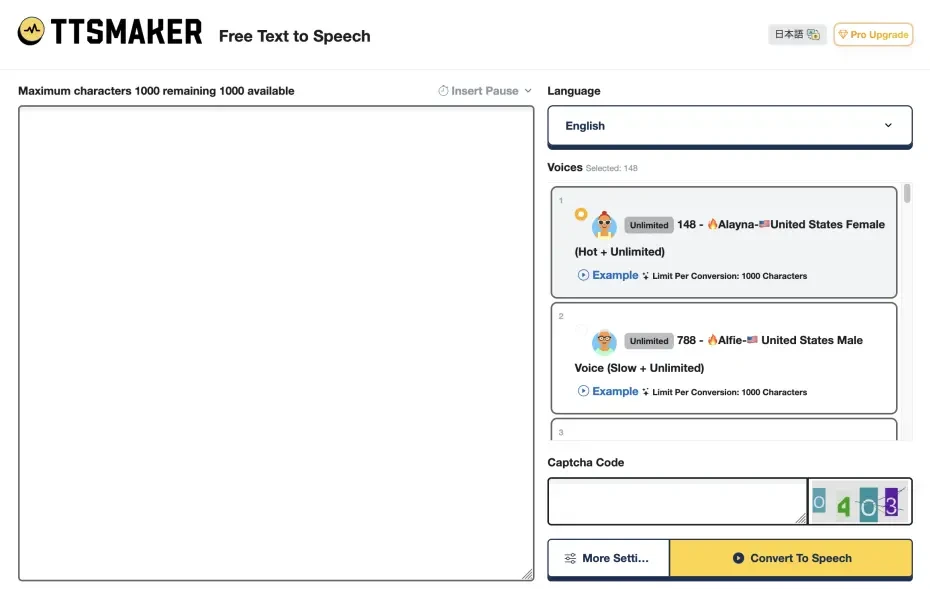
TTSMaker is a web-based text-to-speech software with numerous features.
It features a wide variation of more than 30 languages and over 100 types of voices to choose from.
Fine adjustments such as audio speed, pitch, and volume are possible, and customization to meet your needs is also available.
Created audio can be downloaded in MP3 format, and the automatic file name generation function is also convenient.
It is a recommended text-to-speech software for those seeking diverse voices and fine adjustment functions.
6. Narakeet: Text-to-Speech Software Usable for Education and Presentations

Narakeet is a browser-based text-to-speech software.
It is also suitable for producing educational content and presentation materials.
With more than 50 languages and over 300 types of voices to choose from, it can handle international content.
While the free version has functional limitations, special plans for educational institutions are also available.
It is a recommended text-to-speech software for educational content creators or those who want to turn presentation materials into audio.
9 Recommended Installation-Type Text-to-Speech Software
Next, we will introduce text-to-speech software that you install and use on your PC.
7. A.I.VOICE: Standard Text-to-Speech Software for Character Voices

A.I.VOICE is high-quality speech synthesis software developed by AI Inc.
As of 2026, the A.I.VOICE2 series is being developed.
It features popular character voices such as "Yuzuki Yukari" and "Kotonoha Akane/Aoi," which were previously known as VOICEROID.
It is compatible with both Windows and Mac and is sold as a one-time purchase paid software.
Emotional expression is rich, and you can finely adjust the intensity, pitch, and speed of the reading emotion.
Individual commercial use is generally possible with the product purchase, but corporate use requires a separate license.
It is the ideal software for creating creative audio works and high-quality narrations.
A.I.VOICE2 Complete Guide! Detailed explanation of the features, installation method, and usage of the successor software to VOICEROID
Explaining the features and usage of A.I.VOICE2, where you can use Kotonoha Akane/Aoi and Yuzuki Yukari, familiar from VOICEROID videos. Detailed introduction from installation method to audio export.
8. CeVIO: Integrated Text-to-Speech Software with Singing Functions

CeVIO is audio creation software that combines both reading and singing functions.
It features unique and popular character voices such as "Sato Sasara" and "Suzuki Tsudumi."
It is sold as a Windows-only one-time purchase paid software.
Because emotional parameters can be finely adjusted numerically, it is possible to create audio with rich expressiveness.
In addition to the "Talk Voice" for reading, "Song Voice" for singing is also sold, allowing you to make characters sing.
The conditions for commercial use by individual creators are relatively lenient, but corporate use requires a separate license.
It is a standard paid software that is also highly popular in simulation game play-by-plays, such as flight simulators.

What is CeVIO AI? Detailed explanation of speech synthesis software features, usage, and commercial use
Complete guide to the AI singing synthesis software CeVIO AI. Explaining the features of popular characters like Sato Sasara and Suzuki Tsudumi, how to purchase, and precautions for commercial use for beginners.
9. VOICEPEAK: High-Performance Text-to-Speech Software with Multi-Platform Support

VOICEPEAK is high-quality speech synthesis software characterized by intuitive operability.
Unusually for paid software, it supports Linux in addition to Windows and Mac.
One of the major features is that multiple voices are bundled in the package.
In most packages, bonus voices such as the male voice "Frimomen" are included in addition to the main character voice.
The basic license includes commercial use rights, but separate terms may apply to character voices.

What is speech synthesis software VOICEPEAK? Detailed explanation of features and commercial use
Detailed explanation of the features of the speech synthesis software "VOICEPEAK." Also introducing the commercial use terms, which vary greatly by character.
10. VOICEVOX: AI Text-to-Speech Software with High-Quality Character Voices

VOICEVOX is high-quality open-source speech synthesis software that can be used for free.
The biggest feature is that you can have text read in unique character voices such as "Zundamon" and "Shikoku Metan."
It supports major operating systems: Windows, Mac, and Linux.
With high-quality speech synthesis using deep learning technology, reading with natural intonation and expression is possible.
Fine adjustment functions for intonation and audio parameters are also substantial, allowing for advanced editing.
A GPU-compatible version is also provided, allowing for faster processing on high-performance PCs.
The software itself is free and allows for commercial use, but please be careful as there are individual terms of use for each character separate from the software itself.

VOICEVOX Usage Complete Guide! Detailed explanation from AI free speech synthesis software features to commercial use
Detailed explanation from VOICEVOX features to usage and precautions for commercial use. Complete guide to the free AI speech synthesis software that can read aloud in popular character voices like Zundamon.
11. Bouyomi-chan: Standard Software for Streaming

"Bouyomi-chan" is standard text-to-speech software used mainly in game streaming and live streaming.
It features "Yukkuri Voice" using an old version of AquesTalk, which has a distinct personality.
It is lightweight freeware for Windows and runs comfortably even on low-spec PCs.
Integration functions with other software are substantial, and it is often used in combination with streaming software such as OBS.
Furthermore, it is loved as a standard software for "Yukkuri play-by-play" and "Yukkuri commentary" on Niconico Douga and YouTube.
Unlike other Yukkuri voice software and services, another feature is that it can be used commercially for free.
12. SofTalk: Long-Standing Software with Simple Features

SofTalk is a long-loved free text-to-speech software for Windows.
It specializes in a simple interface and basic functions, making it easy for even beginners to use.
Multiple speech synthesis engines can be selected, including original voices based on the free speech synthesis engine "UTAU," allowing you to choose the voice according to your application.
A major advantage is that it is lightweight and runs comfortably even on low-spec PCs.
While it uses a speech synthesis engine from the Windows 8 era, it also operated on Windows 11 as of 2026.
The software itself is free, but please be careful as checking the speech engine's terms may be necessary when using it commercially.
13. MYukkuriVoice: Easy-to-Use Yukkuri Voice Creation Software for Mac

MYukkuriVoice is software for Mac specialized in creating "Yukkuri Voice".
Developed specifically for macOS, it uses an AquesTalk-based speech synthesis engine and is ideal for creating audio for "Yukkuri play-by-play" and "Yukkuri commentary" videos.
It features an interface that allows for fine audio adjustments and intonation editing visually.
It is the recommended text-to-speech software for Mac users who want to create videos using Yukkuri voice.
14. COEIROINK: Open-Source Software for Creative Work

COEIROINK is AI speech synthesis software developed for creative activities.
In addition to official and certified characters, user-created voice models "MYCOE" can also be used, allowing for reading with a rich variety of voices.
It is compatible with Windows, Mac, and Linux, and realizes high-quality character voices.
Because fine intonation and emotional expression adjustments are possible, and expressive audio can be created, it can be widely used in creative applications.
It can be used for free and basically allows for commercial use, but credit notation is mandatory, and verification of terms for each voice model is required.

What is COEIROINK? Thorough explanation of speech synthesis software features, usage, and commercial use
Complete guide to COEIROINK features and usage. Detailed explanation from how to introduce speech synthesis software to adding character voices and precautions for commercial use.
15. TexTalk: Lightweight and Simple Text-to-Speech Software

TexTalk is lightweight and simple free text-to-speech software for Windows.
It uses OpenJTalk and the standard Windows speech synthesis engine, and has sufficient performance for basic reading.
Specializing in simple features, it doesn't require complex settings, so even beginners can use it easily.
Another point is that it is very lightweight and can be used comfortably even in environments with old PCs or low specs.
It is suitable for those seeking simple and lightweight software or those looking for portable text-to-speech software.
What is Text-to-Speech Software? A Basic Guide for Beginners
I understand there are many recommended software options, but how should I choose?

From here, we will explain the basic knowledge you should know when choosing text-to-speech software!
Basic Knowledge of Reading Technology. What are the Features of Evolving Text-to-Speech?

Text-to-speech software refers to software or programs that automatically turn entered text into audio.
In the past, mechanical vocalization was common, but the latest AI technology has made it possible to achieve natural human-like intonation and pausing.
Many free software options that allow for high-quality reading have appeared, and they are utilized for improving accessibility, language learning, content production, and more.
There are two types of text-to-speech software: "the type used in a web browser" and "the type installed on a computer."
Each has its own characteristics, so whether you choose the web type or the installation type is very important.
Furthermore, because the conditions for commercial use differ by software, checking the terms of use is also important when choosing software.
Latest text-to-speech software supports multiple voice qualities and languages.
High-performance options capable of emotional expression are also increasing.
Features and Selection of Web-Type vs. Installation-Type
The greatest appeal of text-to-speech software used in a web browser is the ease with which you can start using it immediately.
Web-type software such as "Ondoku" allows for high-quality audio generation without installation, enabling you to benefit from the latest AI technology regardless of PC performance.
On the other hand, installation-type text-to-speech software is characterized by the fact that it can be used even in offline environments.
Web-type software is recommended for beginners or those who want to use it easily, while installation-type software is recommended for more specialized applications or those who want to make fine adjustments.
Differences Between Free and Paid Versions: How Far is Commercial Use Possible?
While basic functions can be used sufficiently even with free versions of text-to-speech software, character limits, voice types, and commercial use conditions may differ from paid versions.
Because there is much software where commercial use is prohibited for free versions, check the terms of use beforehand.
Of course, there is also software that can be used commercially for free.
For example, "Ondoku" can be used for commercial purposes even when used for free by displaying credit.
How to display credit for Ondoku. Examples of notation and precautions.
Ondoku is more than happy for you to use it for free. However, if you use it for free, credit notation is mandatory. We also received the question, "Specifically, how should I notation it?" This time, we will discuss how the credit notation for Ondoku's free use...
Also Pay Attention to the Terms of Use for Each Speech Engine
Caution is required because even with free text-to-speech software, the conditions for commercial use may differ depending on the speech engine used.
VOICEVOX and COEIROINK fall into this category.
When using for commercial purposes, a key point is to always check the terms of use for each software and use it after meeting the conditions.
Starting from the free version and upgrading to a paid version as necessary is also recommended.
How to Choose the Optimal Text-to-Speech Software by Application

Recommended Text-to-Speech Software for Video Production and Streaming
For video production and live streaming, there is optimal text-to-speech software depending on the application.
For narration creation, the natural voice of "Ondoku" is optimal!
It is popular among video creators because commercial use is possible even for free.
If you want to use unique character voices, paid speech synthesis software such as "A.I.VOICE" and "CeVIO" is suitable.
If you are creating "Yukkuri play-by-play" or "Yukkuri commentary" videos, "Bouyomi-chan," "Yukumo!," or "MYukkuriVoice" are perfect.
For reading comments in game streaming, "Bouyomi-chan," which has substantial integration functions, is used as standard software.
Yukkuri voice is also explained in this article.
![[Latest 2026] 6 Recommended Yukkuri Voice/Bouyomi Software | Complete Comparison of PC and Smartphone Apps](https://storage.googleapis.com/ondoku3/image/20250507yukkuri_bouyomi_software_tmb_930.webp)
[Latest 2026] 6 Recommended Yukkuri Voice/Bouyomi Software | Complete Comparison of PC and Smartphone Apps
Carefully selecting and introducing Yukkuri voice/Bouyomi software optimal for video production and game play-by-play. From PC to smartphone, explaining how anyone can easily create high-quality audio with the latest 2026 apps.
Optimal Text-to-Speech Software for Learning and Educational Purposes
The application of turning learning content into audio and listening to it during commuting hours is also effective for memory retention.
By choosing software that allows for easy-to-hear speed adjustment, you can increase learning efficiency.
The balance between ease of hearing and functionality is important for text-to-speech software for learning or educational purposes.
Because "Ondoku" can read long texts with natural intonation, it is suitable for turning teaching materials into audio.
Furthermore, because the speed can be reduced to 0.3x, it is also ideal for learning the pronunciation of foreign languages.
A practice you should definitely incorporate into language learning using text-to-speech software is "shadowing."
By creating foreign language audio such as English with text-to-speech software, you can easily start shadowing.
Since shadowing methods are explained in this article, why not start shadowing using text-to-speech software like "Ondoku"?
![[Complete Guide] What is the method for English shadowing? Also explaining how to make free teaching materials!](https://storage.googleapis.com/ondoku3/image/20250522_shadowing_tmb_02_930.webp)
[Complete Guide] What is the method for English shadowing? Also explaining how to make free teaching materials!
Efficiently improve English skills with shadowing! Explaining a learning method that simultaneously improves listening, pronunciation, and speaking for beginners. Also introducing methods for creating materials with free AI voices.
Utilization of Reading for Improving Accessibility
Text-to-speech software also plays a major role in improving accessibility for people with visual impairments or dyslexia.
Text-to-speech software with natural voices like "Ondoku" has the advantage of being less tiring even when listening for long periods.
By turning web content into audio, more people can access digital information.
By implementing reading functions in services for the elderly, ease of use is improved.
By supplementing visual information with audio, a multifaceted understanding of information can be promoted.
Points for Further Utilizing Text-to-Speech Software

From here, we will explain points to keep in mind to utilize text-to-speech software.
Setting Points for Improving Sound Quality
To improve the quality of the read-aloud audio, pay attention to several setting points.
Adjust the reading speed according to the text content; setting it slightly slower for important information makes it easier to convey.
In "Ondoku," the pitch of the voice is also adjustable, allowing for optimal settings according to the listener.
Even with installation-type software such as VOICEVOX or COEIROINK, you can approach natural reading by adjusting the intonation.
For technical terms or proper nouns, it is effective to specify the pronunciation or change kanji to hiragana.
Also, when reading long texts, it becomes easier to hear if you insert breaks or pauses at appropriate positions.
The method for inserting pauses as you wish is explained in this article!
![How to adjust pause and blank time in Ondoku reading [2 types]](https://storage.googleapis.com/ondoku3/image/Line_930.webp)
How to adjust pause and blank time in Ondoku reading [2 types]
Among the needs of those who use Ondoku is "I want to leave a little more pause." For adjustments of "pauses" where you want to leave a little gap, there are two adjustment methods: 1. Punctuation marks, 2. SSML.
How to Utilize Text-to-Speech Software on Smartphones
Of course, you can also effectively utilize text-to-speech software on iPhone/iPad (iOS) and Android smartphones.
When you want to use it on a smartphone, browser-type software such as "Ondoku" is recommended.
Because it is accessible from smartphones, it can be easily used even on the go.
When using text-to-speech software on a smartphone, use in a Wi-Fi environment is recommended to save mobile data traffic.
By saving read-aloud audio created on a smartphone to cloud storage such as Google Drive or Dropbox, it can be easily utilized for editing work on a PC.
Of course, it is also ideal for making effective use of gap time, such as listening to learning content on a smartphone during commuting or travel time.
Recommended reading methods for iPhone or Android smartphones are also introduced in this article, so please take a look!

8 Recommended reading apps for iPhone/iPad! How to easily read text aloud on a smartphone?
Introducing recommended reading methods for iPhone and iPad (iOS). Explaining recommended web apps and reading apps that can be installed from the App Store.
![[Latest 2026 Version] 5 Recommended reading apps for Android smartphones!](https://storage.googleapis.com/ondoku3/image/android-yomiage-app_tmb_2026_930.webp)
[Latest 2026 Version] 5 Recommended reading apps for Android smartphones!
Introducing recommended reading apps usable on Android smartphones. Also explaining the reading function standardly installed in Android smartphones.
Summary: Why Not Try the Text-to-Speech Software Perfect for You?
As you can see, there are many options for text-to-speech software.
Since even free text-to-speech software can read with very high quality, it can be widely utilized for everything from personal to commercial use.
For beginners or those who want to use it easily, browser-type software such as "Ondoku" is recommended.
For video production in specific genres, software with unique voices such as "Bouyomi-chan," "A.I.VOICE," "CeVIO," and "VOICEVOX" is suitable.
If you are considering commercial use, it is also important to always check the terms of use for each software and abide by the conditions.
Another point is to try it out with a free version first, and consider a paid version or specialized software as necessary.
By finding the software optimal for your application, you can make it useful in diverse ways such as creative activities, language learning, and business.
First of all, why not experience text-to-speech software for free right away?
■ AI voice synthesis software "Ondoku"
"Ondoku" is an online text-to-speech tool that can be used with no initial costs.
- Supports 81 languages and regions, including Japanese, English, Chinese, Korean, Spanish, French, and German
- Available from both PC and smartphone
- Suitable for business, education, entertainment, etc.
- No installation required, can be used immediately from your browser
- Supports reading from images
To use it, simply enter text or upload a file on the site. A natural-sounding audio file will be generated within seconds. You can use voice synthesis up to 5,000 characters for free, so please give it a try.

Text-to-speech software "Ondoku" can read out 5000 characters every month with AI voice for free.
You can easily download MP3s and commercial use is also possible.
If you sign up for free, you can convert up to 5,000 characters per month for free from text to speech.
Try Ondoku now.
HP:
ondoku3.com
Email: ondoku3.com@gmail.com
Email: ondoku3.com@gmail.com
Related posts
"Ondoku" is a Text-to-Speech service that anyone can use for free without installation. If you register for free, you can get up to 5000 characters for free each month. Register now for free
- What is Ondoku
- Start text-to-speech conversion
- Free registration
- Pricing
- Posts
- Try other free services














