Best Text-to-Speech Software: 7 Free & Paid Tools for Commercial Use
[2026 Latest] 10 Best AI Text-to-Speech Software: Free & Paid Comparison
Sept. 27, 2026
![[2026 Latest] 10 Best AI Text-to-Speech Software: Free & Paid Comparison](https://storage.googleapis.com/ondoku3/image/tts-software_tmb_930.webp)

I want to know about recommended AI voice synthesis software!
AI voice synthesis software that converts text into natural speech is attracting more and more attention right now!
With the progress of AI technology, the quality of voice synthesis software has improved dramatically.
It can generate natural, human-like voices with high quality that is incomparable to the mechanical reading of the past.
Web app types that can be used for free and desktop types that are installed on a computer differ in their setup process and operating environment.
In addition to products using AI, there are also products that use conventional voice synthesis engines such as AquesTalk and OpenJTalk.
In this article, we will compare 10 of the latest voice synthesis software products for 2026 based on differences in types and functions!
When choosing, you should check whether it is a web app or desktop type, whether it operates locally, how much you can adjust the voice, speed, and intonation, and whether you can use character voices.
We will explain the differences of each in detail, so why not find the perfect voice synthesis software for you?
[Free] Recommended AI Voice Synthesis Software You Can Use Right Now

If you are looking for voice synthesis software, we recommend "Ondoku"!
"Ondoku" is voice synthesis software that uses the latest AI technology and can be used for free from your browser.
The feature is that you can easily synthesize high-quality speech right now on any environment, including PC, iPhone/iPad (iOS), and Android smartphones, with no installation required.
Even though it is free, it can read up to 5,000 characters, and commercial use is also OK!
It supports multiple languages such as English, Korean, and Chinese in addition to Japanese, so you can easily create audio in foreign languages as well.
If you are unsure which voice synthesis software to choose, why not try "Ondoku" for free first?
What is Voice Synthesis Software? Basic Knowledge for Beginners

First, we will briefly explain the types of voice synthesis software and the functions you should check when choosing one.
Difference Between AI Reading and Conventional Voice Synthesis Methods
Voice synthesis software refers to software that automatically converts input text into speech.
Voice synthesis software includes methods that use AI and methods that use conventional voice synthesis engines such as AquesTalk and OpenJTalk.
Previous voice synthesis software had a strong sense of unnaturalness with mechanical vocalization.
However, now, the latest AI technology has made it possible to have natural intonation and pauses like a human.
In particular, voice synthesis software utilizing deep learning can produce realistic and easy-to-hear expressions like those of professional voice actors and narrators.
Fine customization such as adjusting the reading speed and changing the pitch is also possible.
Difference Between Web App Type and Desktop Type
Voice synthesis software includes web app types used from a browser and desktop types installed on a computer.
Web app type voice synthesis software used from a browser is attractive because it can be used immediately with no installation required.
With the AI web app "Ondoku", you can utilize the latest AI technology regardless of your PC's performance.
Desktop types are installed and used on a computer.
Installed voice synthesis software has the advantage of being usable even in offline environments.
When choosing, in addition to whether it is a web app or desktop type and whether it is an AI or conventional method, it is recommended to check the variety of voices, adjustment of speed/pitch/intonation, and support for character voices.
[Free Available] Comparison of 10 Voice Synthesis Software for 2026 by Type and Function
We will compare 10 products based on whether they are used from a browser or installed on a computer, whether they are an AI method or a conventional engine, how much you can adjust the voice/speed/intonation, and whether you can use character voices.
When you want to use it locally, check the supported OS and offline usage conditions for each product.
You can scroll horizontally
| Software | Type / Supported Environment | Method / Voice Features | Adjustment / Operational Features |
|---|---|---|---|
| Ondoku | Web app type (PC, iOS, Android) | Uses the latest AI voice synthesis engine. | Speed and pitch can be adjusted, and you can choose from over 16 types of Japanese voices. |
| VOICEVOX | Desktop type (Windows, Mac, Linux) | Uses deep learning technology. | Voices can be finely adjusted, and character voices such as Zundamon can be used. |
| Bouyomi-chan | Desktop type (Windows) | Uses an older version of AquesTalk. | Lightweight and can be linked with distribution software such as OBS. |
| SofTalk | Desktop type (Windows) | You can choose from multiple voice synthesis engines. | Can be used with a simple screen focused on basic functions. |
| COEIROINK | Desktop type (Windows, Mac, Linux) | Uses AI. | Can use official/authorized characters and user-created voice models "MYCOE". |
| Textalk | Desktop type (Windows) | Uses OpenJTalk and the standard Windows voice synthesis engine. | Can be used simply by extracting the ZIP file, and runs comfortably even on old PCs or low-spec environments. |
| Yukumo! | Web app type | Can use AquesTalk1, AquesTalk2, and AquesTalk10. | No installation required and can be used from any device. |
| A.I.VOICE | Desktop type (Windows, Mac) | Successor to VOICEROID, allows selection of character voices. | It is a one-time purchase paid voice synthesis software. |
| CeVIO AI | Desktop type (Windows) | Uses a unique voice synthesis AI. | Supports reading with emotion, and has talk voices and song voices. |
| VOICEPEAK | Desktop type (Windows, Mac, Linux) | Can use various character voices. | There are packages that include multiple character voices. |
1. Ondoku | Free Voice Synthesis Software that can Read Aloud with Latest AI
"Ondoku" is high-quality voice synthesis software that adopts the latest AI technology.
If you are looking for voice synthesis software, this is the first option you should try!
It is a web app type software that can be used from a browser, and no troublesome installation work is required at all.
By simply entering text and pressing a button, you can synthesize natural audio files in just a few seconds.
Japanese voices can be selected from more than 16 options, with a rich variety such as female voices, male voices, and children's voices.

Try listening to 16 types of Japanese voices for the text-to-speech software Ondoku for free. Change the impression with pitch variations
Ondoku has 16 types of Japanese voices. Of course, both male and female voices are available. We have made it possible for you to listen to 8 commonly used Japanese voices and how they sound when the pitch is adjusted.
Because it supports multiple languages, synthesizing audio in foreign languages such as English, Chinese, and Korean is also easy.
Since the reading speed and pitch can be adjusted freely, you can create the optimal audio for your purpose.
Commercial use is also OK, making it ideal for YouTube monetization and business use (Click here for more details on commercial use).
Furthermore, "Ondoku" is free!
It can be used without registration or login, so we recommend that you first try synthesizing voice with the latest AI for yourself.
Why don't you also start using "Ondoku" for free?
2. VOICEVOX | Voice Synthesis Software that can use Popular Characters like Zundamon

VOICEVOX is a desktop-type voice synthesis software compatible with Windows, Mac, and Linux.
The greatest feature is that it can read aloud using popular character voices such as "Zundamon", "Shikoku Metan", and "Kasukabe Tsumugi".
It uses deep learning technology, and fine adjustments of the voice are possible.
The software itself is free and commercial use is possible, but care is needed as the terms of use differ for each character.
A GPU-compatible version is also provided, allowing for faster processing on high-performance PCs.

Complete guide on how to use VOICEVOX! Detailed explanation from features of free AI voice synthesis software to commercial use
A detailed explanation of everything from the features of VOICEVOX to how to use it and precautions for commercial use. A complete guide to free AI voice synthesis software that allows you to read aloud with popular character voices like Zundamon.
3. Bouyomi-chan | Voice Synthesis Software Compatible with Yukkuri Voice for Streaming

Bouyomi-chan is voice synthesis software widely used in game streaming and live broadcasting.
It can synthesize voice with the characteristic voice known as "Yukkuri Voice".
Linking functions with streaming software such as OBS are also extensive, making it ideal for reading out comments on YouTube and Twitch.
It is also used as a staple for "Yukkuri Jikkyou" and "Yukkuri Kaisetsu" on Nico Nico Douga and YouTube.
It is a lightweight free software for Windows that works comfortably even on low-spec PCs.
Because it uses an older version of AquesTalk, commercial use is possible even for free.
The sound quality is mechanical, but it is a voice synthesis software whose unique personality is loved by many creators.
4. SofTalk | Simple Voice Synthesis Software with a Long History

SofTalk is a simple free voice synthesis software for Windows.
With a simple interface specialized in basic functions, even beginners can use it easily.
Since multiple voice synthesis engines can be selected, you can choose the voice that suits your application.
*Previously it supported "Yukkuri Voice", but it is currently unsupported.
The software itself is free, but if you want to use it commercially, you need to check the terms of the voice engine being used.
It is the ideal free software for those who want basic voice synthesis functions.
5. COEIROINK | AI Voice Synthesis Software for Creative Activities

COEIROINK is AI voice synthesis software developed for creative activities.
It is a desktop type compatible with Windows, Mac, and Linux, and can read aloud with various character voices.
In addition to official/authorized characters, user-created voice models "MYCOE" can also be used.
Commercial use is possible, but credit notation is mandatory.
Also, since the terms of use differ for each voice model, checking before use is important.
It is a voice synthesis software suitable for those seeking unique voices for creative purposes.

What is COEIROINK? Thorough explanation of voice synthesis software features, how to use, and commercial use
A complete guide to the features and usage of COEIROINK. We explain everything in detail from how to install the voice synthesis software to adding character voices and precautions for commercial use.
6. Textalk | Lightweight Voice Synthesis Software for Windows

Textalk is a lightweight and simple free voice synthesis software for Windows.
It uses OpenJTalk and the standard Windows voice synthesis engine.
While there are limits to the naturalness of the voice compared to the latest AI, it has sufficient performance for basic reading.
It is a software that can be used just by extracting the ZIP file, and it runs comfortably even on old PCs or low-spec environments.
7. Yukumo! | Voice Synthesis Software that can use Yukkuri Voice from a Browser

Yukumo! is a web app type voice synthesis software that allows you to use "Yukkuri Voice" from a browser.
No installation is required, and it can be used from any device.
It supports multiple versions such as AquesTalk1, AquesTalk2, and AquesTalk10.
It is a voice synthesis software recommended for those who want to start "Yukkuri Kaisetsu" or "Yukkuri Jikkyou" without installation.
8. A.I.VOICE | Paid Voice Synthesis Software Compatible with Popular VOICEROID Characters

A.I.VOICE is a high-quality paid voice synthesis software developed by AI Inc.
It is the successor product to VOICEROID, and currently A.I.VOICE2 is being deployed.
The greatest feature is the lineup of popular character voices such as "Yuzuki Yukari" and "Kotonoha Akane/Aoi".
It is compatible with both Windows and Mac and is sold as a one-time purchase paid voice synthesis software.
Commercial use by individuals is basically possible by purchasing the product, but corporate use requires a separate license.
It is a voice synthesis software ideal for creating creative audio works and high-quality narrations.
A.I.VOICE2 Complete Guide! Detailed explanation of VOICEROID successor software features, installation method, and usage
Explaining the features and usage of A.I.VOICE2, which allows the use of Kotonoha Akane/Aoi and Yuzuki Yukari, familiar from VOICEROID videos. Introducing everything from installation methods to audio export in detail.
9. CeVIO AI | Expressive Paid Voice Synthesis Software with Popular Characters

CeVIO AI is voice synthesis software that combines reading and singing functions.
It is sold as a paid voice synthesis software exclusively for Windows.
The feature is that you can use a wide variety of popular character voices such as "Sato Sasara" and "Suzuki Tsudumi".
With its unique voice synthesis AI, it can read text with rich emotion.
In addition to "Talk Voice" for reading, "Song Voice" for singing is also available, supporting both reading and singing.
The conditions for commercial use by individual creators are relatively relaxed, but corporate use requires a separate license.
It is a voice synthesis software recommended for those who want to create audio content with rich expressive power.

What is CeVIO AI? Detailed explanation of voice synthesis software features, usage, and commercial use
A complete guide to the AI singing voice synthesis software CeVIO AI. Explaining the features of popular characters like Sato Sasara and Suzuki Tsudumi, how to purchase, and precautions for commercial use for beginners.
10. VOICEPEAK | Paid Voice Synthesis Software with a Wide Variety of Characters

VOICEPEAK is one of the few desktop-type voice synthesis softwares compatible with Windows, Mac, and Linux.
This also allows for voice synthesis with various popular characters.
Another feature is that there are packages that include multiple character voices, providing a rich lineup of not only female but also male voices.
Commercial use rights are included in the basic license, but separate terms apply to character voices.
It is ideal for narration production and voice synthesis across multiple platforms.
What is the voice synthesis software VOICEPEAK? Detailed explanation of features and commercial use
Detailed explanation of the features of the voice synthesis software "VOICEPEAK". Also introducing the commercial use terms, which vary greatly depending on the character.
[Free] How to use voice synthesis software? Detailed explanation of how to use "Ondoku"
How do I use voice synthesis software? Is it easy to use?

From here, we will explain how to actually use voice synthesis software, using "Ondoku" as an example!
[Free] Flow of reading text with the voice synthesis software "Ondoku"
If you are going to use voice synthesis software from now on, web app type voice synthesis software that can be used easily with no installation required is recommended!
To read text with "Ondoku", first access the official website.
When you open the top page, there is a text box, so enter the content you want to be read aloud.
(Copy and paste is also OK)
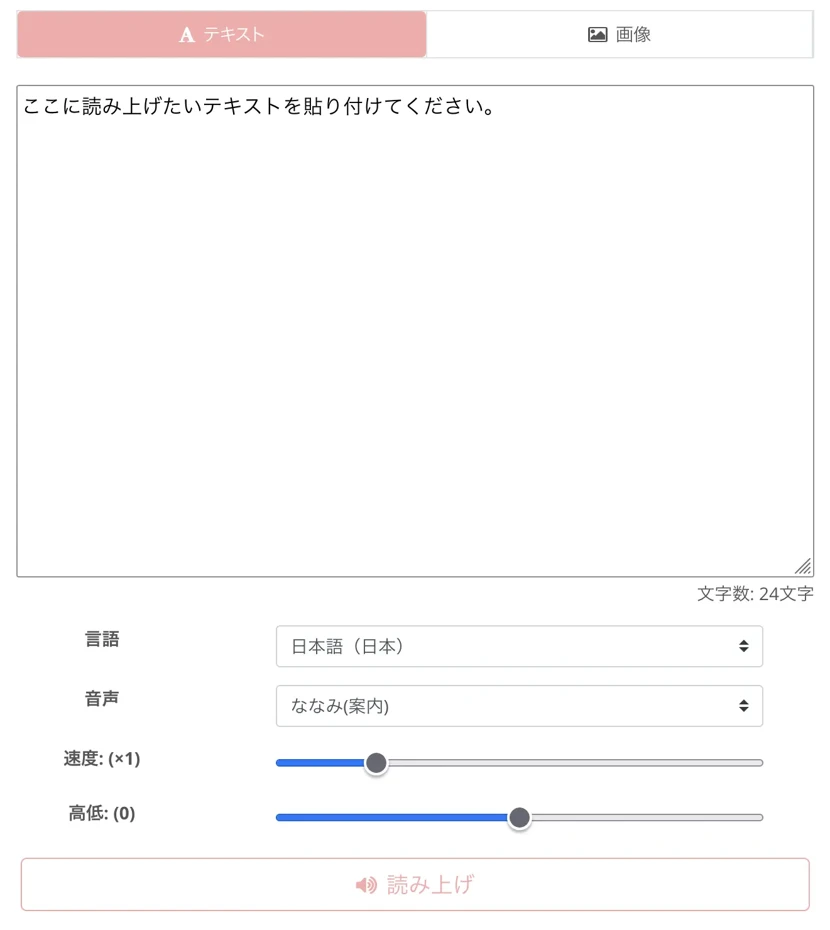
Next, select the type of voice.
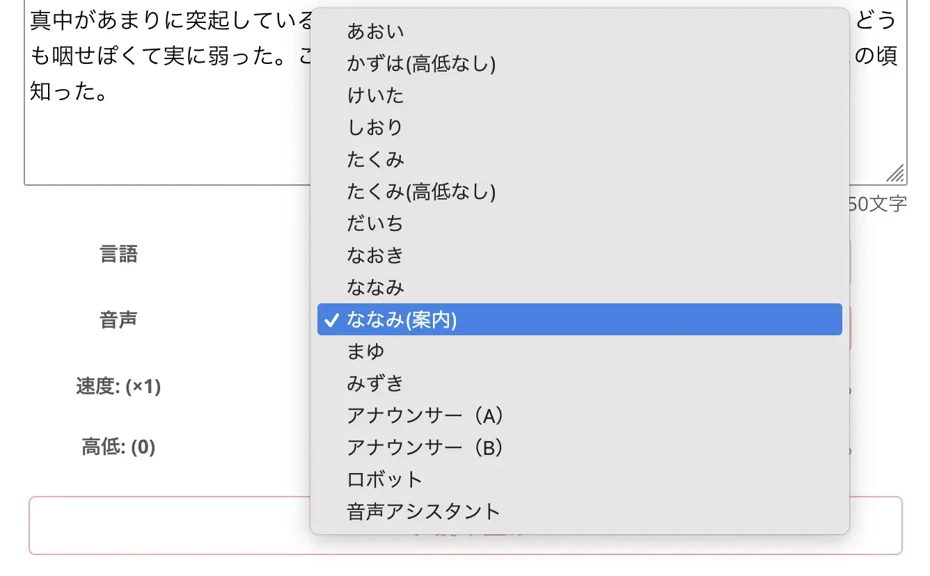
You can listen to the voices available in "Ondoku" in this article, so please take a look!
Try listening to 16 types of Japanese voices for the text-to-speech software Ondoku for free. Change the impression with pitch variations
Ondoku has 16 types of Japanese voices. Of course, both male and female voices are available. We have made it possible for you to listen to 8 commonly used Japanese voices and how they sound when the pitch is adjusted.
All that's left is to click or tap the "Read Aloud" button!
High-quality audio is completed in just a few seconds.

The audio file can be downloaded in MP3 format, so it can be utilized for various purposes such as video narration and in-store broadcasting.
In this way, the free voice synthesis software "Ondoku" is very easy to use.
For those looking for voice synthesis software, why not start by using "Ondoku"?
"Ondoku" also allows adjustment of reading speed and pitch
The voice synthesis software "Ondoku" also supports adjustment of reading speed and pitch!

It is effective to adjust the reading speed according to the importance of the content.
When using it for language study, it is also recommended to take the plunge and lower the speed significantly.
When using it for video narration, adjusting the pitch of the voice is also recommended.
By changing the pitch, you can create a character personality tailored to the listener.
What are the Advantages and Disadvantages of AI Voice Synthesis Software?

It is also recommended to have a solid understanding of the advantages and disadvantages when using voice synthesis software.
We will briefly explain the advantages and disadvantages of AI voice synthesis software.
What are the Advantages of AI Voice Synthesis Software?
The greatest advantage of voice synthesis software is that it can reduce costs.
When requesting a professional narrator, many costs are incurred such as recording fees, studio fees, and travel expenses.
However, if you choose voice synthesis software that can be used commercially for free, you can significantly save on these costs.
The ability to shorten the time taken for audio creation is also one of the major advantages.
Previously, creating video narration or in-store broadcasting required a lot of time for recording appointments, re-recording, and editing work.
But with voice synthesis software, audio is completed in just a few seconds simply by entering text.
High-quality audio can be created for free at any time
The high quality of the voice is also an advantage of AI voice synthesis software.
When a human reads aloud, quality can vary depending on physical condition or mood.
Also, if you record yourself instead of hiring a professional, the audio might end up being very difficult to hear...
In that regard, with voice synthesis software, you can generate audio of the same quality at any time.
There is also no need to worry about sound quality deteriorating due to recording equipment or the surrounding environment.
The ability to use it 24 hours a day, 365 days a year is also a benefit unique to voice synthesis software.
Even late at night or early in the morning, you can create audio as soon as you think of it.
With multi-language support voice synthesis software, narrations in foreign languages can also be easily created.
Disadvantages of AI Voice Synthesis Software
Voice synthesis software also has some disadvantages.
Depending on the software, there may be limits to emotional expression.
If you are dissatisfied with the expression, it is also recommended to try using voice synthesis software that uses the latest AI for free.
Commercial use also requires caution.
Some paid software has restrictions on commercial use, so be sure to check the terms of use beforehand.
When you want to use it for video monetization or business, software that can be used commercially for free, starting with "Ondoku", is ideal.

What you can do with Ondoku. About commercial use (business use) and prohibited acts.
Commercial use (business use) is possible with Ondoku. Regardless of whether you are an individual or a corporation, use for the purpose of obtaining profits such as money directly or indirectly is commercial use. However, please note that prohibited acts are established in Ondoku. This time, we will explain what you can and cannot do with Ondoku...
How to Choose Voice Synthesis Software explained by Application
Finally, we will explain the points for choosing software that matches the audio you want to create in detail by application.
How to choose for Video Production / YouTube Narration
When putting narration in video production, check if it can read aloud with a natural voice and whether character voices can be used.
It is important to choose software that can adjust the type of voice, reading speed, and pitch to match the content of the video.
Another point is to choose voice synthesis software that allows commercial use and is compatible with monetization on platforms like YouTube.
With the high-performance AI voice synthesis engine of "Ondoku", you can create easy-to-hear audio like that of a professional narrator.
What's important in video production is adjusting the reading speed according to the content.
It is effective to set important parts slightly slower.

How to quickly create narrations for videos like YouTube with text-to-speech software. Tips and points
Explaining how to quickly create YouTube video narrations with Ondoku. We explain everything from how to create a script to using Ondoku, adjusting natural intonation, and tips for editing with video editing software in an easy-to-understand way. A must-see for those who want to streamline video production with text-to-speech software!
How to choose for Language Learning Materials
When creating materials for language learning, it is recommended to choose software that supports the audio of the language you want to learn.
By using "Ondoku", which supports multiple languages, you can accurately study the pronunciation of various languages.
Creating materials for shadowing, which is effective for language learning, is also easy if you have voice synthesis software.
You can also create listening materials for foreign languages.
The point when creating materials for language learning is to keep the playback speed slow at first.
Since "Ondoku" can lower the playback speed down to 0.3x, it is ideal even for those who have just started studying a foreign language.
![[Complete Guide] What is the method for English shadowing? Also explaining how to create free materials!](https://storage.googleapis.com/ondoku3/image/20250522_shadowing_tmb_02_930.webp)
[Complete Guide] What is the method for English shadowing? Also explaining how to create free materials!
Efficiently improve your English skills with shadowing! Explaining a learning method for beginners that simultaneously improves listening, pronunciation, and speaking. Also introducing methods for creating materials with free AI voice.
How to choose when making Professional Audio
When using it for corporate business purposes, check if it can be used commercially, if it can read the necessary languages, and if it can be used locally.
- Audio conversion of presentation materials
- Adding audio to internal training materials
- Guidance audio for call centers
- Announcements within facilities
Voice synthesis software can be utilized for a wide range of applications such as these.
If you use voice synthesis software capable of reading aloud in foreign languages, you can also easily create announcements for inbound tourists in English, Korean, Chinese, etc.
For companies that emphasize security, "Ondoku", a service originating from Japan, is safe.
When using it for business, please be careful to use voice synthesis software that supports commercial use.

Realize professional-level in-facility broadcasting with automated voice! Complete AI Announcement Guide
Automate in-facility broadcasting with AI! With Ondoku, create narrator-level automated voice for free. Fully prepared for inbound measures with multi-language support. Also contributing to cost reduction through business efficiency!
Game Streaming / Live Broadcasting
When using voice synthesis software in live broadcasting, real-time reading is important.
By linking voice synthesis software specialized for distribution like Bouyomi-chan with OBS, you can check comments without taking your eyes off the screen.
Utilizing the reading function for viewer comments can further liven up the broadcast content.
Improving Accessibility
Voice synthesis software is also a very important tool for visually impaired people and those with learning disabilities.
By converting website text into audio, more people can access digital information.
Not only for people with disabilities but also for services for the elderly, usability can be improved by introducing voice synthesis software.
When creating audio that is easy for anyone to hear, in addition to natural voice, check if the reading speed and pitch can be adjusted.
With high-quality AI voice synthesis software with realistic voices, you can create audio that is less tiring even when listened to for a long time.
For accessibility compliance for corporate or organizational websites or creating guidance broadcasts for public facilities, the latest AI voice synthesis software is recommended.
Summary of How to Choose Voice Synthesis Software
With the progress of AI technology, anyone can now easily create high-quality audio with voice synthesis software.
If you want to create audio immediately, we recommend the web app type; if you want to use it without connecting to the internet, we recommend the desktop type that works offline.
Even among desktop types, the naturalness of the voice changes significantly depending on whether you choose the AI method or the conventional method.
When you want to check the functions of each software, please take a look at the comparison table introduced in this article.
If you are considering commercial use such as YouTube monetization, it is also important to check the terms of use thoroughly and use voice synthesis software that allows commercial use.
With "Ondoku", you can experience voice synthesis easily right now for free with no installation required.
Why not first experience voice synthesis software that can be used for free?
■ AI voice synthesis software "Ondoku"
"Ondoku" is an online text-to-speech tool that can be used with no initial costs.
- Supports 81 languages and regions, including Japanese, English, Chinese, Korean, Spanish, French, and German
- Available from both PC and smartphone
- Suitable for business, education, entertainment, etc.
- No installation required, can be used immediately from your browser
- Supports reading from images
To use it, simply enter text or upload a file on the site. A natural-sounding audio file will be generated within seconds. You can use voice synthesis up to 5,000 characters for free, so please give it a try.

Text-to-speech software "Ondoku" can read out 5000 characters every month with AI voice for free.
You can easily download MP3s and commercial use is also possible.
If you sign up for free, you can convert up to 5,000 characters per month for free from text to speech.
Try Ondoku now.
HP:
ondoku3.com
Email: ondoku3.com@gmail.com
Email: ondoku3.com@gmail.com
Related posts
"Ondoku" is a Text-to-Speech service that anyone can use for free without installation. If you register for free, you can get up to 5000 characters for free each month. Register now for free
- What is Ondoku
- Start text-to-speech conversion
- Free registration
- Pricing
- Posts
- Try other free services
![[2026 Latest] 10 Best AI Text-to-Speech Software: Free & Paid Comparison](https://storage.googleapis.com/ondoku3/image/irodori-tts_tmb_140.webp)
![[2026 Latest] 10 Best AI Text-to-Speech Software: Free & Paid Comparison](https://storage.googleapis.com/ondoku3/image/tategaki-image-yomiage_howto_tmb_140.webp)
![[2026 Latest] 10 Best AI Text-to-Speech Software: Free & Paid Comparison](https://storage.googleapis.com/ondoku3/image/iphone-video-narration_tmb_140.webp)
![[2026 Latest] 10 Best AI Text-to-Speech Software: Free & Paid Comparison](https://storage.googleapis.com/ondoku3/image/chrome-reading-mode-pc_tmb_140.webp)
![[2026 Latest] 10 Best AI Text-to-Speech Software: Free & Paid Comparison](https://storage.googleapis.com/ondoku3/image/pdf-to-mp3-howto_tmb_140.webp)









