

Best Text-to-Speech Software: 7 Free & Paid Tools for Commercial Use
[2026 Latest] 6 Best Speech Synthesis Sites! Complete Guide to Free AI Text-to-Speech Services
Sept. 27, 2026
![[2026 Latest] 6 Best Speech Synthesis Sites! Complete Guide to Free AI Text-to-Speech Services](https://storage.googleapis.com/ondoku3/image/tts-website_tmb_930.webp)

I want to find a text-to-speech site that can be used for free!
Free text-to-speech sites that convert text into natural speech are attracting attention!
There are various situations where read-aloud audio is needed, such as video production, presentation materials, and language learning.
However, recording it yourself can be surprisingly difficult.
In such cases, free text-to-speech sites that can be used for free are very convenient!
With the advancement of AI technology, it has become possible to easily create natural speech that sounds just like a real person is speaking.
Moreover, sites that can be used for free are appearing!
In this article, we will carefully select and introduce recommended text-to-speech sites, ranging from free services to high-quality sites that utilize AI technology.
Why don't you use this article as a reference to try out these recommended text-to-speech sites?
【Free】Recommended AI Text-to-Speech Sites You Can Use for Free Right Now

For those looking for a text-to-speech site, we recommend 『Ondoku』.
『Ondoku』 is a free text-to-speech site using the latest AI technology.
No installation required; you can use it immediately from your browser.
The biggest attraction is that you can easily generate high-quality audio just by entering text.
With a wide variety of voices, including women, men, and children, you can have text read aloud in a clear, easy-to-hear voice.
Moreover, 『Ondoku』 is free!
You can read text aloud for free for up to 1,000 characters without registration, and up to 5,000 characters after registration.
Since commercial use is OK, you can use it with confidence for monetizing videos or for business purposes.
If you are unsure which text-to-speech site to choose, why not start by using 『Ondoku』?
Basic Knowledge of Text-to-Speech Sites. What are the Characteristics of Free Read-Aloud Methods?

First, we will briefly explain the features of text-to-speech sites that can be used for free.
You Can Read Text Aloud for Free with Text-to-Speech Sites
A text-to-speech site is a web service that automatically converts input text into audio.
By simply entering the text you want read aloud, you can synthesize audio files that are easy to listen to, as if a human were reading them.
Synthesized audio files can be downloaded in convenient formats such as MP3.
Previously, text-to-speech technology could only synthesize mechanical voices, but now, with the latest AI technology, it is possible to synthesize natural, human-like voices.
Currently, free text-to-speech sites are particularly recommended.
By using a text-to-speech site from your browser, you can synthesize high-quality audio for free.
Text-to-speech sites perform read-aloud processing in the cloud, so you can utilize the latest AI text-to-speech technology regardless of the performance of your own computer.
Tasks that previously required hiring a professional narrator can be completed instantly using a text-to-speech site.
What are the Benefits of Free Text-to-Speech Sites?
There are many benefits to using free text-to-speech sites that can be used for free.
First, they can be used easily without installation.
As long as you have a browser, you can access text-to-speech sites immediately from any device.
You can synthesize speech with the latest AI from any environment, including Windows, Mac, Linux, iPhone (iOS), and Android.
The fact that a high-performance computer is not required is another big advantage of free text-to-speech sites.
Since processing using AI technology is done in the cloud, even older computers can utilize the latest text-to-speech technology.
Low cost is another feature of text-to-speech sites.
Tasks that would cost tens of thousands of yen when hiring a professional narrator can be completed for free with a free text-to-speech site.
Furthermore, it is also possible to use the synthesized audio files for commercial purposes.
What is the Difference Between Browser-Based and Installable Types?
Methods for text-to-speech using AI include text-to-speech sites used in a browser and text-to-speech software installed on a computer.
We recommend browser-based text-to-speech sites!
The biggest attraction is the ease of being able to start using it immediately on any PC or smartphone.
With the free text-to-speech site 『Ondoku』, you can have text read aloud with the latest AI technology just by accessing the site.
A characteristic of installable text-to-speech software is that it can be used even in an offline environment.
However, to perform high-quality text-to-speech using AI technology, a high-performance computer is required.
Also, many installable text-to-speech software programs are paid and cannot be used without purchasing a package.
- Beginners
- Those who want to try text-to-speech easily
- Those who want to create audio right now
For these people, free text-to-speech sites are recommended.
【Free】6 Recommended Free Text-to-Speech Sites
I want to know about recommended text-to-speech sites!
Now, let's introduce the recommended text-to-speech sites in detail!
1. Ondoku|The Highest Quality Recommended Free AI Text-to-Speech Site
『Ondoku』 is a free text-to-speech site recommended for those who want to create read-aloud audio from now on.
The biggest feature is that it can read text aloud with a natural voice utilizing the latest AI technology.
A wide variety of voices, such as women, men, and children, are available, allowing you to choose the best voice for your purpose.
Furthermore, text-to-speech in multiple languages, such as English, French, German, Chinese, and Korean, is also possible.
The conversation function is also included, so you can create audio in a dialogue format using multiple voices.
You can also change the pitch and speed of the voice and make adjustments using SSML (Speech Synthesis Markup Language) tags.
Free for Commercial Use. Recommended for Monetization and Business Use
『Ondoku』 is free and OK for commercial use.
You can use it with peace of mind when you want to monetize on video sites like YouTube, or when using it for business purposes such as announcements or call centers.
For more details on commercial use, please see this article.
『Ondoku』 is a Free AI Text-to-Speech Site You Can Use for Free
Moreover, 『Ondoku』 is free!
You can read aloud and download for free up to 1,000 characters without registration and up to 5,000 characters after registration.
It can be used immediately from a browser without installation, so why not experience 『Ondoku』's AI text-to-speech for yourself?
2. TTSMaker|A Global and Multi-functional Text-to-Speech Site
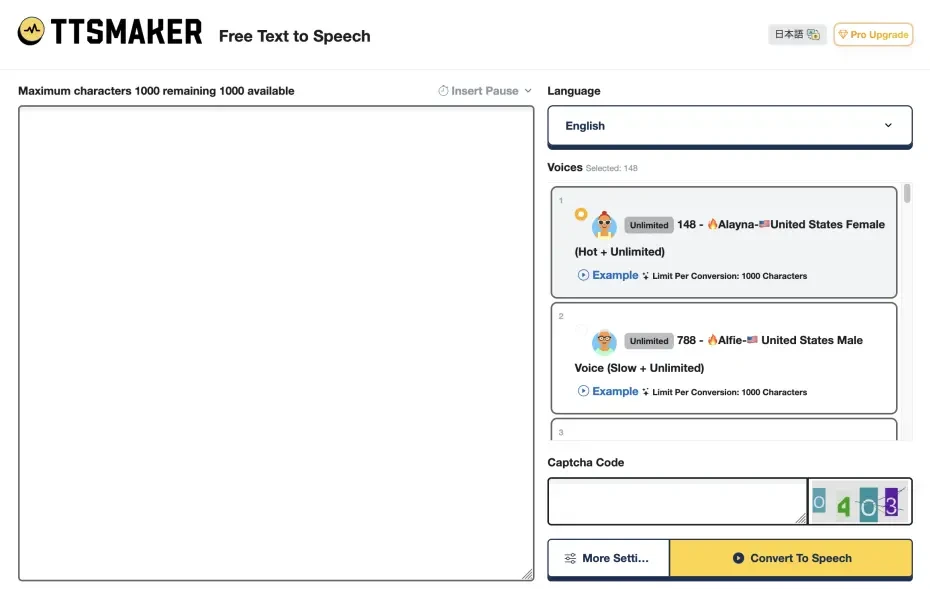
TTSMaker is a text-to-speech site known for its multi-functionality.
Because it supports multiple languages, it can be utilized for global content production.
Fine parameter adjustments such as voice speed, pitch, and volume are also possible.
The free version has limitations, but basic text-to-speech is available for free.
This is a recommended text-to-speech site as an option when creating audio for foreign audiences.
3. ttsMP3.com|A Text-to-Speech Site Using Amazon Polly

ttsMP3.com is a text-to-speech site that uses the AI text-to-speech engine 'Amazon Polly'.
It can perform text-to-speech for languages supported by Amazon Polly in male, female, and child voices.
It also supports SSML, allowing for fine pronunciation adjustments.
Also, as the site name suggests, file downloads in MP3 format are possible.
This is a recommended free text-to-speech site for those who want to try Amazon Polly.
4. ゆくも! (Yukumo!)|A Text-to-Speech Site Where You Can Use Yukkuri Voices

ゆくも! (Yukumo!) is a text-to-speech site specialized in Yukkuri voices.
It uses a text-to-speech engine called AquesTalk and can read text aloud with the characteristic 'Yukkuri voice' (monotone voice).
Ideal for creating audio for 'Yukkuri Commentary' and 'Yukkuri Gameplay' videos popular on YouTube and Nico Nico Douga.
Since it can be used from a browser without installation, it is a recommended text-to-speech site for those who want to easily create Yukkuri videos.
While it is a free text-to-speech site, caution is required for commercial use.
Non-commercial use by individuals is free, but a license purchase is required for commercial use.
5. Narakeet|A Text-to-Speech Site Strong in Education and Presentation Uses

Narakeet is a text-to-speech site strong in uses such as education and presentations.
It supports many languages and offers special plans for educational institutions, making it ideal for creating learning content.
It is a text-to-speech site that can be used for free, but there are functional limitations.
It is a convenient text-to-speech site when you want to create content for overseas or in multiple languages.
6. TTSFree|A Simple Text-to-Speech Site
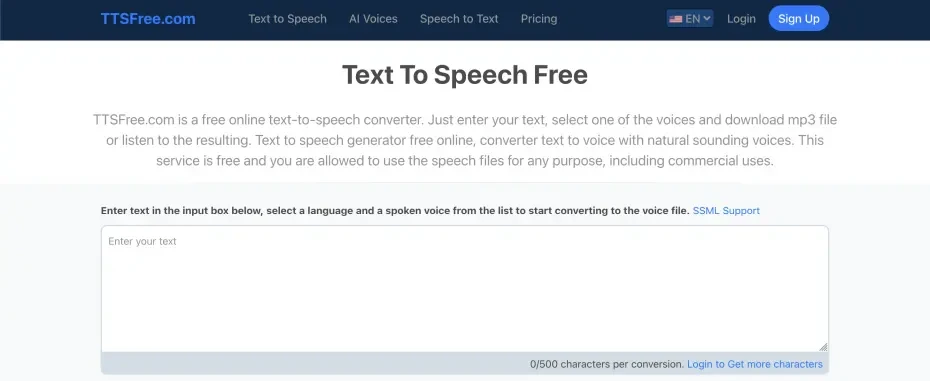
TTSFree is a text-to-speech site characterized by its simplicity.
With an intuitive interface, you can operate it without hesitation even if you are not used to text-to-speech sites.
It supports major languages such as Japanese and English.
Created audio can be downloaded in MP3 format.
【Free】Detailed Explanation of How to Use Free Text-to-Speech Sites
How do you use a free text-to-speech site? Is it easy to use?

From here, we will explain how to use a free text-to-speech site, using 『Ondoku』 as an example!
How to Read Text Aloud for Free with the Free Text-to-Speech Site 『Ondoku』
It is very easy to synthesize speech from text with the free text-to-speech site 『Ondoku』.
First, access the official 『Ondoku』 website in your browser.
Once you open the top page, enter the text you want read aloud in the text input field.
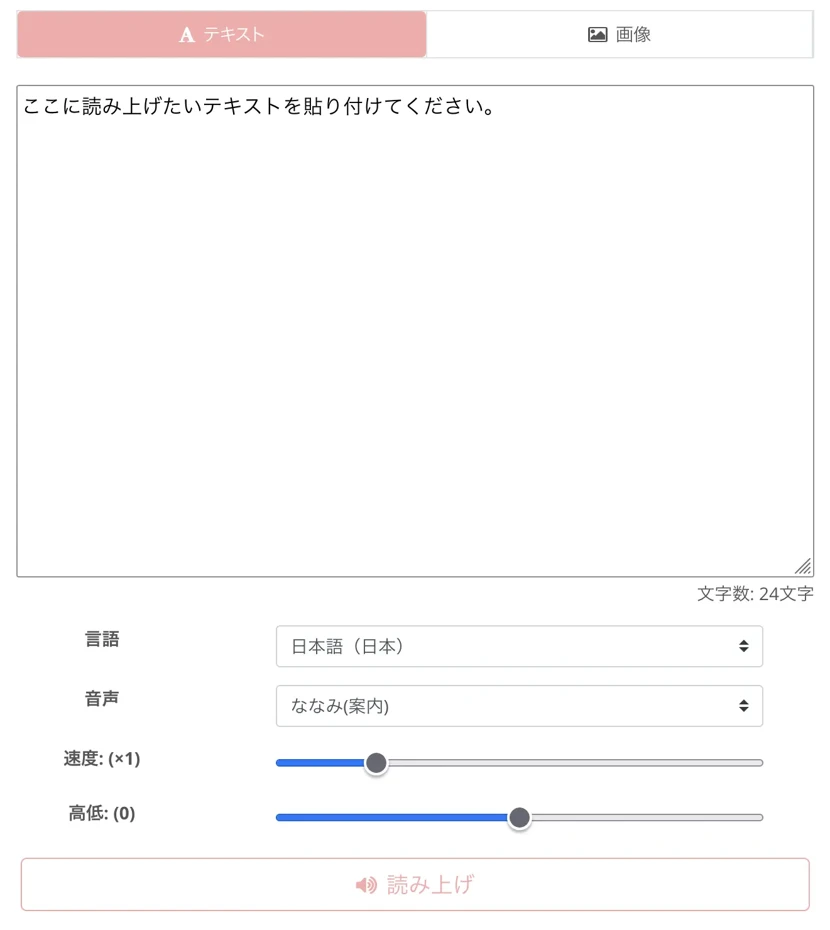
You can read aloud for up to 1,000 characters for free, and up to 5,000 characters after registration!
Next, select the type of voice.
In the case of Japanese, you can choose from 16 types of voices.
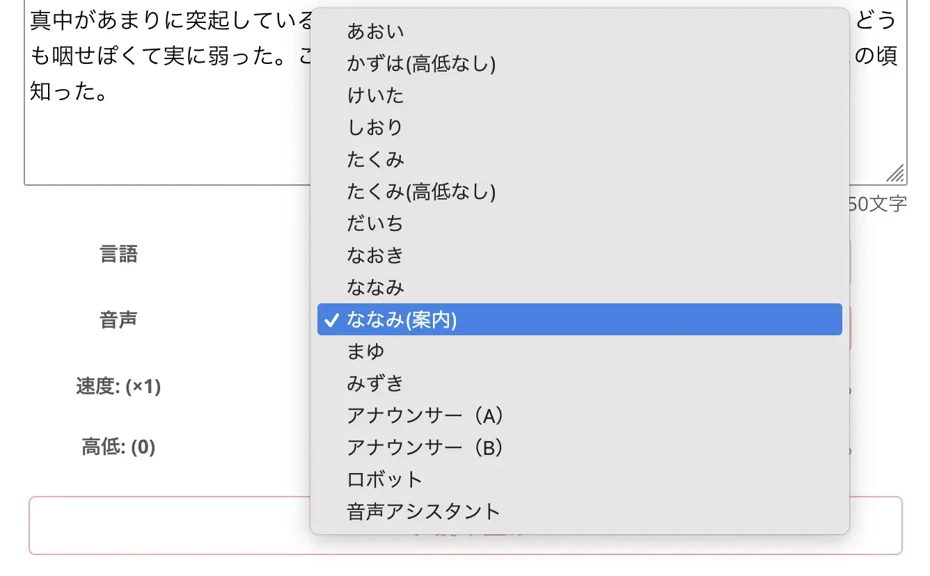
You can listen to samples of read-aloud voices in this article, so please take a look.
Read-aloud speed and pitch can also be easily adjusted with sliders.

The settings are now complete.
Click or tap the "Read aloud" button.
The text-to-speech processing is completed in just a few seconds.

The display will change, and the read-aloud audio will be played.
Check the audio and, if there are no problems, save it as an MP3 file using the "Download" button.
This completes the flow of synthesizing speech for free with 『Ondoku』.
In this way, anyone can easily read text aloud with the free text-to-speech site 『Ondoku』!
Since it can be used for free, why not start by synthesizing audio using 『Ondoku』?
What are the Points for Synthesizing More Natural Speech with 『Ondoku』?
By trying out a few points, you can create even more natural speech with 『Ondoku』!
First, adjust the read-aloud speed.
Standard speed is effective for general explanations, while a slightly slower setting is effective for important content.
Also, with 『Ondoku』, it is possible to be creative with pausing.
The rhythm of the read-aloud changes depending on the position of punctuation marks.
If you want to create natural pauses, it is also key to be creative with how the sentences are divided.
This article explains how to adjust pauses, so please take a look!
![How to adjust intervals and blank time in Ondoku read-aloud [2 types]](https://storage.googleapis.com/ondoku3/image/Line_930.webp)
With 『Ondoku』, Text-to-Speech is Easy on Smartphones and Tablets too!
With the free text-to-speech site 『Ondoku』, you can use it on iPhones, iPads, Android smartphones, and tablets just like on a PC!
The method for using it on a smartphone is basically the same as on a computer.
By simply opening the 『Ondoku』 top page in your smartphone's browser, you can easily perform text-to-speech for free.
If you download the read-aloud audio to your smartphone, you can also use it in Instagram and TikTok videos.
If you are creating audio on a smartphone or tablet, we recommend the free text-to-speech site 『Ondoku』.
![【Ondoku】How to easily use it from the home screen like an app on iPhone [No installation required]](https://storage.googleapis.com/ondoku3/image/add_Ondoku_app_on_iphone_930.webp)
Explanation of Points to Keep in Mind When Choosing a Free Text-to-Speech Site

We will explain in detail the points to avoid failure when choosing a text-to-speech site!
Select a Free Text-to-Speech Site That Suits Your Purpose
When choosing a text-to-speech site, it is important to choose according to your purpose.
For video production purposes, a high-quality AI text-to-speech site is recommended.
By using 『Ondoku』, you can create easy-to-hear audio with natural intonation and give a good impression to viewers.
When you want to create Yukkuri videos, a specialized text-to-speech site like 'ゆくも! (Yukumo!)' is ideal.
For software that supports Yukkuri voices, please see this article: 『【2026 Latest】6 Recommended Yukkuri Voice/Monotone Software | Complete Comparison of PC and Smartphone Apps』.
Also, when using it for language learning, choose a text-to-speech site that supports multiple languages.
Since 『Ondoku』 supports 81 languages and regions, you can easily create materials for pronunciation practice, listening, and shadowing.

What is important for business use is to choose a text-to-speech site that allows commercial use.
By using a free text-to-speech site that allows commercial use, you can synthesize high-quality, professional audio while keeping costs down.
Text-to-speech sites that allow commercial use are safe even when you want to monetize YouTube.
Recommended Comparison Points for Free Text-to-Speech Sites
When comparing text-to-speech sites, the most important factor is the naturalness of the voice.
A text-to-speech site that utilizes the latest AI technology can read text aloud with a human-like natural voice.
It is also recommended to choose by listening to samples on the website.
Whether or not it can be used for commercial purposes is also, of course, important.
Among free text-to-speech sites, there are sites that allow commercial use and sites that do not.
To avoid a situation where 'I went to the trouble of making a video, but the narration audio was not allowed for commercial use,' it is recommended to confirm that commercial use is allowed before using it.
Things to Keep in Mind When Using Free Text-to-Speech Sites for Commercial Purposes
When using a free text-to-speech site for commercial purposes, it is also important to understand what uses fall under commercial use.
Generally, monetization of YouTube videos falls under commercial use.
In addition, other monetization features such as memberships and super chats are almost always included in the scope of commercial use.
Even for channels operated by individuals, monetization is considered commercial use.
Of course, using a free text-to-speech site as a corporation is considered commercial use.
When using it for corporate promotion videos or product explanation videos, check if commercial use is permitted.
Commercial use conditions vary greatly depending on the site.
『Ondoku』 is free and OK for commercial use, even when used for free, provided you give credit.
(For more details on 『Ondoku』's credit method, please see here.)
When using a free text-to-speech site for commercial purposes, be careful to use it according to the terms of use.
Why Not Conveniently Read Text Aloud with a Free Text-to-Speech Site?
In this article, we introduced recommended free text-to-speech sites that can be used easily without installation.
The six text-to-speech sites introduced this time each have different features.
If you want high-quality AI voices, 『Ondoku』 is best; for Yukkuri videos, 'ゆくも! (Yukumo!)' is ideal.
Even with free text-to-speech sites, it is important to choose the best service according to your purpose.
For beginners, we recommend starting with the free text-to-speech site 『Ondoku』, which anyone can use easily.
『Ondoku』 allows you to read aloud for up to 5,000 characters for free.
Since commercial use is also OK, you can use it for various purposes such as video narration, guidance broadcasts, and call centers.
First, why not experience text-to-speech for free yourself using a free text-to-speech site?
■ AI voice synthesis software "Ondoku"
"Ondoku" is an online text-to-speech tool that can be used with no initial costs.
- Supports 81 languages and regions, including Japanese, English, Chinese, Korean, Spanish, French, and German
- Available from both PC and smartphone
- Suitable for business, education, entertainment, etc.
- No installation required, can be used immediately from your browser
- Supports reading from images
To use it, simply enter text or upload a file on the site. A natural-sounding audio file will be generated within seconds. You can use voice synthesis up to 5,000 characters for free, so please give it a try.

Text-to-speech software "Ondoku" can read out 5000 characters every month with AI voice for free.
You can easily download MP3s and commercial use is also possible.
If you sign up for free, you can convert up to 5,000 characters per month for free from text to speech.
Try Ondoku now.
HP:
ondoku3.com
Email: ondoku3.com@gmail.com
Email: ondoku3.com@gmail.com
Related posts
"Ondoku" is a Text-to-Speech service that anyone can use for free without installation. If you register for free, you can get up to 5000 characters for free each month. Register now for free
- What is Ondoku
- Start text-to-speech conversion
- Free registration
- Pricing
- Posts
- Try other free services
![[2026 Latest] 6 Best Speech Synthesis Sites! Complete Guide to Free AI Text-to-Speech Services](https://storage.googleapis.com/ondoku3/image/irodori-tts_tmb_140.webp)
![[2026 Latest] 6 Best Speech Synthesis Sites! Complete Guide to Free AI Text-to-Speech Services](https://storage.googleapis.com/ondoku3/image/tategaki-image-yomiage_howto_tmb_140.webp)
![[2026 Latest] 6 Best Speech Synthesis Sites! Complete Guide to Free AI Text-to-Speech Services](https://storage.googleapis.com/ondoku3/image/iphone-video-narration_tmb_140.webp)
![[2026 Latest] 6 Best Speech Synthesis Sites! Complete Guide to Free AI Text-to-Speech Services](https://storage.googleapis.com/ondoku3/image/chrome-reading-mode-pc_tmb_140.webp)
![[2026 Latest] 6 Best Speech Synthesis Sites! Complete Guide to Free AI Text-to-Speech Services](https://storage.googleapis.com/ondoku3/image/pdf-to-mp3-howto_tmb_140.webp)









