

Best Text-to-Speech Software: 7 Free & Paid Tools for Commercial Use
[2026] 6 Best Yukkuri & Robotic Voice Software | PC & Mobile Comparison
Sept. 27, 2026
![[2026] 6 Best Yukkuri & Robotic Voice Software | PC & Mobile Comparison](https://storage.googleapis.com/ondoku3/image/20250507yukkuri_bouyomi_software_tmb_930.webp)

I want to use Bouyomi software to make Yukkuri Voice videos!
Yukkuri Voice and Bouyomi software are popular for video narration and game commentary.
The number of apps that can be easily used on PCs and smartphones has increased, making it easy for even beginners to get started.
In this article, we will thoroughly explain the latest recommended Yukkuri Voice and Bouyomi software for 2026.
From those who want to produce carefully on a PC to those who want to use it easily on a smartphone, you are sure to find an app that suits you.
We will compare everything from installable software to services that can be used in a browser from all angles.
Basic Knowledge of Yukkuri Voice and Bouyomi software
What are Yukkuri Voice and Bouyomi software?
"Yukkuri Voice" and "Bouyomi software" refer to software that reads aloud with flat intonation, literally like "reading like a stick" (bouyomi).
They became widely known through "Yukkuri Jikkyou" videos featuring characters from Touhou Project as motifs, which is why they came to be called Yukkuri Voice.
Yukkuri Voice Bouyomi software uses a text-to-speech engine called "AquesTalk."
Many apps have been developed for both PC and smartphone that can realize this unique voice style.
Reasons for the popularity and uses of Yukkuri Voice. What is the appeal of Bouyomi software?
There are several reasons why Yukkuri Voice has gained so much popularity.
First, its unique voice quality attracts the viewer's attention and gives personality to the content.
Also, since there is no need to actually record your voice, a major advantage is that you can add high-quality narration even without a microphone.
By using PC or smartphone apps, anyone can easily create narration just by entering text.
It is used in various genres such as game commentary, commentary videos, and news commentary, and has had such an impact that it has established the genre called "Yukkuri Commentary."
Yukkuri Voice can be read aloud on PC as well as iPhone and Android smartphones
There are versions for PC and versions for smartphones for Yukkuri Voice and Bouyomi software.
There are differences in functionality and usability between the PC desktop type and smartphone apps.
The PC desktop type is characterized by abundant functions and detailed settings, making it suitable for long video production and complex editing.
On the other hand, the biggest attraction of smartphone apps is the convenience of being able to use them anywhere easily, allowing you to create Yukkuri Voice while commuting or on the go.
Recently, high-performance Yukkuri Voice apps for smartphones have been increasing, and it has become possible to complete simple video production using only a smartphone.
Ideally, you should use both PC software and smartphone apps according to the purpose and situation.
How to Choose Yukkuri Voice and Bouyomi software for Beginners

Points to consider when choosing Yukkuri Voice and Bouyomi software
When choosing Yukkuri Voice or Bouyomi software, there are several points that beginners should emphasize.
The most important is ease of use.
Choose software that can be operated intuitively without complex settings.
For those who are particularly unfamiliar with PC or smartphone operations, apps with simple interfaces are recommended.
Cost is also an important point.
Bouyomi software and apps that read aloud in Yukkuri Voice can be used for free, but if you want to monetize your videos, some require a commercial plan contract.
It is a good idea to select software based on whether or not you will use it for monetization purposes.
It is recommended to check the license in advance.
Also, the supported OS is important.
Choose software or apps according to the device you are using, such as Windows, Mac, iPhone (iOS), or Android.
Software that is updated regularly has fewer bugs and adds new features, so it can be used for a long time.
New text-to-speech methods in the AI era
In addition to Yukkuri Voice and Bouyomi software, text-to-speech tools utilizing the latest AI technology are developing rapidly.
Particularly recently, with the development of AI text-to-speech technology, anyone can easily generate high-quality audio.
Web apps like Ondoku, which can be used from a browser, are also increasing and can be used regardless of the device.
Through the evolution of such AI voice technology, more natural and varied voice expressions different from traditional Yukkuri Voice have become possible.
It can be said that the trend for modern creators is to use both Yukkuri Voice and the latest AI voices according to the application.
How to choose recommended apps and software by use case?
The best choice for Yukkuri Voice or Bouyomi software changes depending on the use case.
For game streaming, "Bouyomi-chan," which has extensive comment reading functions, is recommended for use on PC.
For streaming from a smartphone, the "Yukkuri Bouyomi Talk" app can be used easily.
For commentary video production, software such as "VOICEVOX" or "CeVIO," which have natural intonation utilizing AI, are suitable.
If you want to create high-quality videos on PC, these software programs with abundant adjustment functions will demonstrate their strength.
For short videos or SNS posts, browser-based services like Ondoku, which can also be used on smartphones, are convenient.

Since it can be used in the same way from both PC and smartphone, you can shape your ideas immediately.
For reading aloud to improve accessibility, natural-sounding Ondoku or the standard text-to-speech functions of each device are also options.
In this way, it is important to choose the most suitable Yukkuri Voice or Bouyomi software according to your purpose.
[2026 Latest] 6 Recommended Yukkuri Voice and Bouyomi software + α
What kind of Yukkuri Voice Bouyomi software is available?

Now, let's specifically introduce recommended Yukkuri Voice Bouyomi software!
1. Bouyomi-chan: The standard Bouyomi software ideal for game commentary

"Bouyomi-chan" is a typical free Bouyomi software that can be used on Windows PCs.
It also supports Yukkuri Voice and is particularly popular among game commentators and streamers.
It is an installation-type software, and the official page guides users to use the beta version instead of the official version.
It supports external app linkage via plugins and Socket, HTTP, or IpcClientChannel.
In addition, audio can be saved as files in WAV format (8kHz, 16bit, mono).
The included old version of AquesTalk (for Windows) can be used free of charge for both commercial and non-commercial purposes.
Because the operation is very light, it does not place a burden on commentary while playing games.
However, while the appearance is simple, a little learning is required to master detailed settings and linkage functions.
Even beginners can easily use just the basic functions, so it is worth trying first if you are starting Yukkuri Voice on a PC.
The operating environment is Microsoft Windows 2000 or higher, and the official page states that operation has been confirmed only for the 64-bit version of Windows 7.
Precautions when using Bouyomi-chan
The built-in Nico Nico Jikkyou and Nico Nico Live Broadcasting plugins that were previously available have ended due to the abolition of the API.
For Nico Nico Live Broadcasting comments, use an external comment viewer that can link with Bouyomi-chan.
Also, the Twitter reading function has many parts that do not respond to specification changes, and the official page warns of the possibility that it may stop working.
2. AquesTalk Player: Bouyomi software provided by the developer of Yukkuri Voice
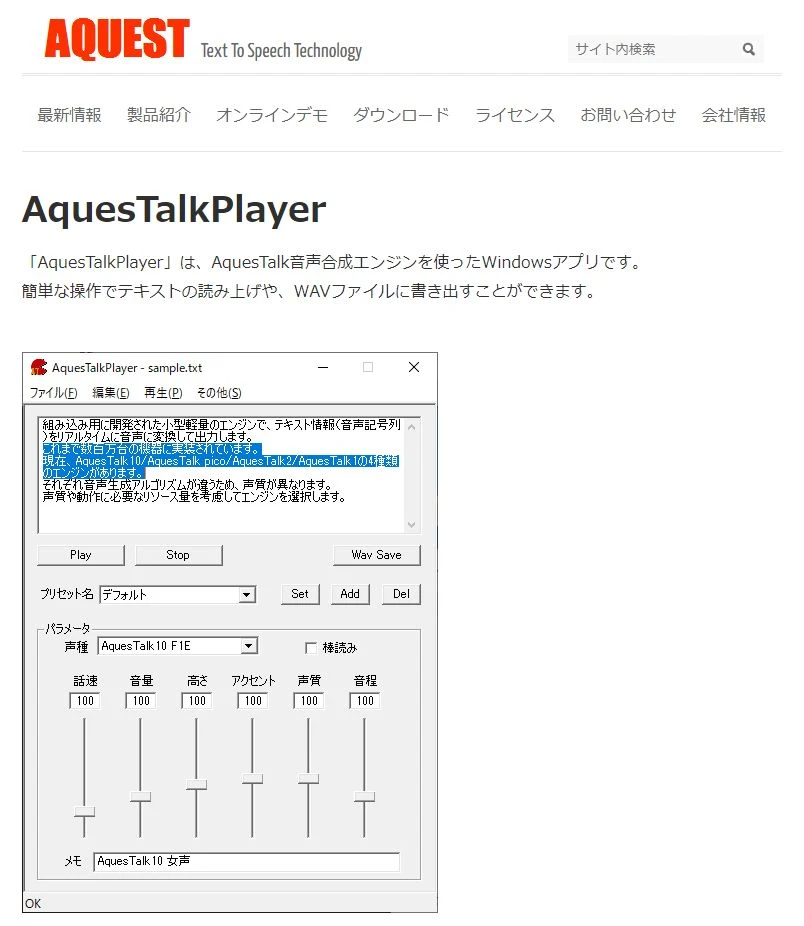
"AquesTalk Player" is a text-to-speech software officially provided by the developer of "AquesTalk," the speech synthesis engine that is the basis of Yukkuri Voice.
Windows and Mac versions are distributed; the Windows version supports various 64-bit and 32-bit Windows OS, and the Mac version supports macOS 14 Sonoma or later.
It is software where Bouyomi Voice (Yukkuri Voice) can be used authentically, and it can generate high-quality audio.
It is free only when used by individuals for non-commercial purposes; for other uses, purchase of a usage license and setting of a license key are required.
Functions of AquesTalk Player
Three types of speech synthesis engines can be used: "AquesTalk1," "AquesTalk2," and "AquesTalk10."
It supports reading text aloud and writing to WAV files.
It is also possible to call it from external apps by specifying the text and output file from the command line.
The operation is simple with a simple interface, but detailed customization is also possible, making it a software suitable for everyone from beginners to advanced users.
It is especially suitable for those who want to seriously create Yukkuri Jikkyou or commentary videos.
3. Yukkuri Bouyomi Talk: Yukkuri Voice on iPhone and Android smartphones!
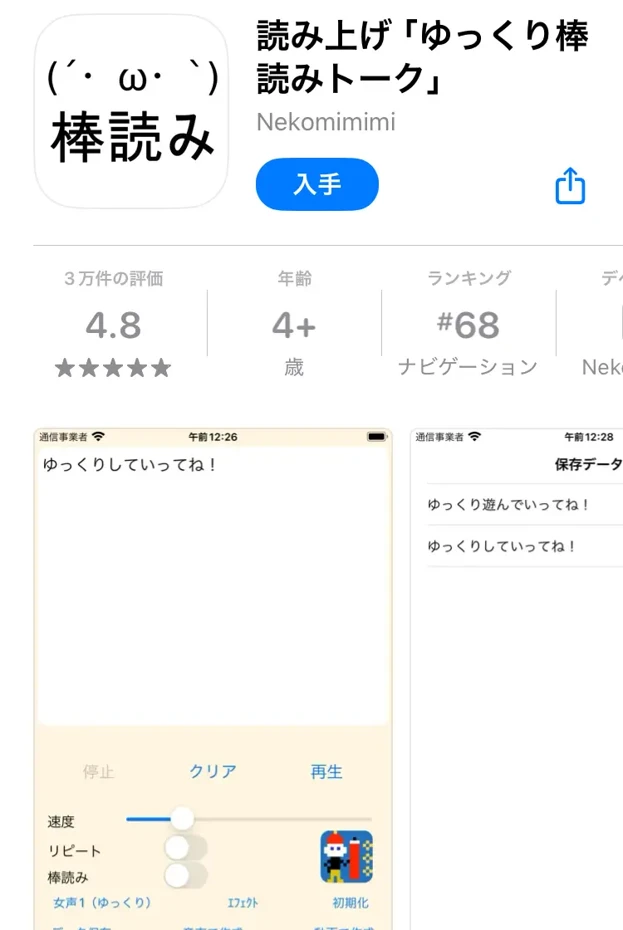
"Yukkuri Bouyomi Talk" is a Yukkuri Voice app that can be used on smartphones (iPhone, Android).
This app uses Aquest Co., Ltd.'s speech synthesis library "AquesTalk," allowing you to easily create authentic Yukkuri Voice.
The iOS version can be used on both iPhone and iPad and supports iOS/iPadOS 15.6 or later.
The biggest attraction is that it can be used easily on a smartphone; you can start using it immediately after installing.
With intuitive operation unique to smartphones, you can also easily adjust the speed and pitch of the voice.
Functions of the iOS and Android versions
With the iOS version of Yukkuri Bouyomi Talk, it is also possible to link audio files and videos to other apps.
In the case of the Android version, it supports saving and sharing audio files and saving as videos.
Ads are displayed in both the iOS and Android versions.
Also, for both the iOS and Android versions, if you use AquesTalk voice for commercial purposes, a usage license for the relevant library is required.
This app is recommended for those who want to create authentic Yukkuri Voice even if they don't have a PC, or for those who want to shape their ideas immediately while on the go.
4. Yukumo!: A Yukkuri Voice web app that can be used from a browser

"Yukumo!" is a text-to-speech service that can be used immediately from a browser.
There was a period from late July to late August 2026 when the site could not be accessed, but it is now available again.
It is gaining popularity as a convenient tool where various voices and effects can be used.
Because it supports reading aloud in Yukkuri Voice, it is highly valued by video creators.
No installation is required, and it can be used from any browser with JavaScript enabled.
Extremely old browsers are not supported.
It can convert text to speech and save the audio data.
This service also uses Aquest's speech synthesis library, and its use within the scope of personal hobbies is free.
However, it is important to note that if you distribute videos with ads on YouTube, you need to purchase a usage license.
5. Yukkuri Voice Maker: A browser-based Yukkuri Voice web app that can also be used on smartphones
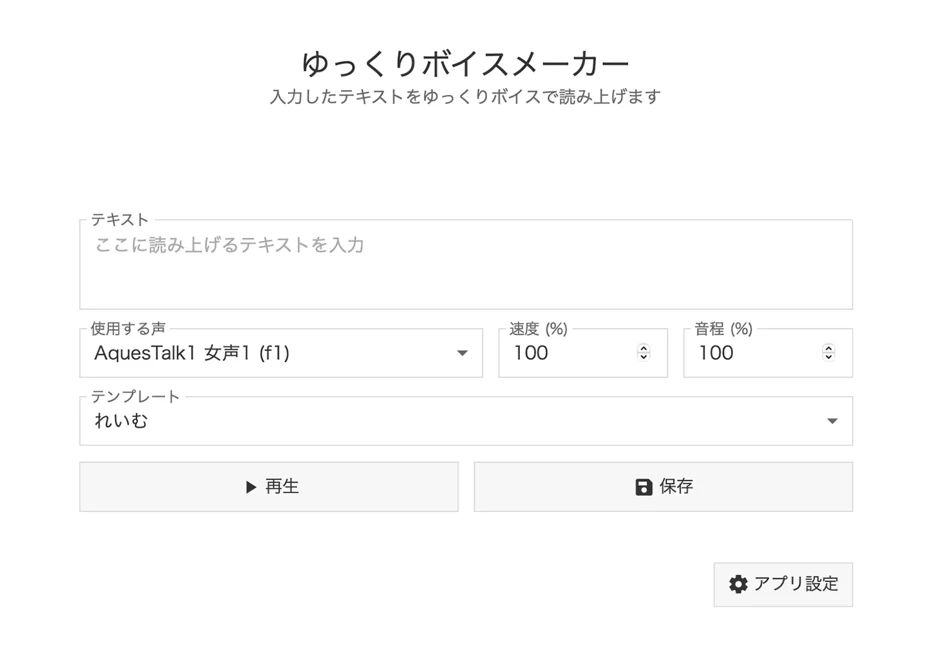
"Yukkuri Voice Maker" is a text-to-speech service for Yukkuri Voice that can be used immediately from a browser.
No installation is required, and it can be used not only from a computer but also from the browser of an iPhone or Android smartphone.
It is equipped with each version of AquesTalk1, AquesTalk2, and AquesTalk10, allowing you to choose various voices, including Yukkuri Voice.
Furthermore, templates for each character such as "Reimu" and "Marisa" are also available.
Speed, pitch, accent, and voice quality can also be adjusted in detail.
Created audio can be saved in MP3 format.
Since there is also a function to arrange multiple voices into a single audio file, conversational audio can also be created.
The service itself can be used for free, but if you use it for purposes other than personal use, you need to purchase an AquesTalk usage license from Aquest.
6. MYukkuriVoice: Yukkuri Voice Bouyomi software for macOS

MYukkuriVoice is a speech synthesis app specialized for macOS.
The official page guides support for Mac OS X El Capitan (10.11), macOS Sierra (10.12), macOS High Sierra (10.13) and later.
The development version 0.13 series and the tested stable version 0.11.4 are distributed.
A feature is that it can generate synthetic audio adjusted for video production.
By simply entering Japanese text, you can easily create natural audio files.
Main functions include audio playback and saving functions based on AquesTalk1, AquesTalk2, and AquesTalk10.
Another point is that for audio files, you can choose between a method of specifying the file name and a method of saving with serial numbers.
Saved audio files can be dragged and dropped directly from the app to video editing software.
MYukkuriVoice can be used free of charge for individual non-commercial purposes, but for use by companies or use that generates revenue such as videos with ads, a usage license for the relevant AquesTalk library is required.
Ondoku: Latest AI web app with natural reading
Ondoku is a natural reading service utilizing the latest AI.
Since it is a web app that can be used from a browser, it can be used immediately on both PCs and smartphones without the need for installation.
The biggest feature is the natural intonation and smooth audio that sounds as if a human is speaking.
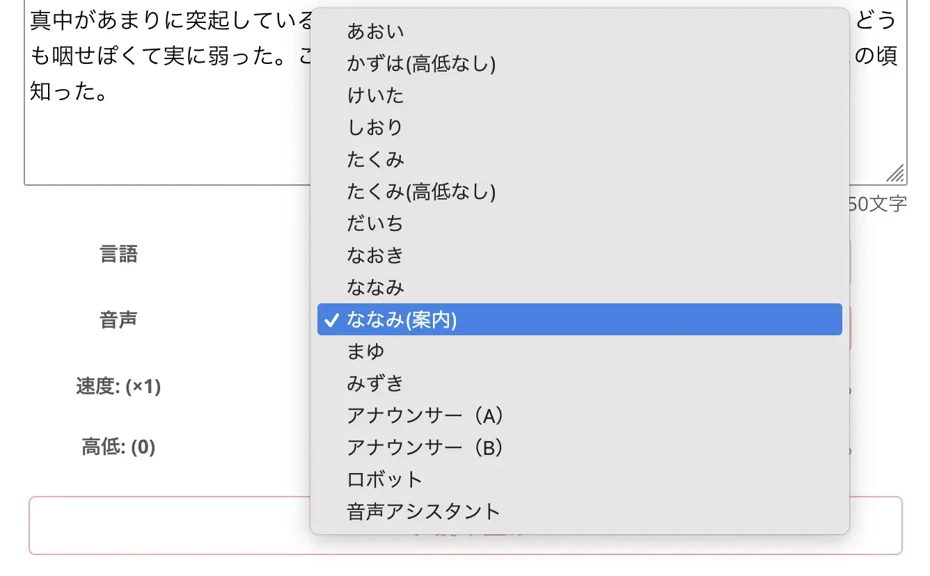
In the case of Japanese, there are 16 types of voice tones, and you can choose from a wide variety such as male voices, female voices, and children's voices.
Since you can create conversational audio using multiple voices, interaction between characters can also be easily achieved.
It also supports foreign languages and can read in 81 languages and regions, making it useful for international content production.
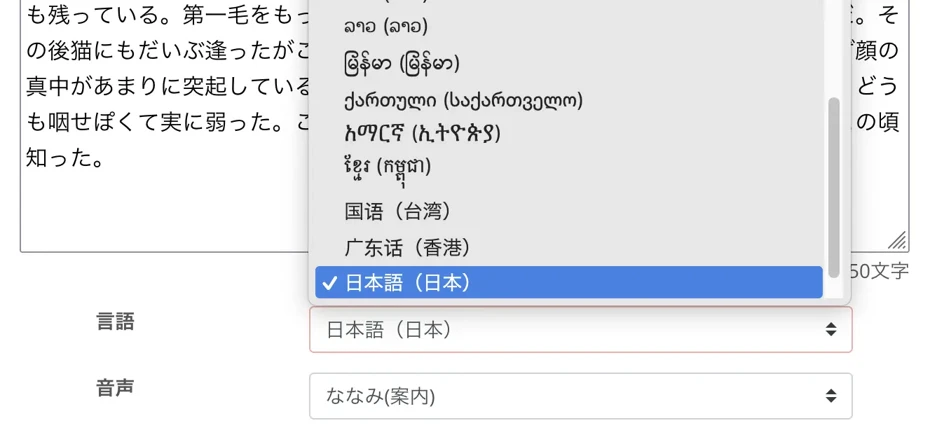
The appeal is that sufficient functions can be used for free; you can read up to 1,000 characters without registration and up to 5,000 characters for free with registration.
Since commercial use is OK, you can use it with peace of mind even if you want to monetize your videos.
Since the read-aloud audio can be downloaded as an MP3, it is also easy to use in video editing software.
It is different from the unique flavor of Yukkuri Voice, but it is ideal for videos where you want to give a professional impression or content with an official feel.
Since high-quality audio can be generated regardless of the performance of the PC or smartphone, it is a service recommended for everyone.
How to Install and Set Up Yukkuri Voice and Bouyomi software
Installation and plugin settings for Bouyomi-chan
Bouyomi-chan is a popular Bouyomi software for game commentary and streaming.
Introduction is relatively easy; first, unzip the zip file downloaded from the official website.

Basic reading functions can be used immediately by double-clicking and starting "BouyomiChan.exe" in the unzipped folder.
Basic usage is to simply enter the text in the text box and press the "Read Aloud" button.

Audio adjustment is also easy; you can change the speed, pitch, volume, etc., from "Voice Settings."
If you want to use Yukkuri Voice, select "AquesTalk" in "Voice Type."
When reading stream comments aloud, use an external comment viewer that can link with Bouyomi-chan.
Settings for Yukkuri Bouyomi Talk on iPhone
We will introduce how to set up the "Yukkuri Bouyomi Talk" app that can be used on iPhone and Android.
First, download the app from the App Store or Google Play and install it.
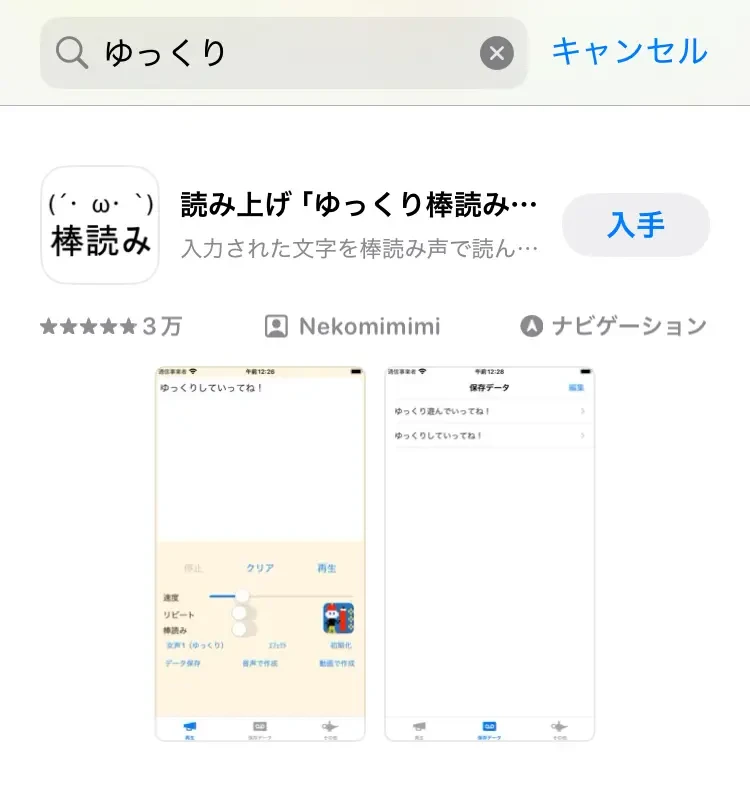
When you start the app, the text input screen is displayed immediately, so enter the text you want to read aloud.
The voice type can be changed from the settings at the bottom of the screen, and you can choose from multiple voice tones, including Yukkuri Voice (Bouyomi Voice).

Since speed and pitch can also be easily adjusted, set it to your preferred voice.
When you press the read-aloud button, the entered text will be read aloud.
For smartphone users, it is a convenient app that allows you to easily create Yukkuri Voice even if you don't have a PC.
It is recommended for video production beginners and those who want to shape their ideas immediately while on the go.
For those who want to try without installation: Introduction to Ondoku
For those who want to avoid installing on a PC or those looking for a service that can be used in the same way on both smartphones and PCs, Ondoku is recommended.
Since Ondoku is a web app that works in a browser, no troublesome installation work is required at all.
Usage is very simple.
Access the official website and enter the text in the text box.
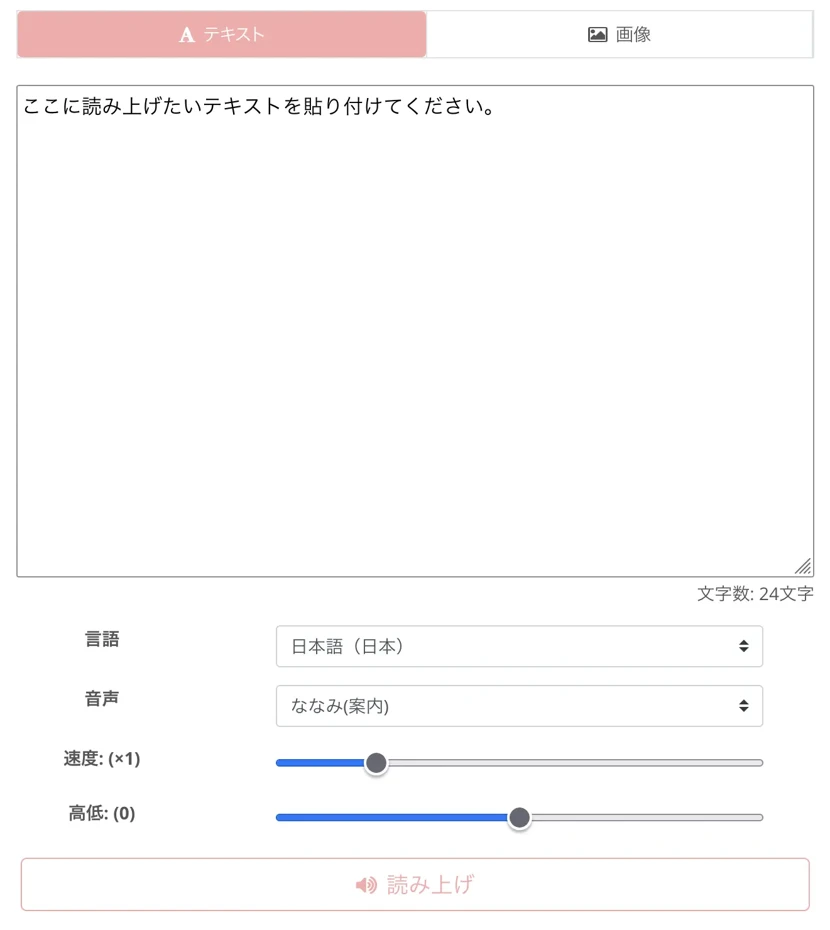
All you have to do is click the "Read Aloud" button.
Abundant functions that can be adjusted according to the application
There are 16 types of Japanese voices, and you can choose according to your application, from calm adult voices to cute children's voices.
It is characterized by more natural audio rather than unique voices like Yukkuri Voice, but it is ideal for those who want to create videos with a professional impression.
Of course, you can also adjust the speed and pitch of the voice.

Since you can also create conversational audio using multiple voice tones, interaction between characters can be easily realized.
Read-aloud audio can be downloaded as an MP3 and directly imported into video editing software.
The fact that it is free to use is also a big attraction; you can read up to 1,000 characters without registration and up to 5,000 characters with registration for free.
Since high-quality audio can be generated regardless of PC performance, it is also recommended for those using low-spec PCs.
Since it can be tried immediately without installation, it is recommended to first experience what kind of audio can be created.
Points for Utilizing Yukkuri Voice and Bouyomi software

Basic flow of Yukkuri Voice video production
Here is the basic flow for creating Yukkuri Voice videos.
First, create a script for the video.
The point is to break it down into shorter sentences so that it is easy to read aloud.
Next, input the script into the selected Yukkuri Voice or Bouyomi software to generate audio.
Choose a tool that suits your environment, such as "Bouyomi-chan" for PC software or "Yukkuri Bouyomi Talk" for smartphone apps.
Software that generates Yukkuri Voice is light in operation, so if it doesn't work well, adjust the text and try generating it again.
Save the generated audio as MP3 or WAV and import it into video editing software.
In video editing, place images, videos, and captions according to the audio.
In Yukkuri Voice videos, it is common to display text on the screen, so displaying the same text as the read-aloud content makes it easier to understand.
Finally, add BGM and effects to increase the level of completion and export the video.
By keeping this basic workflow in mind, even beginners can easily create Yukkuri Voice videos.
Let's gradually polish your techniques as you gain experience.
Tips for audio settings for commentary and narration
Here are some tips for the best audio settings for game commentary and narration.
In game commentary, the balance with the game sound is important, so settings that prioritize ease of hearing are recommended.
In PC software such as "Bouyomi-chan," setting the speed slightly faster and the volume slightly louder than the game sound makes it easier to hear.
In commentary videos and narration, the ease of understanding the content is important, so settings that read slowly and clearly at standard speed are appropriate.
When using AI services other than Yukkuri Voice, such as Ondoku, by choosing a voice with natural intonation, more professional and reliable narration can be realized.
For long commentary, considering the viewer's ear fatigue, it is good to choose a slightly lower pitch and a calm voice quality.
Also, whether with PC software or smartphone apps, the content will be easier to convey if you also devise the timing, such as inserting pauses at important points.
By providing appropriate pauses for each break in the sentence, viewers can listen while organizing the information.
Furthermore, if you adjust the reading settings for technical terms and game-specific words in advance, the narration will sound natural.
By following these tips, you can create commentary and narration videos that viewers can listen to comfortably.
Common Problems and Solutions for Yukkuri Voice Reading

Problems related to audio quality and improvement methods
When using Yukkuri Voice or Bouyomi software, problems related to audio quality may occur.
A common one is the problem of "unnatural pronunciation."
Particularly, misreadings of technical terms, proper nouns, and internet terminology often occur.
If you are concerned, it is good to write only those parts in hiragana and read them again.
Also, the problem that "word breaks are strange" can be improved by devising the way the sentences are written.
Control the breaks in reading by putting punctuation marks in appropriate places or adding line breaks.
By dealing with these issues, you can create audio that is easier to hear and more natural.
Precautions for commercial use and licenses
When using Yukkuri Voice or Bouyomi software for commercial purposes, check the current conditions on the official page for each product.
Here, we introduce a list of licenses for each software.
You can scroll horizontally
| Software | Individual/Non-commercial use | Commercial use (Distribution of videos with ads, etc.) |
|---|---|---|
| Bouyomi-chan (Included old version AquesTalk for Windows) | Free | Free (Regardless of commercial or non-commercial use) |
| AquesTalk Player | Free | Purchase of usage license and setting of license key required |
| Yukkuri Bouyomi Talk (iOS version, Android version) | Free | When using AquesTalk voice, a usage license for the relevant library is required |
| Yukumo! | Free | Purchase of usage license (for commercial content) required |
| Yukkuri Voice Maker | Free | AquesTalk usage license required |
| MYukkuriVoice | Free | Usage license for the relevant AquesTalk library is required (Same for use by companies) |
Conditions may be changed, so please see the current conditions on the official page at each link before use.
What will happen to Yukkuri Voice and Bouyomi software in the future? Future and Outlook

Speech synthesis technology by AI is constantly evolving
Reading software such as Yukkuri Voice and Bouyomi software is changing significantly due to the evolution of speech synthesis technology by AI.
They are evolving from traditional mechanical voices to more natural and emotionally rich voices.
Particularly due to the development of deep learning technology in recent years, latest AI services such as Ondoku have realized natural audio as if read by a professional narrator.
In the future, the range of emotional expression will further expand, and it is expected that speech synthesis technology that can freely express emotions such as joy, anger, sorrow, and pleasure will develop.
Also, technology to reproduce an individual's voice from a small amount of voice samples is progressing, and in the future, it will become possible to easily create an AI voice modeled on your own voice.
With the improvement of the processing power of PCs and smartphones, high-quality speech synthesis will be possible in real-time, and it is thought that utilization in live streaming, etc., will also spread.
As cloud-based services also increase, it will become possible to generate high-quality audio regardless of the specs of the PC or smartphone.
Through these technological developments, it is expected that new possibilities for voice expression that go beyond the traditional concept of Yukkuri Voice and Bouyomi software will expand.
Value of Yukkuri Voice for video creators
Yukkuri Voice and Bouyomi software will continue to develop as tools with great value for individual creators.
Even for those who are reluctant to speak or who are not confident in their narration techniques, they are expanding the possibility of producing high-quality content.
Particularly in educational content and commentary videos, they have become established as narration that allows focus on the content, and provide the value of ease of listening to viewers.
They are also suitable for storytelling utilizing characters, allowing one person to play multiple characters.
With the emergence of services like Ondoku utilizing the latest AI, natural and professional-looking audio can now be easily created, further expanding the creator's range of expression.
The flexibility to use them on both PCs and smartphones also provides an environment where creative activities can be carried out regardless of location.
As even easier-to-use and higher-quality speech synthesis tools appear along with the development of AI technology, the possibilities for individual creators will expand even further.
Yukkuri Voice and Bouyomi software will continue to hold value as important partners that support creative expression beyond simple voice generation tools.
Enjoy using Yukkuri Voice and Bouyomi software slowly!
Yukkuri Voice and Bouyomi software have become indispensable tools for video production and content creation as apps that can be easily used on PCs and smartphones.
In this article, we introduced recommended software and apps, but selecting one that fits your application and environment is important.
There are various options, from standard installation-type software to smartphone apps and services that can be used in a browser.
In addition to Yukkuri Voice Bouyomi software, high-performance reading services using AI can be used for free.
Especially for beginners, if you start with a browser-based service like Ondoku, you can learn the basics of audio creation with ease of use that is compatible with both PCs and smartphones.
Why not enjoy video production, streaming, and creative work using Yukkuri Voice, Bouyomi software, and speech synthesis technology utilizing the latest AI?
Translation:■ AI voice synthesis software "Ondoku"
"Ondoku" is an online text-to-speech tool that can be used with no initial costs.
- Supports 81 languages and regions, including Japanese, English, Chinese, Korean, Spanish, French, and German
- Available from both PC and smartphone
- Suitable for business, education, entertainment, etc.
- No installation required, can be used immediately from your browser
- Supports reading from images
To use it, simply enter text or upload a file on the site. A natural-sounding audio file will be generated within seconds. You can use voice synthesis up to 5,000 characters for free, so please give it a try.

Text-to-speech software "Ondoku" can read out 5000 characters every month with AI voice for free.
You can easily download MP3s and commercial use is also possible.
If you sign up for free, you can convert up to 5,000 characters per month for free from text to speech.
Try Ondoku now.
HP:
ondoku3.com
Email: ondoku3.com@gmail.com
Email: ondoku3.com@gmail.com
Related posts
"Ondoku" is a Text-to-Speech service that anyone can use for free without installation. If you register for free, you can get up to 5000 characters for free each month. Register now for free
- What is Ondoku
- Start text-to-speech conversion
- Free registration
- Pricing
- Posts
- Try other free services
![[2026] 6 Best Yukkuri & Robotic Voice Software | PC & Mobile Comparison](https://storage.googleapis.com/ondoku3/image/irodori-tts_tmb_140.webp)
![[2026] 6 Best Yukkuri & Robotic Voice Software | PC & Mobile Comparison](https://storage.googleapis.com/ondoku3/image/tategaki-image-yomiage_howto_tmb_140.webp)
![[2026] 6 Best Yukkuri & Robotic Voice Software | PC & Mobile Comparison](https://storage.googleapis.com/ondoku3/image/iphone-video-narration_tmb_140.webp)
![[2026] 6 Best Yukkuri & Robotic Voice Software | PC & Mobile Comparison](https://storage.googleapis.com/ondoku3/image/chrome-reading-mode-pc_tmb_140.webp)
![[2026] 6 Best Yukkuri & Robotic Voice Software | PC & Mobile Comparison](https://storage.googleapis.com/ondoku3/image/pdf-to-mp3-howto_tmb_140.webp)









