Best Text-to-Speech Software: 7 Free & Paid Tools for Commercial Use
[2026 Edition] 10 Best AI Text-to-Speech Apps Compared! Features and Usage from Free to Paid Software.
Sept. 9, 2026
![[2026 Edition] 10 Best AI Text-to-Speech Apps Compared! Features and Usage from Free to Paid Software.](https://storage.googleapis.com/ondoku3/image/ai-tts-software-app-2025_tmb_930.webp)
I want to know about recommended AI text-to-speech software and apps that can be used for free!

AI text-to-speech apps and software that can convert text into natural-sounding audio are attracting attention!
With advancements in AI technology, it is now possible to read text aloud with very high quality.
Moreover, some of the recommended AI text-to-speech apps and software are available for free.
AI text-to-speech apps can be used in various situations, such as narration for video production, creating language learning materials, and converting business documents into audio.
In this article, we will carefully select and introduce the latest recommended AI text-to-speech apps and software for 2026!
We will explain the features and usage in detail, from free apps to paid software, so why not find the perfect text-to-speech app for you?
[Free] Recommended AI Text-to-Speech App "Ondoku"

If you are looking for an AI text-to-speech app or software, "Ondoku" is recommended!
"Ondoku" is a high-performance AI text-to-speech web app that can be used for free.
No installation required; you can convert text to audio right now.
With high-performance speech synthesis AI, it can synthesize easy-to-hear audio that sounds like a professional narrator speaking.
Since it supports 81 languages and regions, including English, Chinese, and Korean, it can be used for YouTube video narration for overseas audiences or announcements for inbound tourists.
Furthermore, "Ondoku" is free!
By registering and logging in, you can read up to 5,000 characters, so you can create video narration for free right now.
If you are looking for an AI text-to-speech app or software, "Ondoku" is recommended!
Why don't you start by using "Ondoku" for free?
[Latest 2026 - Free Options Available] Explaining How to Choose AI Text-to-Speech Apps and Software
![[Latest 2026 - Free Options Available] Explaining How to Choose AI Text-to-Speech Apps and Software](https://storage.googleapis.com/ondoku3/image/ai-tts-software-app-2025_051_930.webp)
AI text-to-speech apps and software are recommended for creating video narration, in-store announcements, or language learning materials.
First, we will explain how to choose the recommended AI text-to-speech apps and software.
Why are AI text-to-speech apps and software recommended?
- I want to create narration for videos
- I want to create announcements for shops or facilities
- I want language learning materials with native pronunciation
In such cases, AI text-to-speech apps and software are recommended.
AI text-to-speech apps and software are applications or programs that synthesize and read aloud audio when text is entered.
The main feature is that they can synthesize clear and easy-to-hear audio that sounds just like a real person reading it.
As AI technology such as deep learning has advanced, much more realistic audio can be synthesized compared to previous conventional mechanical text-to-speech audio.
Moreover, AI text-to-speech apps can be used for free!
If you want to synthesize audio for free, the latest AI text-to-speech apps and software are recommended.
Why not use this article as a reference to create narration or announcement audio?
What are the types of AI text-to-speech apps and software?
Text-to-speech apps and software include:
- AI text-to-speech web apps used from a browser
- AI text-to-speech software used by installing
Web app type text-to-speech services available from a browser have the advantage of being usable for free!
Furthermore, no installation is required, and you can use them immediately whenever you want.
Another advantage is that they support many foreign languages, including Japanese and English.
On the other hand, AI text-to-speech software installed on a PC is characterized by many programs having set characters.
There are software sold as packaged or download versions, and free software that can be used for free.
Supported languages are often fixed for each software, such as Japanese only or English only.
Check if commercial use is possible! Even paid apps/software may prohibit commercial use
When choosing an AI text-to-speech app or software, it is recommended to check if commercial use is possible.
When monetizing video production or using it for business in companies or public institutions, you must choose an app or software that allows commercial use.
Some paid software may allow video monetization but prohibit commercial use by corporations.
In this article, we will also explain whether recommended AI text-to-speech apps and software are okay for commercial use, so please use it as a reference.
[Free Options Available] 10 Recommended AI Text-to-Speech Apps and Software
I want to try AI speech synthesis with an app or software! I want to know about free apps too!
Now, let's specifically introduce which AI text-to-speech apps and software are recommended!
- Ondoku
- A.I.VOICE
- Kantan! AITalk
- CeVIO AI
- VOICEPEAK
- COEIROINK
- VOICEVOX
- CoeFont
- Bouyomi-chan
- MYukkuriVoice
Comparison of Features of Recommended AI Text-to-Speech Apps
| App Name | Features | Price |
|---|---|---|
| Ondoku | Recommended AI text-to-speech app that can be used for free | Free |
| A.I.VOICE | Paid app that allows using VOICEROID characters | From 8,800 yen |
| Kantan! AITalk | Simple paid AI text-to-speech app | 16,500 yen |
| CeVIO AI | Paid app with character voices rich in emotional expression | From 14,718 yen |
| VOICEPEAK | Paid app that allows using many characters | From 6,800 yen |
| COEIROINK | AI text-to-speech app for creative activities | Free |
| VOICEVOX |
AI text-to-speech app that allows using character voices |
Free |
| CoeFont | Paid app that can read aloud in the voices of famous people | 3,300 yen/month (Individual)
From 55,000 yen/month (Corporate) |
| Bouyomi-chan | Windows app that can read aloud with "Yukkuri" voice | Free |
| MYukkuriVoice | Mac app that can read aloud with "Yukkuri" voice | Free |
1. Ondoku: High-Quality Recommended AI Text-to-Speech Web App Available for Free
| App Name | Ondoku |
|---|---|
| Features |
Recommended AI text-to-speech app that can be used for free
|
| Price | Free |
"Ondoku" is the recommended web app you should try first if you are looking for a speech synthesis app or software!
The main feature is that high-quality audio can be synthesized for free using the latest AI speech synthesis technology.
As a web app that can be used from a browser, no tedious installation work is required at all.
Just by entering text and pressing a button, natural AI audio can be synthesized in just a few seconds.
Japanese audio can be selected from over 16 types, including female voices, male voices, and children's voices.

Try listening to 16 types of Japanese voices for text-to-speech software Ondoku for free. Change impressions by adjusting pitch
Ondoku has 16 types of Japanese voices. Of course, both male and female voices are available. We have made it possible to listen to 8 types of commonly used Japanese voices and how they sound when their pitch is adjusted.
With the latest AI speech synthesis engine, it can generate easy-to-hear audio as if a professional narrator were reading it.
Reading speed and pitch can also be freely adjusted.
There is also a conversation function that uses multiple voices, so you can create the audio exactly as you want according to your purpose.
Ondoku also supports foreign language speech synthesis. Recommended for narration and announcements.
"Ondoku" is also characterized by its multilingual support!
AI text-to-speech is possible in 81 languages and regions, including English, Chinese, and Korean.
![[Ondoku] Listen to the voice types and sample audio of supported languages](https://storage.googleapis.com/ondoku3/image/%E5%A4%9A%E6%A7%98%E6%80%A7_930.webp)
[Ondoku] Listen to the voice types and sample audio of supported languages
Here we will introduce Ondoku's supported languages and sample audio.
It is also recommended for creating YouTube video narration for overseas audiences or announcements for inbound tourists.
Commercial use OK! Broadly compatible from YouTube monetization to business use
"Ondoku" of course allows commercial use.
It is also recommended for YouTube monetization and business use in companies.
Commercial use is possible even when using it for free, so you can create video audio and facility narration for free (Credit is required when using it for free. Click here for details).

What you can do with Ondoku. About commercial use (business use) and prohibited items.
Ondoku allows commercial use (business use). Use for the purpose of obtaining direct or indirect financial benefits, regardless of whether you are an individual or a corporation, is considered commercial use. However, please note that prohibited acts are established in Ondoku. This time, we will explain what you can and cannot do with Ondoku...
Recommended AI text-to-speech app that can be used for free
Moreover, "Ondoku" can be used for free!
- Without registration/login: 1,000 characters
- With registration/login: 5,000 characters
Since you can read aloud this much, you can try AI text-to-speech for free right now.
For video production, language learning, audio conversion of business materials, improving accessibility, etc., "Ondoku" is a recommended AI text-to-speech web app that can be used for a wide range of purposes.
When you are looking for a text-to-speech app or software, why don't you start by using "Ondoku"?
2. A.I.VOICE / A.I.VOICE2: Paid AI Text-to-Speech Software with Famous Characters

| App Name | A.I.VOICE |
|---|---|
| Features | Paid app that allows using VOICEROID characters
A.I.VOICE2 is compatible with Windows and macOS (Apple silicon models only) |
| Price | From 8,800 yen |
A.I.VOICE is a paid text-to-speech software developed by AI Inc.
It is the successor to the VOICEROID products, and A.I.VOICE2 is currently being developed as the latest version.
The biggest feature is the lineup of popular character voices such as "Yuzuki Yukari" and "Kotonoha Akane/Aoi."
This software is recommended if you want to create VOICEROID videos.
A.I.VOICE2 is sold as a one-time purchase paid software compatible with Windows and macOS (Apple silicon models only).
Commercial use by individuals is generally possible by purchasing the product, but corporate use requires a separate license.
3. Kantan! AITalk: Paid AI Text-to-Speech Software with Orthodox Voices
| App Name | Kantan! AITalk |
|---|---|
| Features | Simple paid AI text-to-speech app
No character settings |
| Price | 16,500 yen |
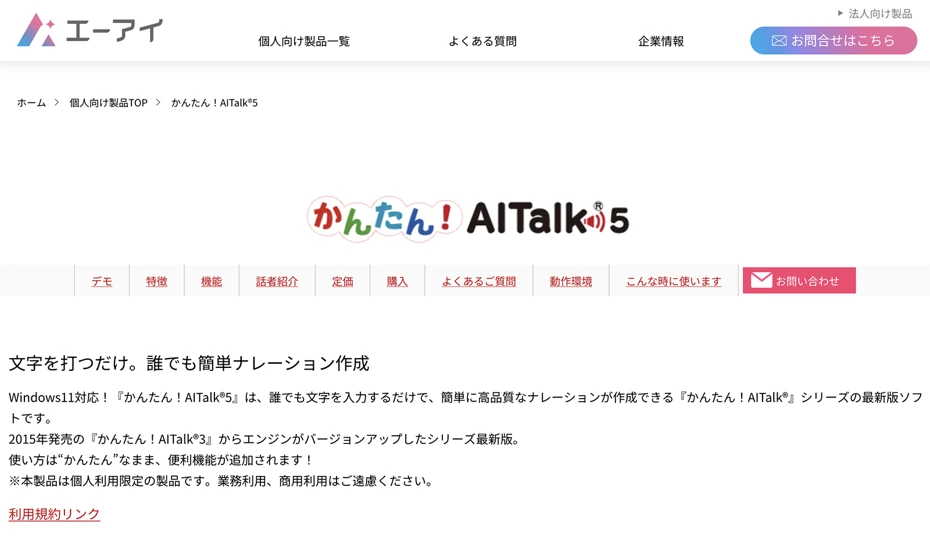
Kantan! AITalk is an AI text-to-speech software also developed by AI Inc., the same as A.I.VOICE.
It is software installed on a PC and is compatible with Windows only.
Unlike the A.I.VOICE series, Kantan! AITalk does not have character illustrations set.
It is a convenient paid software for when characterization is not needed for the audio.
However, it is exclusively for individual use, and commercial use by companies is not allowed.
4. CeVIO AI: AI Text-to-Speech Software Capable of Speech Synthesis with Character Voices

| App Name | CeVIO AI |
|---|---|
| Features |
Capable of reading aloud in character voices
|
| Price | From 14,718 yen |
CeVIO AI is speech synthesis software that allows realistic AI reading in character voices.
A unique feature is that both text-to-speech software and singing software are available.
It is a one-time purchase paid software exclusively for Windows, and you can read aloud in the voices of a wide variety of characters such as "Sato Sasara" and "Suzuki Tsudumi."
For each character, a "Talk Voice" for text-to-speech and a "Song Voice" for singing are sold.
It can read text aloud with rich emotion using original AI speech synthesis technology.
The conditions for individual commercial use are relatively flexible, but corporate use requires a separate license.
5. VOICEPEAK: Paid AI Text-to-Speech Software that Allows Using Various Voices

| App Name | VOICEPEAK |
|---|---|
| Features | Paid app that allows using many characters
Products including multiple characters are available |
| Price | From 6,800 yen |
VOICEPEAK is AI text-to-speech software compatible with Windows, Mac, and Linux.
Like A.I.VOICE and CeVIO, it is a paid software that allows reading aloud in character voices.
Additionally, voices without character illustrations are sold, which are ideal for narration in videos for corporate marketing or branding.
Another feature is that some packages include multiple character voices, allowing you to create videos where characters talk to each other.
When using it commercially, caution is required as you must follow the terms of use for each character.
6. COEIROINK: AI Speech Synthesis Software for Creative Activities

| App Name | COEIROINK |
|---|---|
| Features | AI text-to-speech app for creative activities |
| Price | Free |
COEIROINK is AI text-to-speech software developed specifically for creative activities.
It is a desktop software compatible with Windows, Mac, and Linux, and can read aloud in various character voices.
In addition to official and officially recognized characters, the voice model "MYCOE" created by users can also be used.
It also supports fine adjustments such as intonation and emotional expression.
It is free software and commercial use is possible, but since the terms vary depending on the voice model used, prior confirmation is essential.
The characters' terms of use are generally based on the premise of individual use in many cases.
7. VOICEVOX: AI Speech Synthesis Software Popular for its Character Voices

| App Name | VOICEVOX |
|---|---|
| Features | AI text-to-speech app that allows using Zundamon |
| Price | Free |
VOICEVOX is an AI text-to-speech software popular for its unique character voices.
The biggest feature is that it can read aloud in the voices of popular characters such as "Zundamon," "Shikoku Metan," and "Kasukabe Tsumugi."
It is a desktop-type free software compatible with Windows, Mac, and Linux, and can read aloud in natural voices using AI technology.
Since it allows fine adjustments of intonation and voice parameters, professional-level audio editing is possible.
While the software itself is free and commercial use is possible, you must also follow the terms of use for characters like Zundamon, so caution is required.
8. CoeFont: Paid Web App for Reading Aloud in the Voices of Voice Actors and Celebrities

| App Name | CoeFont |
|---|---|
| Features | Paid app that can read aloud in the voices of famous people
Includes free services for social contribution |
| Price | 3,300 yen/month (Individual)
From 55,000 yen/month (Corporate) |
CoeFont is a web app that allows reading aloud in AI voices from a browser.
It is a paid service, with individual and corporate plans available.
It is characterized by being able to read aloud in AI voices created based on the voices of voice actors, narrators, and celebrities, and also supports multilingual reading.
Additionally, it is possible to create an AI voice based on your own voice.
They also provide free services for people who can no longer speak due to illness.
9. Bouyomi-chan: A Staple App Popular Among Streamers

| App Name | Bouyomi-chan |
|---|---|
| Features | Windows app that can read aloud with "Yukkuri" voice
Can be linked with commentary software |
| Price | Free |
Bouyomi-chan is a classic text-to-speech software widely used in game streaming and live broadcasting.
It can read aloud with a characteristic audio known as "Yukkuri Voice."
A major feature is its extensive linking functionality with streaming software such as OBS.
It is a standard free software for reading YouTube stream comments and is especially recommended for streamers.
It is also widely used in "Yukkuri Jikkyou" (Yukkuri Let's Plays) and "Yukkuri Kaisetsu" (Yukkuri Commentary) on YouTube and Nico Nico Douga.
It is free software and is compatible with Windows only.
Another feature is that it uses an older version of the "AquesTalk" speech synthesis engine, allowing commercial use.
Unlike the latest AI speech synthesis engines, it only produces mechanical and unique voices, but in return, it is a distinctive app that can do things only it can do.
10. MYukkuriVoice: Yukkuri Voice Reading Software Compatible with Mac

| App Name | MYukkuriVoice |
|---|---|
| Features | Mac app that can read aloud with "Yukkuri" voice |
| Price | Free |
MYukkuriVoice is a reading software recommended for Mac users.
This software can also read aloud with the unique voice called "Yukkuri Voice."
While it is free software, using it for commercial purposes requires a commercial license for the "AquesTalk" speech synthesis engine.
Since there are few reading software programs compatible with Mac, it is a valuable app for those who want to create Yukkuri commentary or Yukkuri Let's Play videos.
[Free is OK] Explaining How to Use AI Text-to-Speech Apps!

I want to try using an AI text-to-speech app!
From here, for those who actually want to use an AI text-to-speech app or software, we will explain how to use "Ondoku"!
[Free] How to Use the AI Text-to-Speech App "Ondoku"
To use AI reading with "Ondoku", first open the top page of the official website.
When you open the top page, a text input field will be displayed, so enter the text you want to read aloud. Copy and paste is also fine.
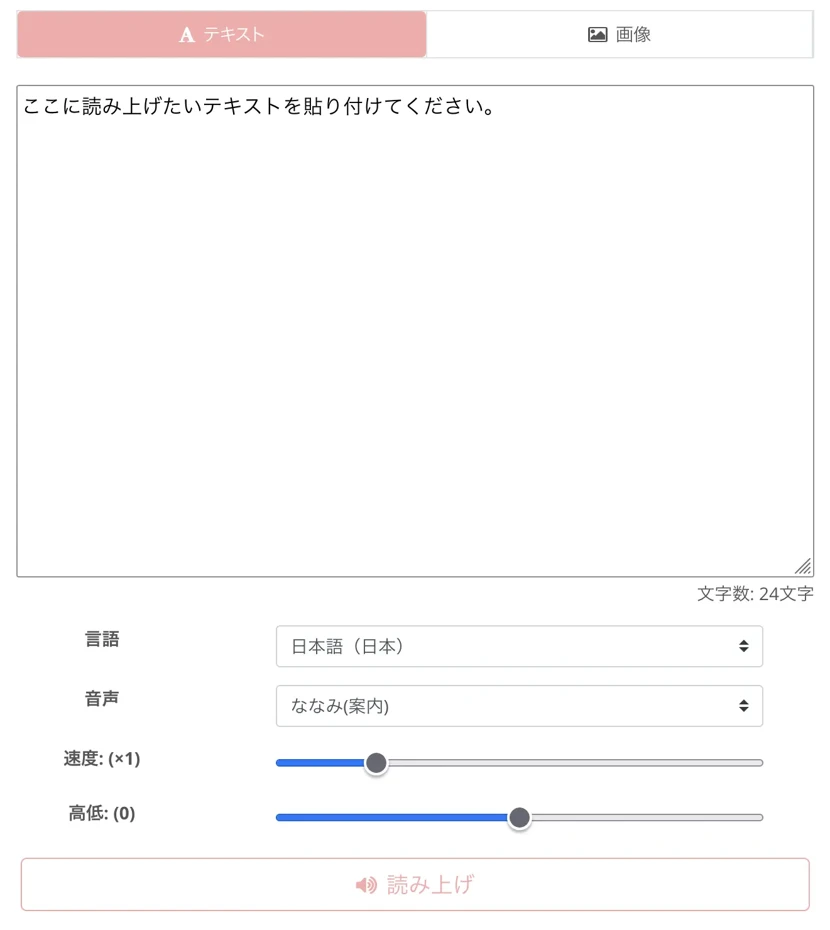
Next, select the language.
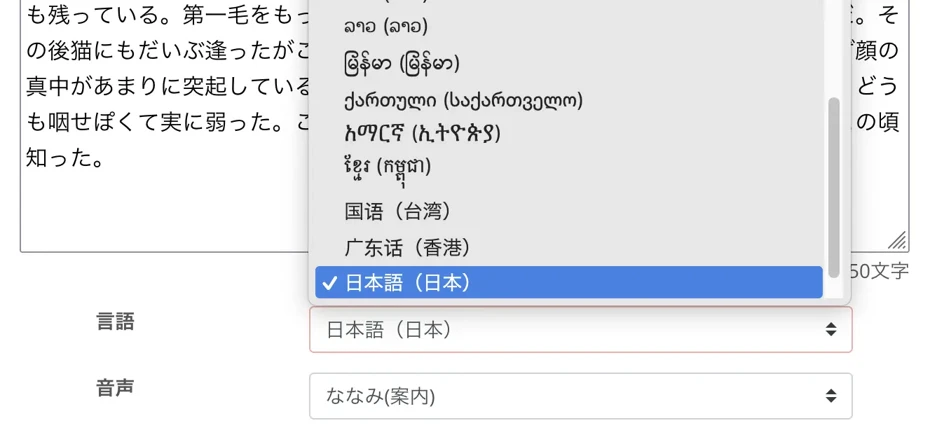
After choosing the language, select the voice type.
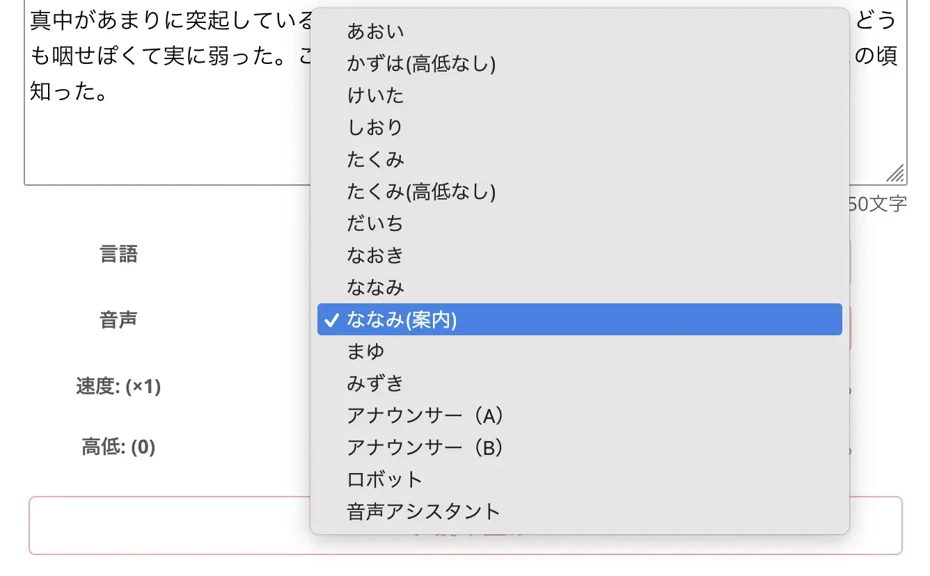
In the case of Japanese, you can choose from over 16 types of voices, including female, male, and children's voices.
You can listen to Japanese voices in this article.
Try listening to 16 types of Japanese voices for text-to-speech software Ondoku for free. Change impressions by adjusting pitch
Ondoku has 16 types of Japanese voices. Of course, both male and female voices are available. We have made it possible to listen to 8 types of commonly used Japanese voices and how they sound when their pitch is adjusted.
You can listen to foreign language voices in this article.
[Ondoku] Listen to the voice types and sample audio of supported languages
Here we will introduce Ondoku's supported languages and sample audio.
If you need to adjust the reading speed or pitch, you can do so by moving the sliders left and right.

Now the preparation for reading is complete!
Press the "Read aloud" button to read.

The AI reading process is completed in just a few seconds.
The screen will change and the reading result will be displayed.

The created audio can be saved in MP3 format using the "Download" button.
As you can see, with the AI reading web app "Ondoku", anyone can easily synthesize easy-to-hear AI audio!
Since it can be used for free, why don't you start by using "Ondoku"?
Recommended Ways to Use AI Text-to-Speech Apps by Purpose!
What kind of uses are there for AI reading apps and software?
The possibilities for AI reading apps that can synthesize easy-to-hear audio are endless!
They can be used for a wide range of purposes, from video production and store announcements to language learning.
[Video Production] Create YouTube Narration for Free
A recommended use for AI text-to-speech apps is narration for video production.
Since the audio is completed just by entering the script text, it is much easier to add narration than recording it yourself.
Unlike when recording yourself, no editing is required, and the audio created with the AI text-to-speech app can be used directly as narration.
Another point is that expensive recording equipment is not required.
![[Latest 2026] Creating video narration with AI speech synthesis! Recommended free services and usage for YouTube monetization](https://storage.googleapis.com/ondoku3/image/video-narration-ai_tmb_930.webp)
[Latest 2026] Creating video narration with AI speech synthesis! Recommended free services and usage for YouTube monetization
Explaining how to utilize AI text-to-speech services for YouTube video narration production. We introduce in detail the features and usage of tools that can be used for free, such as Ondoku, and points to note in video editing.
When thinking about monetization through video posting on YouTube, it is important to choose an app or software that allows commercial use.
"Ondoku" allows commercial use, so you can feel safe when monetizing your channel.
Reading aloud in foreign languages is also possible, so you can create videos for overseas audiences and gather even more viewers!
Announcements for Shops and Facilities Can Also Be Created for Free with AI Reading Apps!
AI text-to-speech apps can also be used for announcements in shops and facilities!
Since you can create easy-to-hear audio like a professional narrator, you can guide users of shops and facilities in a clear way.
Furthermore, by playing announcements introducing services and products, you can also increase sales!

Achieve professional-level facility broadcasting with automatic audio! Complete guide to AI announcements
Automate facility broadcasting with AI! With Ondoku, create narrator-level automatic audio for free. Multilingual support for perfect inbound measures. Contribute to cost reduction through improved operational efficiency!
Of particular note are announcements for inbound tourists.
It is very difficult to create announcements in foreign languages such as English yourself, but with an AI text-to-speech app, you can easily create them for free.
By playing announcements in shops, facilities, and transportation troubled by overtourism, you can accurately convey facility usage instructions and manners to inbound tourists.
This is a recommended way to use AI text-to-speech apps actually used in the transportation and tourism industries, such as on Shinkansen trains.
![[Must-read] Solve inbound tourism and overtourism issues! Multilingual guidance methods created with the latest AI tools](https://storage.googleapis.com/ondoku3/image/20241215_inbound_overtourism_tmb_930.webp)
[Must-read] Solve inbound tourism and overtourism issues! Multilingual guidance methods created with the latest AI tools
Are you troubled by overtourism due to the increase in inbound tourists? This article thoroughly explains how to create free multilingual guidance using AI technology and specific countermeasure methods in tourist areas. We introduce practical guides that you can start right away.
[Shadowing] AI Reading Apps are also Recommended for Language Learning!
AI text-to-speech apps are also recommended for language learning.
Since you can immediately create foreign language audio with native pronunciation, you can quickly learn the pronunciation of unknown words or the rhythm of sentences.
A particularly recommended learning method is "shadowing."
Since you can create audio for educational materials with any content you like, you can shadow sentences tailored to your learning goals, such as work or tourism.
Please also see this article about shadowing.
![[Complete Guide] What is the way to do English shadowing? Also explains how to create materials for free!](https://storage.googleapis.com/ondoku3/image/20250522_shadowing_tmb_02_930.webp)
[Complete Guide] What is the way to do English shadowing? Also explains how to create materials for free!
Efficiently improve your English skills with shadowing! Explaining the learning method for beginners that improves listening, pronunciation, and speaking at the same time. We also introduce how to create materials with free AI audio.
When using an AI text-to-speech app for language learning, it is recommended to choose a multilingual app or software.
"Ondoku" supports 81 languages and regions, so it can be used for learning not only English but also languages from all over the world.
Why Not Find the Perfect AI Text-to-Speech App for You?
As AI technology has advanced, it has become possible to synthesize very high-quality audio with free AI text-to-speech apps.
The latest AI can be conveniently utilized for a wide range of purposes, such as video production, store announcements, and language learning!
For beginners or those who want to easily create high-quality audio right now, "Ondoku", which can be used for free from a browser, is recommended.
If you are looking for an AI text-to-speech app, why not start by using "Ondoku" for free?
■ AI voice synthesis software "Ondoku"
"Ondoku" is an online text-to-speech tool that can be used with no initial costs.
- Supports 81 languages and regions, including Japanese, English, Chinese, Korean, Spanish, French, and German
- Available from both PC and smartphone
- Suitable for business, education, entertainment, etc.
- No installation required, can be used immediately from your browser
- Supports reading from images
To use it, simply enter text or upload a file on the site. A natural-sounding audio file will be generated within seconds. You can use voice synthesis up to 5,000 characters for free, so please give it a try.

Text-to-speech software "Ondoku" can read out 5000 characters every month with AI voice for free.
You can easily download MP3s and commercial use is also possible.
If you sign up for free, you can convert up to 5,000 characters per month for free from text to speech.
Try Ondoku now.
HP:
ondoku3.com
Email: ondoku3.com@gmail.com
Email: ondoku3.com@gmail.com
Related posts
"Ondoku" is a Text-to-Speech service that anyone can use for free without installation. If you register for free, you can get up to 5000 characters for free each month. Register now for free
- What is Ondoku
- Start text-to-speech conversion
- Free registration
- Pricing
- Posts
- Try other free services
![[2026 Edition] 10 Best AI Text-to-Speech Apps Compared! Features and Usage from Free to Paid Software.](https://storage.googleapis.com/ondoku3/image/irodori-tts_tmb_140.webp)
![[2026 Edition] 10 Best AI Text-to-Speech Apps Compared! Features and Usage from Free to Paid Software.](https://storage.googleapis.com/ondoku3/image/tategaki-image-yomiage_howto_tmb_140.webp)
![[2026 Edition] 10 Best AI Text-to-Speech Apps Compared! Features and Usage from Free to Paid Software.](https://storage.googleapis.com/ondoku3/image/iphone-video-narration_tmb_140.webp)
![[2026 Edition] 10 Best AI Text-to-Speech Apps Compared! Features and Usage from Free to Paid Software.](https://storage.googleapis.com/ondoku3/image/chrome-reading-mode-pc_tmb_140.webp)
![[2026 Edition] 10 Best AI Text-to-Speech Apps Compared! Features and Usage from Free to Paid Software.](https://storage.googleapis.com/ondoku3/image/pdf-to-mp3-howto_tmb_140.webp)









