Best Text-to-Speech Software: 7 Free & Paid Tools for Commercial Use
Best YouTube Posting Times for Global Audiences: US & Europe Guide
Sept. 9, 2026

When uploading videos for overseas audiences to YouTube, what should I do about the posting time?

When creating videos for overseas audiences on YouTube, setting the posting time is very important.
To get many people to watch videos created in English or other foreign languages, it is recommended to choose a posting time that matches overseas viewers.
Posting time settings are very important not only for personally operated YouTube channels but also for channel management for corporate marketing and branding purposes.
In this article, we will explain the posting time for YouTube videos aimed at overseas audiences in detail.
We will also explain the optimal posting time slots for each overseas region, so why not use this article as a reference to reach more overseas viewers with your YouTube channel?
[Free] Recommended Narration Creation Site for Producing YouTube Videos for Overseas!

If you are making videos for overseas, Ondoku is recommended!
Ondoku is a text-to-speech site that uses the latest speech synthesis AI to create narrations with native pronunciation.
You can conveniently read aloud in 81 languages and regions, including English, Korean, Chinese, German, French, and Spanish.
It is easy to use: just enter the text and press the read button!
Moreover, Ondoku is free!
When you register and log in, you can read up to 5,000 characters for free, so anyone can create foreign language narrations right away.
Commercial use is also OK, so it can be used for corporate marketing and branding videos (Click here for details on commercial use).
When making YouTube videos for overseas in English or other foreign languages, why not try using Ondoku for free?
[English Support] Why is the Posting Time Important for YouTube Videos Aimed at Overseas?

Setting the posting time is important to get your YouTube videos played by more overseas viewers.
By posting according to overseas viewers, you can rapidly increase the number of views and subscribers.
Why Does the Posting Time of YouTube Videos for Overseas Affect the Number of Views?
The reason why posting time is important when uploading videos for overseas audiences to YouTube is that
"Getting many views immediately after posting"
is very important.
On YouTube, videos that are played many times immediately after being posted are more likely to appear in recommendations.
Since they are displayed on the app's top screen and in related videos, you will be able to continuously increase the number of views thereafter.
Post According to the Time Overseas Viewers Watch YouTube
When do you usually watch YouTube?
It is likely:
- After returning home at night
- During company lunch breaks
- On weekends (Sat/Sun) and holidays
It is the same for overseas viewers.
Therefore, by posting videos during the time slots when overseas viewers often watch YouTube (active time slots), it is possible to rapidly increase the number of views immediately after posting.
Of course, since there are time differences with other countries, it is necessary to set the optimal posting time for each target country or region.
Match the posting time to the lifestyle of viewers in each region.
This is the basis for increasing the number of views and subscribers for YouTube videos aimed at overseas audiences.
Note that Overseas Viewers Have Different Living Rhythms Depending on the Country
However, overseas viewers have different living rhythms depending on the country or region.
When deciding the posting time for YouTube videos for overseas, it is important to research:
- Differences in work and school time slots
- Differences in how holidays are spent and YouTube viewing habits
When making videos for English-speaking countries and other overseas markets, it is recommended to set the posting time after considering which countries or regions you are targeting.
Please refer to the points introduced in this article to set effective posting times.
Recommended YouTube Posting Time Slots by Overseas Region

From here, we will specifically explain the recommended posting times for YouTube videos for overseas by region.
Recommended YouTube Posting Time for the United States
One thing to keep in mind regarding the posting time for YouTube videos aimed at the United States is the time difference between the East Coast and the West Coast.
- US East Coast (New York, Washington D.C., etc.): 14 hours behind Japan time.
- US West Coast (Los Angeles, San Francisco, etc.): 17 hours behind Japan time.
As you can see, there is a 4-hour time difference within the continental United States.
The recommended posting time for YouTube videos for the United States is around 8:00 AM to 12:00 PM Japan time.
By posting during this time slot, you can have the video viewed during the late afternoon to evening hours when US viewers use YouTube the most.
Considering getting views from all over the US, around 8:00-9:00 AM is recommended, although it is a bit early for the West Coast.
You can listen to recommended English AI voices for US-targeted videos here! Please take a look.

For English learning listening! Audition (trial listening) native pronunciation from 92 speakers, including voices of women, men, girls, and boys!
Ondoku is a text-to-speech service that can pronounce words from all over the world. You can listen to 92 types of Ondoku's English voices.
Recommended YouTube Posting Time for Europe
For YouTube videos aimed at Europe, it is also important to decide the posting time while being aware of the time differences of major countries.
- UK (London): 9 hours behind Japan time
- Germany, France (Berlin, Paris): 8 hours behind Japan time
The recommended posting time for YouTube videos for Europe is around 2:00 AM to 4:00 AM Japan time.
By uploading videos during this time slot, you can get them played during the hours after European viewers return home.
Since it is late at night in Japan, it is recommended to post using YouTube's scheduled posting feature.
Ondoku can, of course, read aloud in European languages such as French and German!
You can synthesize AI voices with very easy-to-understand native pronunciation, so please try listening to the sample voices.

For checking pronunciation and listening while studying French! Audition (trial listening) native pronunciation from 31 speakers, voices of women, men, and children.
Here, you can listen to Ondoku's French voices. Voices include female, male, and children's voices. Please use them for narration, work training, presentations, learning, etc.

For checking pronunciation and listening while studying German! Audition (trial listening) native pronunciation from 24 speakers, voices of women, men, and children.
Here, you can listen to Ondoku's German voices. Voices include female, male, and children's voices. Please use them for narration, work training, presentations, learning, etc.
Recommended YouTube Posting Time for the East Asian Region
When posting YouTube videos from Japan aimed at East Asia or the Pacific region, the same posting time as in Japan is OK.
- Korea: No time difference with Japan, same time zone
- Mainland China, Hong Kong, Taiwan, Singapore: 1 hour behind Japan time
- Vietnam, Thailand, Indonesia: 2 hours behind Japan time
- Australia: 1 hour ahead of Japan time
As there is not much time difference with Japan, it is recommended to post around 7:00 PM to 9:00 PM Japan time.
Ondoku can read aloud Asian languages such as Chinese, Korean, Vietnamese, Thai, and Indonesian with native pronunciation!
Why not create YouTube videos for Asia with Ondoku?
Explaining How to Use and Set Up the Scheduled Posting Feature for Overseas!

I can't post videos on YouTube in the middle of the night~
If you are posting videos on YouTube for overseas, it is recommended to use the scheduled posting feature!
Even for videos aimed at overseas with time differences, you can post at the optimal time by utilizing the scheduled posting feature.
Basic Setting Procedures for Scheduled Posting
How to use YouTube's scheduled posting feature is very simple.
First, upload the video to YouTube.
When you start uploading the video, the posting details screen will open.
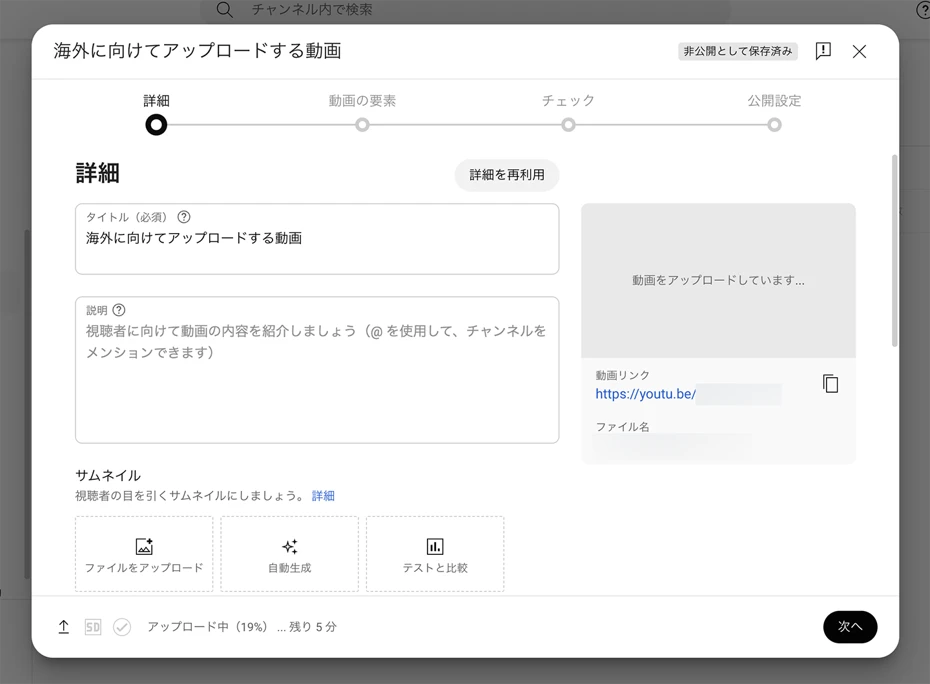
After completing the post settings, "Visibility" will be displayed at the end.
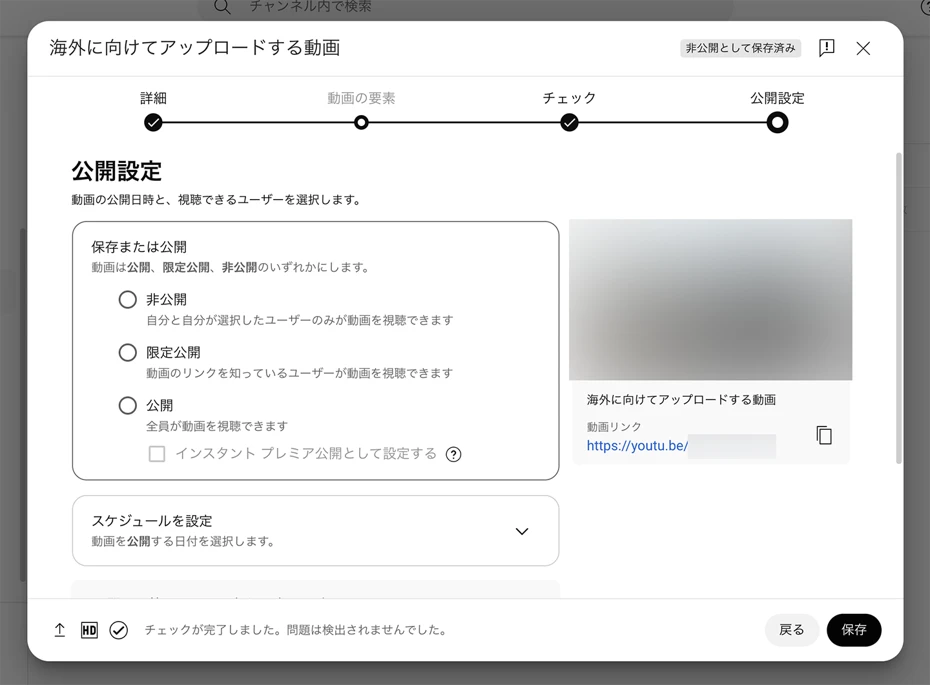
If you press "Schedule" here, you can set the posting time.
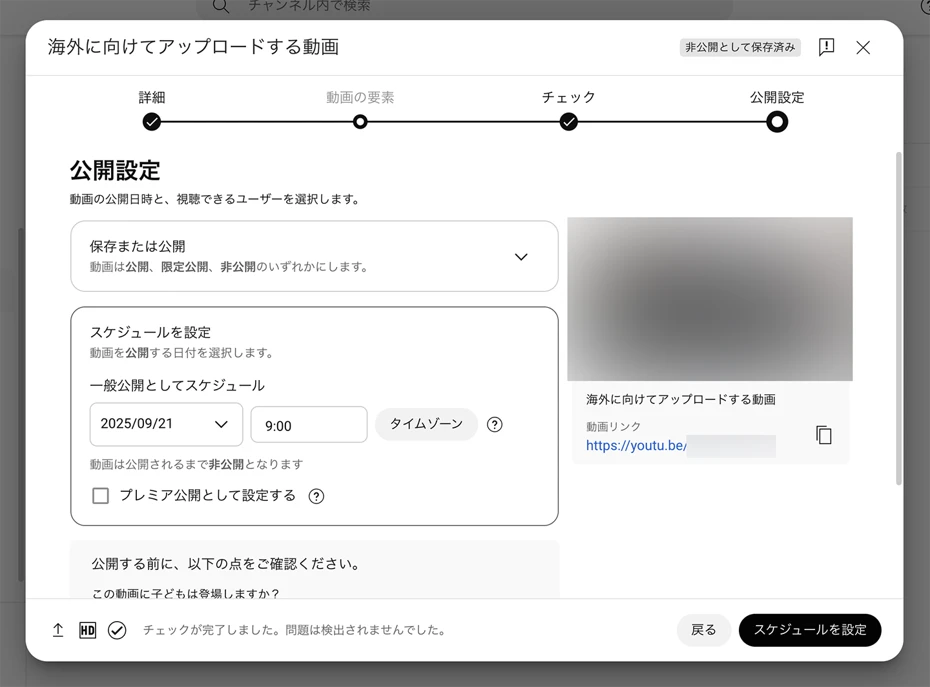
Set the date and time.
For example, if you want to publish a video at 7 PM on the US East Coast, set the scheduled post for 9 AM the next day Japan time.
Note that the time displayed at this point is Japan time (you can check by clicking "Time Zone").
Once the settings are complete, click the "Schedule" button to finish the reservation!
Now, the video will be automatically published at the specified posting time.
In this way, you can publish videos at the optimal time for overseas without worrying about time differences, so it is recommended to utilize the scheduled posting feature when posting videos for overseas to YouTube.
[Related Article] How to Make Thumbnails for YouTube Videos Aimed at Overseas
When creating videos for overseas on YouTube, setting thumbnails is also very important.
Please take a look at this article for a detailed explanation.

How to Make Thumbnails for YouTube Videos Aimed at Overseas? Detailed explanation from design tips to fonts.
Explaining precautions and tips for creating thumbnails for YouTube videos aimed at overseas viewers. Introducing a wide range from basic text size and placement to design trends by country.
Time Slots to Avoid and Precautions for Overseas Posting

When posting videos for overseas to YouTube, pay attention to time slots you should avoid.
Depending on the culture or religion of each country, there may be holidays when videos won't get many views even if you post them.
What are the Posting Times when Overseas Videos are Hard to Watch?
When posting YouTube videos for overseas, there are posting times you should avoid.
In the United States, there are fewer viewers during weekday mornings local time (around 10 PM to 5 AM Japan time).
Since this is the time when Americans are at work or school, it is recommended to avoid this posting time.
In Europe, too, viewers are fewer during weekday mornings local time (around 4 PM to 9 PM Japan time).
For videos aimed at East Asia or the Pacific region, it is recommended to avoid posting during Japan's daytime hours.
In this way, the key to increasing views for YouTube videos aimed at overseas is to avoid time slots when many people are at work or school and post during the golden time from evening to night.
Caution is Needed for Video Posting During Holidays and Event Periods. Views May Not Grow.
When posting YouTube videos for overseas, caution is needed regarding regional holidays and cultural events.
While views often grow on days when work or school is closed, in the case of national or religious holidays, viewers may not watch even if you post.
In the United States, many people spend time with their families around Thanksgiving (4th Thursday of November) and Christmas, so views often do not increase.
The same applies to US Independence Day (July 4).
In countries where many people attend church, views may not increase during the Christian Easter (Resurrection Sunday).
Note that the date of Easter changes every year.
In the Asian region, there are days when viewers from Chinese-speaking regions decrease, such as January 1st (New Year's Day) and the Spring Festival (Lunar New Year).
The date of the Spring Festival (Lunar New Year) also changes every year.
In this way, it is also important to decide the posting date according to the culture and religion of each country.
Basic Overseas Settings to Do Along with Posting Time
For YouTube videos aimed at overseas, not only the posting time but also overseas language settings are important.
Language Settings are Very Important for YouTube Videos Aimed at Overseas
For overseas YouTube videos, region settings and language settings are as important as the posting time.
There is a "Language" item on the video details setting page.
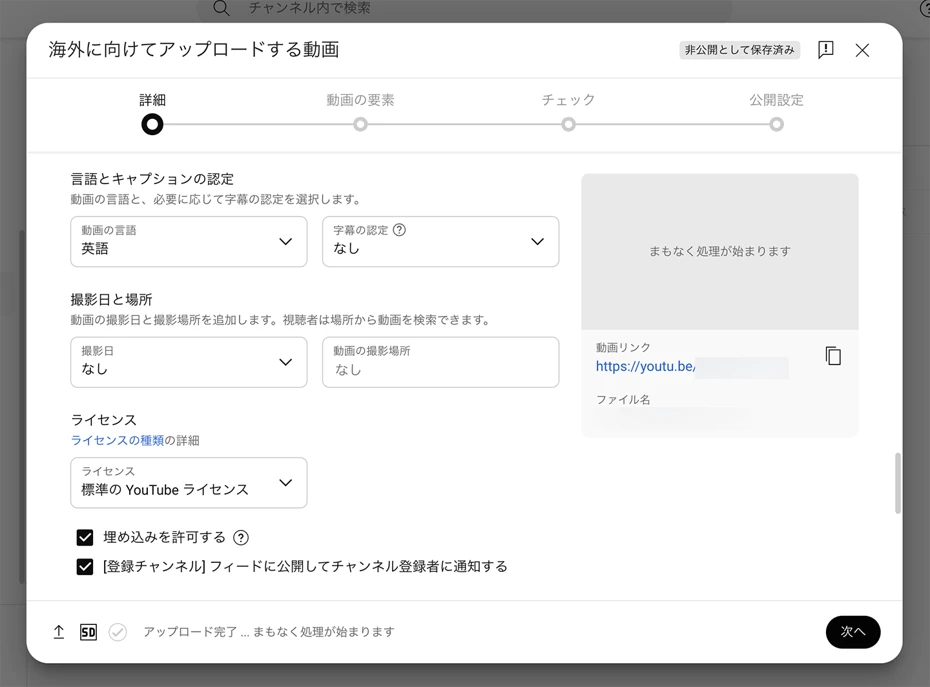
By setting this item to "English" for an English video or "Korean" for a Korean video, it becomes easier to be recommended to viewers in those respective countries.
Moreover, by setting the language in this item, you will be able to use YouTube's auto-generated subtitle feature.
In particular, setting the language for an English video increases the possibility that viewers of languages other than English will watch with auto-translated subtitles, so you can further increase the number of views and subscribers.
How to Easily Create Narrations for YouTube Videos Aimed at Overseas
To increase the number of views for YouTube videos aimed at overseas, native pronunciation narration is important!
We will explain how to create narration, which is as important as the posting time.
1. Create a script for overseas using AI

First, create a script for the YouTube video aimed at overseas.
The method is simple.
Just write the script in Japanese and translate it using an AI service.
When using a translation service, DeepL, a standard in AI translation, is recommended for English and other languages of the US and Europe.
You can perform AI translation for languages all over the world in a multi-functional way.
Depending on the language, there are services that can translate with expressions closer to native speakers than DeepL, such as "Papago" for Korean and "Baidu Translation" for Chinese.
Recommended to translate using generative AI services
Using AI translation services is convenient, but
- ChatGPT
- Claude
- Gemini
using generative AI services like these is also recommended.
The usage is simple: once you have loaded the script file (text file, Word file, etc.), just
Please translate this script into native expressions in [Language] (e.g., English)
give the instruction.
You can get it translated into natural expressions even closer to native speakers than specialized AI translation services.
Recommended: Transcribe Japanese videos with AI → AI translation
If you already have a Japanese video and want to create a foreign language translated version, it is also recommended to create a foreign language script based on the audio of the Japanese video.
If you want to translate video audio into a foreign language, the AI transcription service Mojiokoshi-san is recommended.

Just by uploading a Japanese video to Mojiokoshi-san, you can convert the video audio into text.
After that, simply translate it using an AI translation service or generative AI service in the same way.
Using Mojiokoshi-san, you can also create subtitles from the video.
How to transcribe videos and create subtitles with Mojiokoshi-san is explained in this article.
Please take a look.

2. Create Narration from the Overseas YouTube Script Using Ondoku
Once the script is ready, use the AI reading service Ondoku to create the narration.
Using Ondoku is simple.
Once you open the Ondoku top page, paste the text of the script.

Next, select the language.

After selecting the language, choose the voice to be used for reading from options such as female or male.
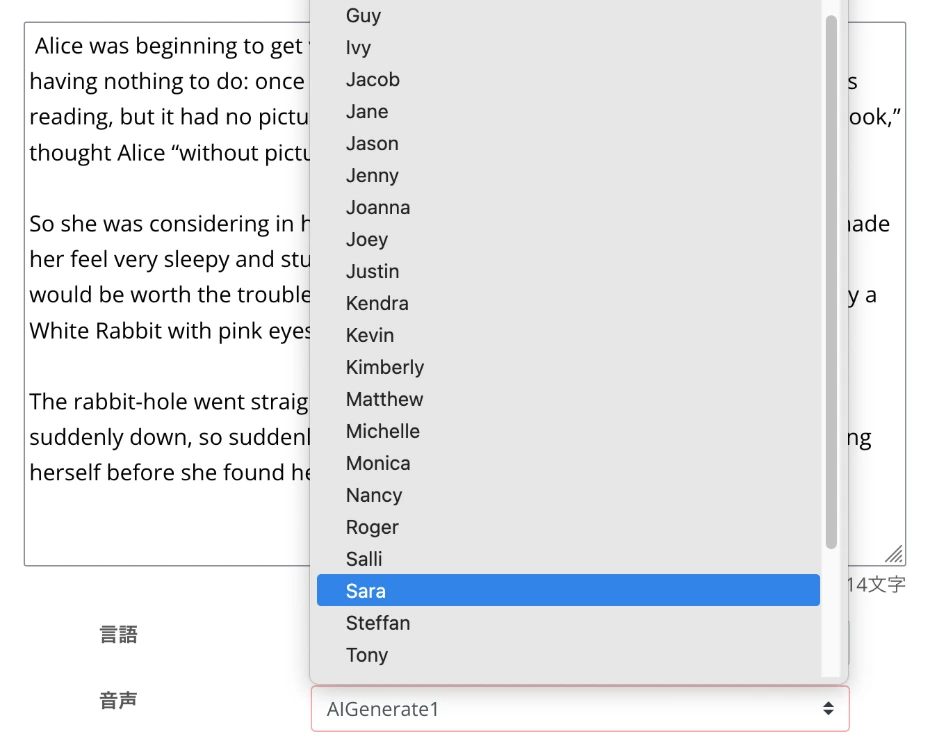
You can listen to the voices of each language on this page, so please take a look!

【Ondoku】Audition Voice Types and Sample Audio for Supported Languages
Here we will introduce Ondoku's supported languages and sample audio.
You can also adjust the pitch and speed of the reading voice, but it is OK to leave them at default settings when using it for the first time.

Now the settings are complete!
Press the read button to start reading.
The reading process is completed immediately.
The screen will switch and the narration audio will be played back.

Check the content and if there are no problems, download the MP3 file.
How to create English narration for YouTube is also explained in this article.
Please take a look.
![[2026 Latest] How to Add English Narration to YouTube Videos? Easy production with AI speech synthesis](https://storage.googleapis.com/ondoku3/image/youtube_english_narration_tmb_930.webp)
[2026 Latest] How to Add English Narration to YouTube Videos? Easy production with AI speech synthesis
Thoroughly explaining how to add English narration to YouTube videos. Easily produce high-quality foreign language narrations with the free AI reading service Ondoku. Introducing video production techniques effective for acquiring overseas viewers.
3. Edit the Overseas Video and Upload to YouTube
Once the narration is complete, create the overseas video using video editing software.
When you finish editing the video, upload it to your YouTube channel.
The point when uploading is to perform the actions explained in this article:
- Setting the scheduled posting time
- Setting the language
Now, you have been able to upload a video with narration for overseas using the AI reading service Ondoku.
Using AI reading services, anyone can easily create narrations for overseas with native pronunciation.
When you want to create videos in English or other foreign languages, why not try using Ondoku?
Why Not Increase Views for Your Overseas YouTube Videos by Setting the Posting Time?
In this way, setting the posting time is very important when posting videos for overseas to YouTube.
By using the scheduled posting feature well, you can rapidly increase the number of views for your overseas videos.
Native pronunciation narration is also important when making videos for overseas.
By using AI reading services, you can have your videos watched by more viewers.
If you want to increase YouTube views and subscribers, targeting viewers all over the world is recommended.
Why don't you also utilize the AI reading service Ondoku to create videos for overseas with native pronunciation?
■ AI voice synthesis software "Ondoku"
"Ondoku" is an online text-to-speech tool that can be used with no initial costs.
- Supports 81 languages and regions, including Japanese, English, Chinese, Korean, Spanish, French, and German
- Available from both PC and smartphone
- Suitable for business, education, entertainment, etc.
- No installation required, can be used immediately from your browser
- Supports reading from images
To use it, simply enter text or upload a file on the site. A natural-sounding audio file will be generated within seconds. You can use voice synthesis up to 5,000 characters for free, so please give it a try.

Text-to-speech software "Ondoku" can read out 5000 characters every month with AI voice for free.
You can easily download MP3s and commercial use is also possible.
If you sign up for free, you can convert up to 5,000 characters per month for free from text to speech.
Try Ondoku now.
HP:
ondoku3.com
Email: ondoku3.com@gmail.com
Email: ondoku3.com@gmail.com
Related posts
"Ondoku" is a Text-to-Speech service that anyone can use for free without installation. If you register for free, you can get up to 5000 characters for free each month. Register now for free
- What is Ondoku
- Start text-to-speech conversion
- Free registration
- Pricing
- Posts
- Try other free services














