Best Text-to-Speech Software: 7 Free & Paid Tools for Commercial Use
[2026 Update] 5 Best Text-to-Speech Apps for Android!
Sept. 9, 2026
![[2026 Update] 5 Best Text-to-Speech Apps for Android!](https://storage.googleapis.com/ondoku3/image/android-yomiage-app_tmb_2026_930.webp)
Tell me some recommended text-to-speech apps for Android!

In this article, we will explain recommended text-to-speech apps that can be used on Android smartphones.
By converting text into audio with a text-to-speech app, you can use your Android smartphone more conveniently.
- "Reading" books and websites with your ears while doing other tasks
- Improving accessibility by reading out the screen
- Studying languages by reading out foreign language text
And much more—the ways to utilize text-to-speech apps are endless!
Web apps that require no installation and apps installed from the Google Play Store are easy for anyone to use, so you can turn text into speech right away.
If you are looking for ways to read text aloud on your Android smartphone, why not use this article as a reference to try out recommended text-to-speech apps?
[No Installation Required] Recommended Text-to-Speech Method for Android Smartphones
There is a recommended method for reading text aloud on Android smartphones.
That is the web app 『Ondoku』.
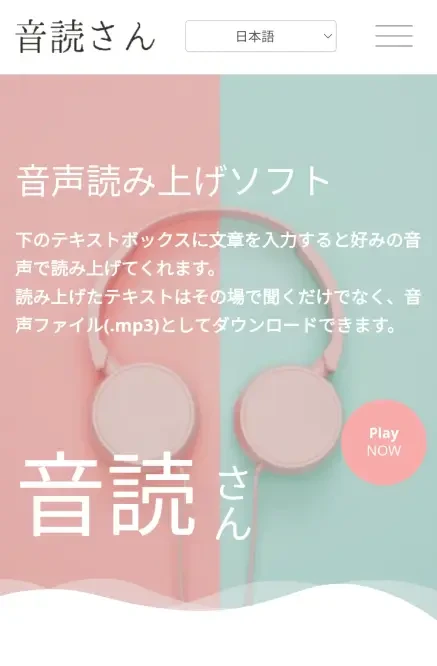
『Ondoku』 is a web app that requires no installation and can be used immediately from your browser.
Anyone can easily read text aloud with high accuracy unique to the latest AI.
Moreover, 『Ondoku』 is available for free with no ads!
If you are looking for a free text-to-speech method for Android smartphones, why not try 『Ondoku』 for free?
[2026 Latest] How to Read Text Aloud on Android Smartphones?

How do I read text aloud on an Android smartphone?
To read text aloud on an Android smartphone, there are three methods:
- Web apps
- Installed apps
- Standard text-to-speech function
First, we will explain the features of each method.
1. Web Apps

For easy and smooth text-to-speech, we recommend using web apps like 『Ondoku』.
A web app is an application that can be used from a web browser like Google Chrome without installation.
Without any tedious installation work, you can enter text and read it aloud as soon as you want.
In the case of 『Ondoku』, it is a simple operation of just entering text in the text box and pressing the "Read" button.
If you want to read text easily, we recommend web apps like 『Ondoku』.
2. Installed Apps

Text-to-speech apps that you install and use on your Android smartphone are also an option.
You can install a text-to-speech app from the Google Play Store and read content by entering text within the app or loading websites.
- Apps strong at reading long texts
- Apps strong at communication for those with hearing difficulties
Since there are apps strong in specific scenarios, installed text-to-speech apps are also recommended if your purpose is clear.
3. Standard Text-to-Speech Function
Android smartphones are also equipped with a standard text-to-speech function.
The standard text-to-speech function on Android smartphones can be turned ON from the "Settings" app.
By turning on the standard text-to-speech function, you can select and read out text displayed on the screen.
However, since this is strictly a feature for improving accessibility, there is no function to save the read-out audio to a file.
5 Recommended Text-to-Speech Apps for Android Smartphones
I want to know about recommended text-to-speech apps for Android smartphones!
We will introduce recommended text-to-speech apps for turning text into audio on Android smartphones!
For text-to-speech from now on, AI is recommended!
Why not try reading text aloud easily and comfortably with a text-to-speech app using the latest AI?
- Ondoku
- Text-to-speech "Yukkuri Bouyomi Talk"
- Text-to-speech App
- Listen to Novels - Web Novel Reader
- Koetora
1. Ondoku|Recommended Ad-free, Free Android Text-to-Speech Web App
『Ondoku』 is a web app that allows anyone to easily read text aloud using the latest AI.
Since it is a web app, no tedious installation work is required.
You can use it for free right now from a browser like Google Chrome.
Since it reads using the latest speech synthesis AI, the inflection and intonation are very realistic.
Anyone can generate easy-to-hear audio that sounds just like a professional narrator is reading it.
As it is a web app originating from Japan, it is also secure.
Read comfortably without ads
One thing that is bothersome when using smartphone apps is advertisements.
There are other free apps for Android smartphones, but it is normal for ads to be displayed when they are free.
In that regard, 『Ondoku』 is different!
『Ondoku』 can be used for free with no ads displayed.
You can use it comfortably without being distracted by advertisements.
Comfortable reading even on low-performance smartphones
『Ondoku』's text-to-speech processing is performed on a server over the internet.
Therefore, you can read aloud comfortably regardless of your smartphone's performance.
It is safe even if you are using a budget Android smartphone or an older Android smartphone.
Convenient reading with a wide variety of Japanese voices
In 『Ondoku』, you can use 16 types of voices for Japanese text-to-speech.
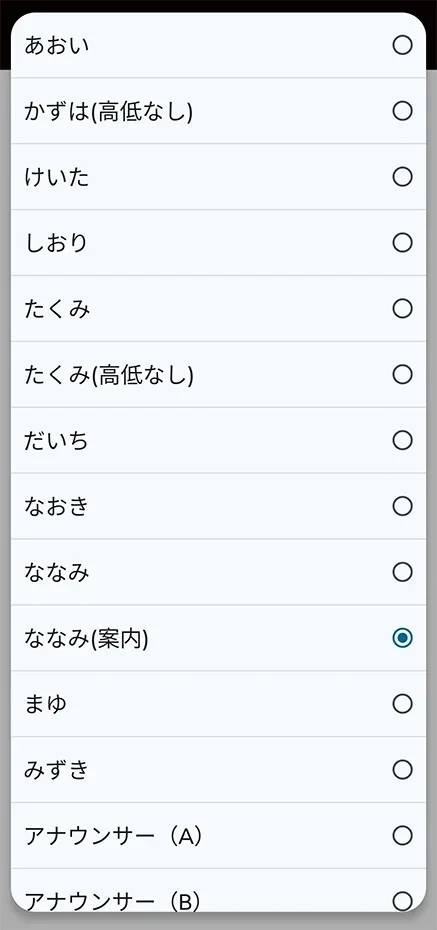
You can choose a voice that fits the scene, such as for video production or in-store announcements.

Listen to 16 types of voices for the text-to-speech software Ondoku for free. Change impressions with pitch variations.
Ondoku has 16 types of Japanese voices. Of course, both male and female voices are available. We have made it possible to listen to 8 commonly used Japanese voices and the voices when the pitch of each voice is adjusted.
Furthermore, it is possible to use multiple voices simultaneously to generate audio that sounds like a conversation.
Of course, the conversation function can also be used for free.

How to use Ondoku's conversation/dialogue function. Make listening materials and long text creation even more convenient with speech synthesis!
How to use Ondoku's conversation function! We will explain how to use the conversation function with images and introduce specific examples of what the conversation function can be used for.
Supports reading in foreign languages
『Ondoku』 supports 81 languages and regions, including Japanese, English, German, French, Korean, and Chinese.
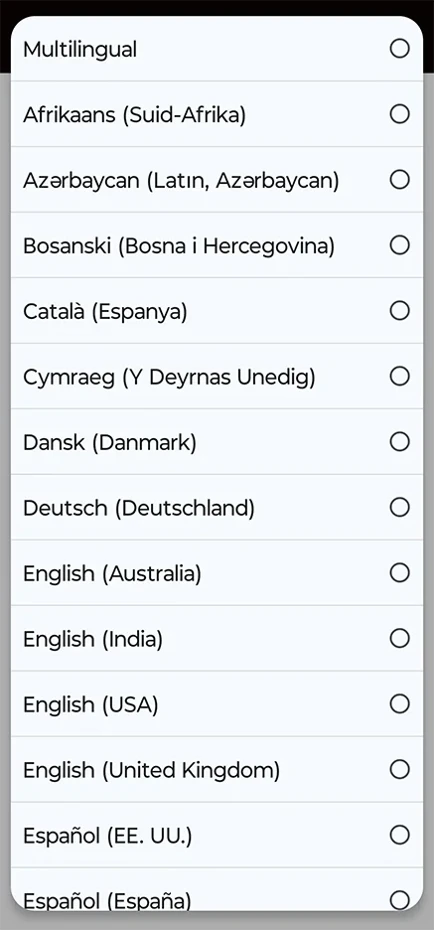
Since audio read in a foreign language can be saved as a file, you can also add foreign language audio to TikTok and Instagram videos.
It is also recommended for studying foreign languages.

【Ondoku】Listen to voice types and sample audio for supported languages
Here we will introduce Ondoku's supported languages and sample audio.
『Ondoku』 is OK for commercial use!
Audio read with 『Ondoku』 is available for commercial use.
You can feel secure even if you want to monetize videos using the read-out audio.
*Credit notation is required for free commercial use.
By subscribing to a paid plan, credit notation becomes unnecessary (please see here for details on commercial use).

What you can do with Ondoku. About commercial use (business use) and prohibited acts.
Commercial use (business use) is possible with Ondoku. Use for the purpose of obtaining monetary or other benefits directly or indirectly, regardless of whether you are an individual or a corporation, is commercial use. However, please note that prohibited acts are established in Ondoku. This time, we will cover what you can and cannot do with Ondoku...
A text-to-speech app that can be used for free
The biggest reason we recommend 『Ondoku』.
That is because it can be used for free.
- No account registration: 1,000 characters/month
- With free account registration: 5,000 characters/month
You can read text aloud for free up to these limits.
Anyone can easily read text aloud for free, so if you are looking for a text-to-speech app for your Android smartphone, why not start by using 『Ondoku』 from here?
2. Text-to-speech "Yukkuri Bouyomi Talk"|An Android app that can read aloud with standard voices

Text-to-speech "Yukkuri Bouyomi Talk" is an app that can read entered text using so-called "Yukkuri Voice".
It uses the speech synthesis engine "AquesTalk" produced by Aquest Co., Ltd., known for "Yukkuri Voice".
"AquesTalk" is characterized by being lightweight in operation and having a small download size, instead of having realistic voices.
This app also operates very light, so you can feel secure even if you are using a budget Android smartphone or an older Android smartphone.
The read-out audio can also be saved as a file.
It can be used for conversations when you cannot speak or for creating audio for videos.
However, if you want to use the read-out audio commercially, you need to subscribe to a commercial license for "AquesTalk".
It is a free app, but advertisements are displayed.
3. Text-to-speech App|An Android text-to-speech app specialized for Japanese
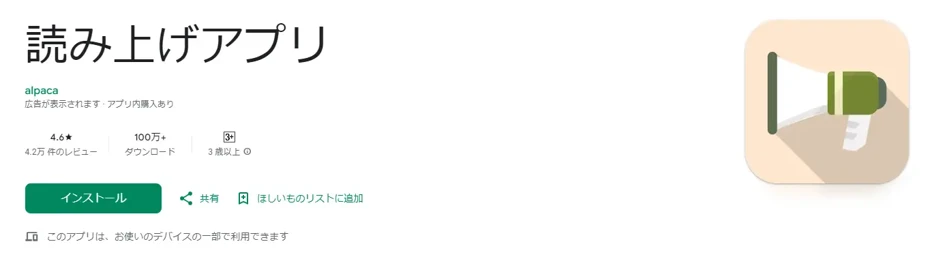
"Text-to-speech App" is an app for reading text provided by Alpaca Works.
A simple app that supports reading entered text, web pages, and reading by loading files.
It is convenient when you want to read materials such as PDF, text files, and Word documents (docx format).
The read-out audio can also be saved as a file.
It can be installed for free, but advertisements are displayed.
In-app purchase elements are also provided.
4. Listen to Novels - Web Novel Reader|An Android app for listening to Aozora Bunko and Kakuyomu

Listen to Novels - Web Novel Reader is a text-to-speech app for Android smartphones specialized in reading e-books.
It standardly supports various sites such as "Aozora Bunko" and "Kakuyomu".
You can read novels aloud and "read with your ears".
It can also be used as an e-book reader for "reading with your eyes".
As it is a Japanese app, it is also a plus that it supports vertical writing display.
It also supports loading files in PDF, epub, and txt formats.
It is a free app, but advertisements are displayed.
By registering for the paid plan "Premium" for 300 yen per month, you can hide ads within the app.
5. Koetora|An Android text-to-speech app for people with disabilities
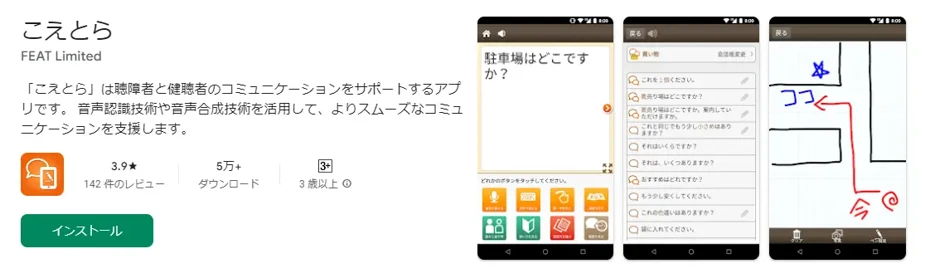
"Koetora" is an app developed for people with hearing impairments due to illness, disability, or aging.
It is equipped with a text-to-speech function, allowing people with hearing impairments to communicate by reading aloud the content they enter in characters.
In addition, it is equipped with various functions for smoother communication, such as a handwriting input function, a fixed phrase function, and a chat function.
It was previously provided by the National Institute of Information and Communications Technology (NICT).
It is currently provided by FEAT Limited, and is free to use.
No advertisements are displayed either.
It is a recommended text-to-speech app when you want to improve the accessibility of your Android smartphone.
How to Use the Standard Text-to-Speech Function Built into Android Smartphones
Finally, we will explain how to use the standard text-to-speech function built into Android smartphones.
*Explanation using an Android 12 screen.
1. Open the Settings app
First, open the "Settings" app on your Android smartphone.

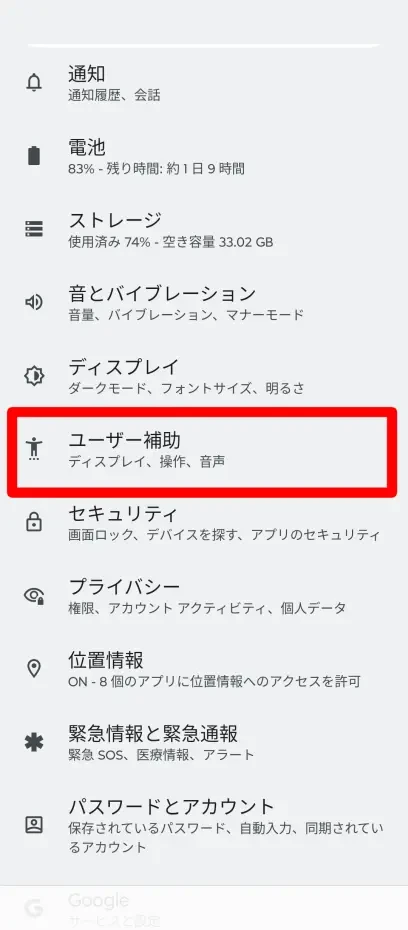
2. Open Accessibility
Once you open the "Settings" app, open "Accessibility".
3. Open Select to Speak
Open "Select to Speak" within "Accessibility".

4. Turn ON Select to Speak
Turn ON the "Select to Speak shortcut" on the Select to Speak settings screen.

A confirmation screen will be displayed when you tap the button to turn it ON.

Tap "Allow".
You have now turned ON "Select to Speak".
5. Select and read text
To read aloud, select text displayed in your browser or elsewhere.
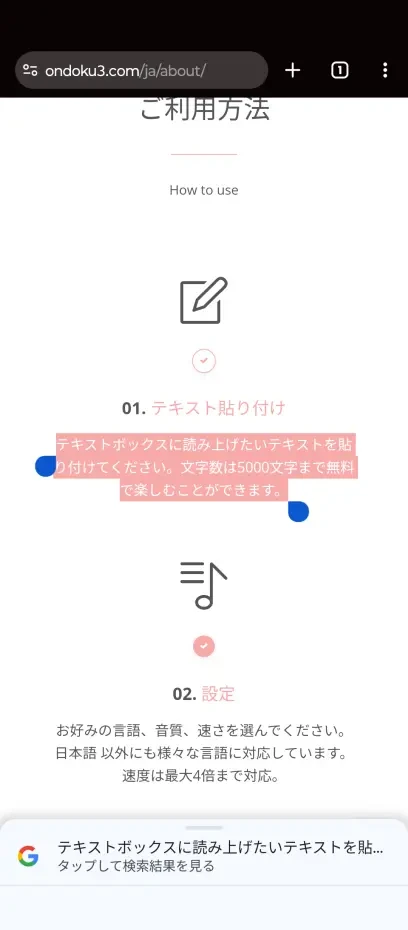
Then, "Read aloud" will appear in the pop-up menu alongside "Copy," etc., that appears when selected.
Tap "Read aloud", and the content of the selected part will be read aloud.
This completes the flow of reading text using the standard function of an Android smartphone.
Standard Android Text-to-Speech Function Cannot Save
However, the standard text-to-speech function on Android smartphones, even in Android 16, does not have a function to save audio.
This is because it is strictly an auxiliary function for the user to listen to content.
Since the standard function of Android smartphones does not have an audio saving function, if you want to save audio as a file, we recommend using web apps such as 『Ondoku』.
If you are making audio for apps like YouTube, Instagram, and TikTok, we recommend using an app specialized in speech synthesis.
Why not try reading text aloud conveniently with a recommended Android app?
■ AI voice synthesis software "Ondoku"
"Ondoku" is an online text-to-speech tool that can be used with no initial costs.
- Supports 81 languages and regions, including Japanese, English, Chinese, Korean, Spanish, French, and German
- Available from both PC and smartphone
- Suitable for business, education, entertainment, etc.
- No installation required, can be used immediately from your browser
- Supports reading from images
To use it, simply enter text or upload a file on the site. A natural-sounding audio file will be generated within seconds. You can use voice synthesis up to 5,000 characters for free, so please give it a try.

Text-to-speech software "Ondoku" can read out 5000 characters every month with AI voice for free.
You can easily download MP3s and commercial use is also possible.
If you sign up for free, you can convert up to 5,000 characters per month for free from text to speech.
Try Ondoku now.
HP:
ondoku3.com
Email: ondoku3.com@gmail.com
Email: ondoku3.com@gmail.com
Related posts
"Ondoku" is a Text-to-Speech service that anyone can use for free without installation. If you register for free, you can get up to 5000 characters for free each month. Register now for free
- What is Ondoku
- Start text-to-speech conversion
- Free registration
- Pricing
- Posts
- Try other free services
![[2026 Update] 5 Best Text-to-Speech Apps for Android!](https://storage.googleapis.com/ondoku3/image/irodori-tts_tmb_140.webp)
![[2026 Update] 5 Best Text-to-Speech Apps for Android!](https://storage.googleapis.com/ondoku3/image/tategaki-image-yomiage_howto_tmb_140.webp)
![[2026 Update] 5 Best Text-to-Speech Apps for Android!](https://storage.googleapis.com/ondoku3/image/iphone-video-narration_tmb_140.webp)
![[2026 Update] 5 Best Text-to-Speech Apps for Android!](https://storage.googleapis.com/ondoku3/image/chrome-reading-mode-pc_tmb_140.webp)
![[2026 Update] 5 Best Text-to-Speech Apps for Android!](https://storage.googleapis.com/ondoku3/image/pdf-to-mp3-howto_tmb_140.webp)









