Best Text-to-Speech Software: 7 Free & Paid Tools for Commercial Use
What is Hikakin Voice? How to Use TikTok's Viral AI Text-to-Speech
July 28, 2026

What kind of feature is the Hikakin voice on TikTok?

Have you ever seen the term "Hikakin voice" on TikTok?
Hikakin voice is a feature that reads out text in the characteristic voice of the famous YouTuber, HIKAKIN.
It is widely used by many users on TikTok.
In this article, we will explain in detail the features of the Hikakin voice, how to use it in the TikTok app, and even recommended AI text-to-speech services and apps!
Why not try making videos on TikTok or YouTube yourself by utilizing text-to-speech functions like the Hikakin voice, which are becoming increasingly accessible?
[Free] Also recommended for TikTok videos! AI text-to-speech sites you can use from your smartphone
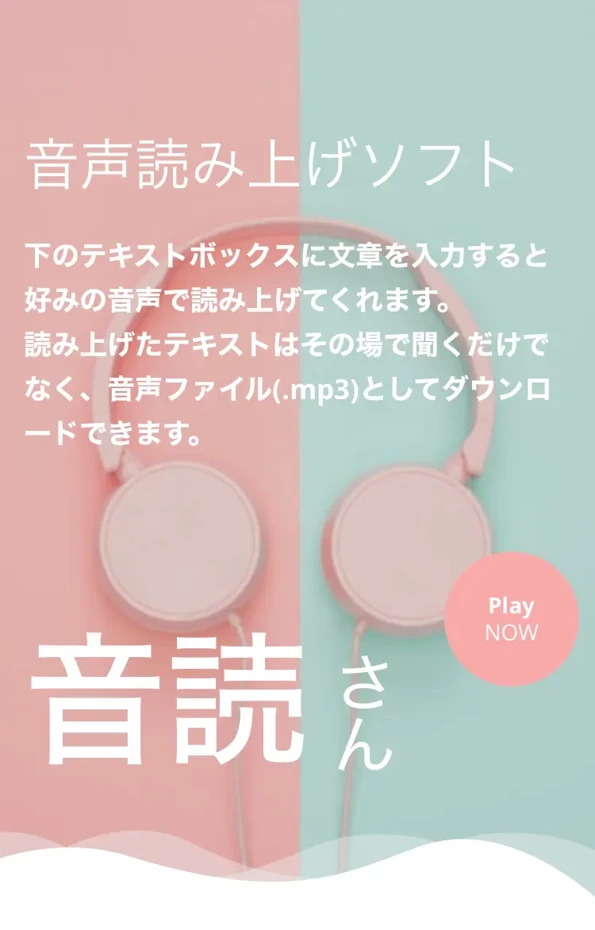
For those of you who want to make videos on your smartphone for TikTok, Instagram, or YouTube, we recommend Ondoku.
Ondoku is an AI service that allows anyone to easily create speech synthesis with the latest AI.
Since it is a web app that requires no installation, you can use it easily just by entering text from your smartphone.
Furthermore, Ondoku is free!
You can experience it without registration or login, so why not try making a video with Ondoku?
What is Hikakin voice? Detailed explanation of the AI text-to-speech feature trending on TikTok
First, let's explain what kind of feature the Hikakin voice is!
What are the features of Hikakin voice?

Hikakin voice is an AI text-to-speech feature that reproduces the voice of the popular YouTuber, HIKAKIN.
It can be used on the editing screen of the TikTok app.
It uses the latest AI technology to learn HIKAKIN's characteristic speaking style and voice quality.
Just by entering text, it will read it out in HIKAKIN's voice.
The greatest feature of the Hikakin voice is that it reproduces HIKAKIN's voice very naturally.
The latest AI synthesized speech is very realistic.
Unlike previous mechanical voices, you can create audio that sounds as if the real HIKAKIN is speaking.
Hikakin voice appeared in the TikTok app in October 2022

The Hikakin voice was implemented in the TikTok app in October 2022.
This new feature was produced by HIKAKIN himself recording a vast amount of voice data.
According to HIKAKIN's video, he recorded a total of 1,303 sentences for AI learning.
The sentences were all things that made little sense on their own, such as "How do cats make that purring sound?" or "Yummy with rich butter soy sauce!", making it a very difficult task.
By reading various sentences, the AI was able to learn the characteristics of HIKAKIN's voice more accurately.
TikTok also cooperated to conduct a long recording session of about 4 hours.
As a result, a very high-quality Hikakin voice was completed!
The text-to-speech feature installed in the TikTok app was significantly powered up and became loved by many users.
Why is the Hikakin voice attracting attention?
When you search with the hashtag "#HikakinVoice" in the TikTok app, you can see that many videos using the Hikakin voice are being played.
The reason the Hikakin voice is attracting attention is that anyone can easily create attractive short videos.
HIKAKIN is a YouTuber who represents Japan.
By creating videos using HIKAKIN's voice, you can appeal your posts to many viewers.
In addition, the evolution of AI technology, which can reproduce a celebrity's voice very realistically, also drew attention.
Another point is that even people who are reluctant to use their own voice can easily create videos with audio.
The ease of use within the TikTok app is also a reason for the popularity of the Hikakin voice.
Detailed explanation of how to use the Hikakin voice in the TikTok app

What should I do to use the Hikakin voice on TikTok?
Next, we will briefly explain how to use the Hikakin voice in the TikTok app.
The flow of using the Hikakin voice in TikTok videos
To use the Hikakin voice on TikTok, you use the text-to-speech feature built into the app.
First, open the TikTok app and tap the "+" button at the bottom of the screen to create a new post.
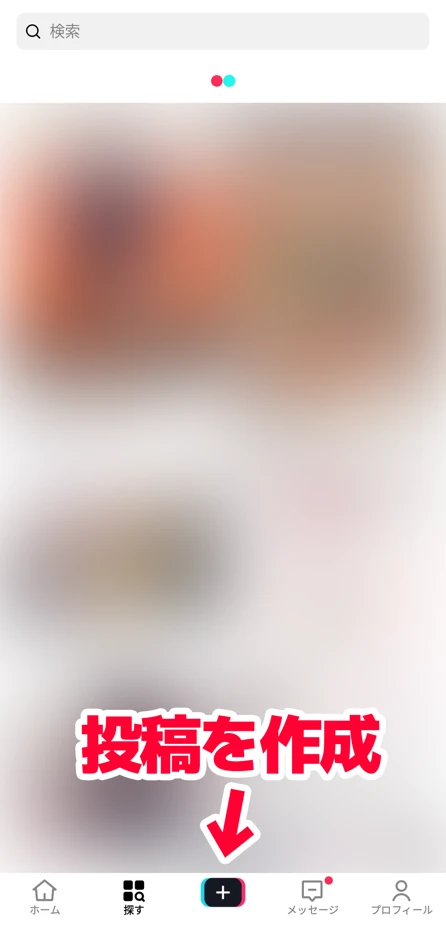
Record a video or upload an existing video to proceed to the editing screen.
From the editing tools displayed on the right side of the editing screen, select "Text (Aa)".
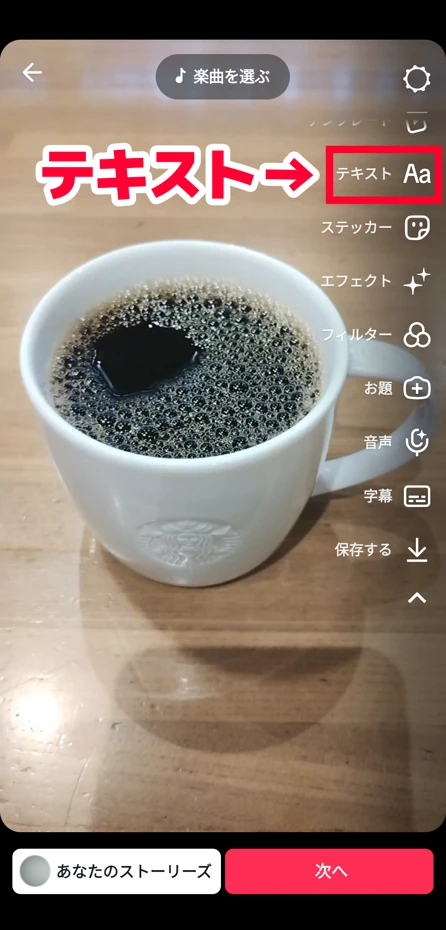
Enter the text you want to be read out on the text input screen.
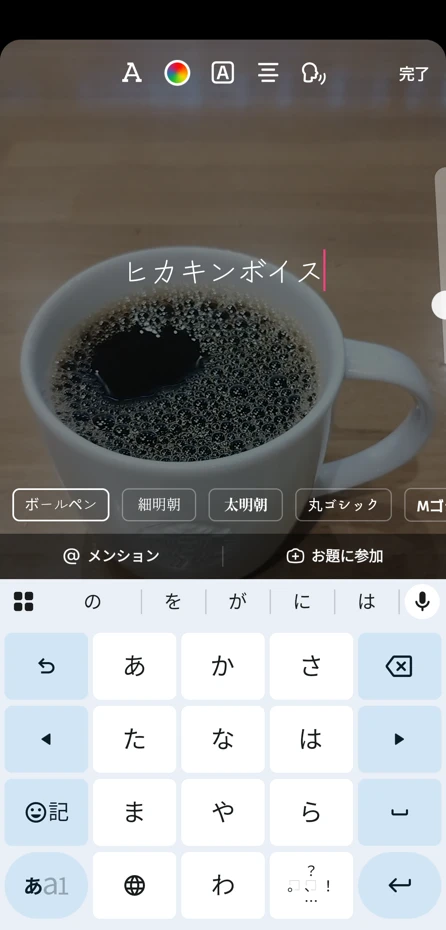
When you tap the entered text, a menu will appear.
Tap "Text-to-speech" in the menu.
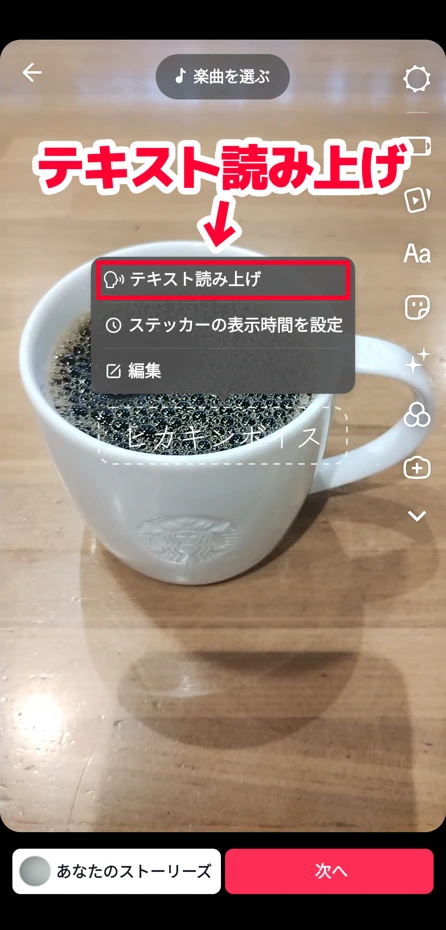
Then, options for the voice to be used for reading will be displayed.
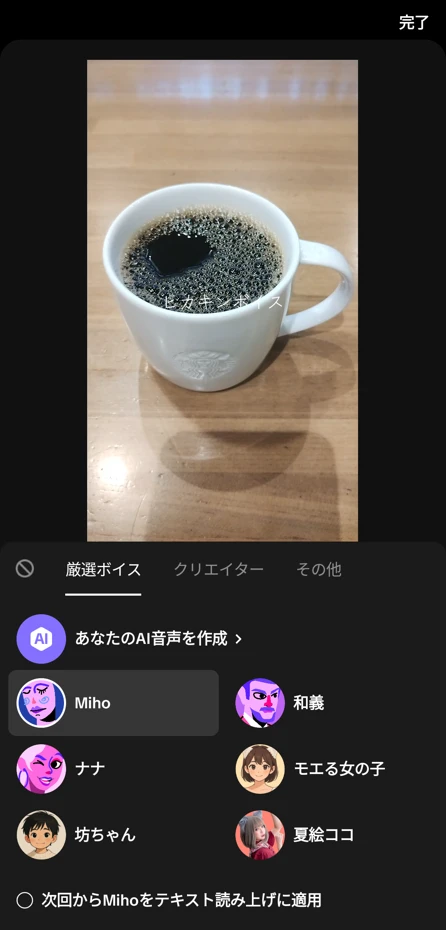
If you scroll down, there is a "Hikakin" option.
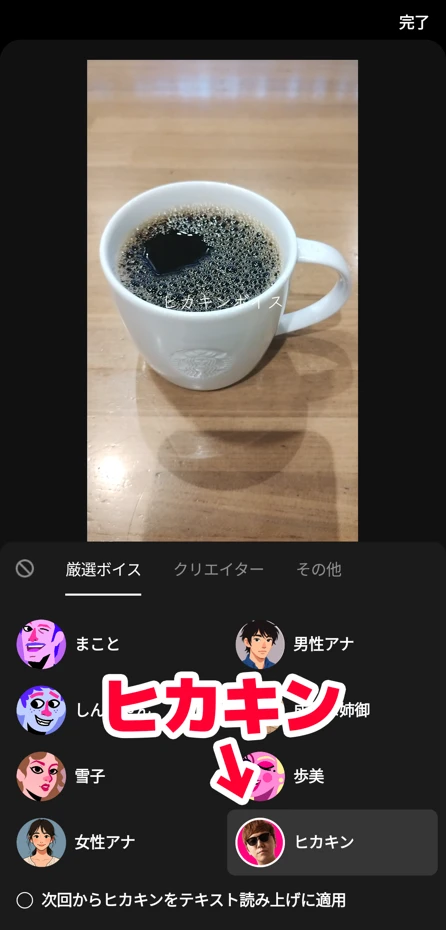
Tapping "Hikakin" will select the Hikakin voice.
After that, just post the video.
This completes the flow of using the Hikakin voice to read text in the TikTok app.
Causes and solutions for when the Hikakin voice cannot be used in the app
There are cases where you want to use the Hikakin voice in a TikTok short video, but the Hikakin voice does not appear.
One of the reasons the Hikakin voice cannot be used is that the TikTok account is set as a Business Account.
The Hikakin voice is a reading voice exclusive to Personal Accounts, so it cannot be used with a Business Account.
To switch from a Business Account to a Personal Account, first open "Settings and privacy" in the TikTok app.
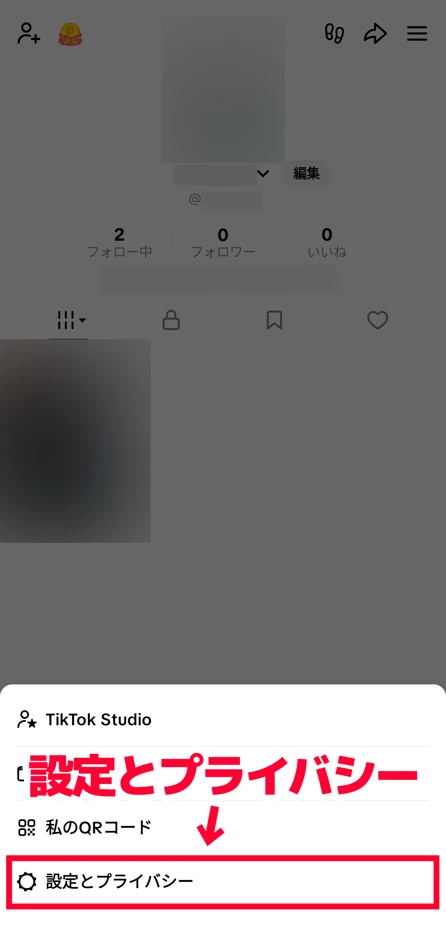
Open "Account" from the menu.
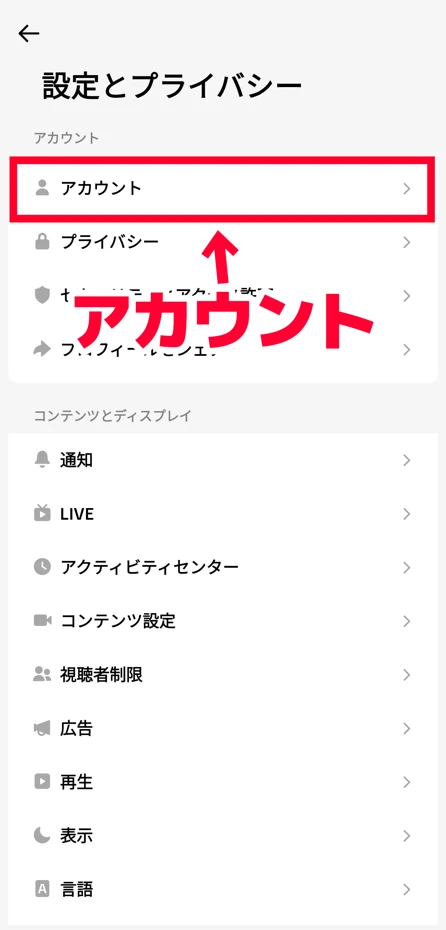
If the Account screen says "Switch to Personal Account," the TikTok account is currently a Business Account.
Tap "Switch to Personal Account," and after a confirmation screen is displayed, the TikTok account will switch to a Personal Account.
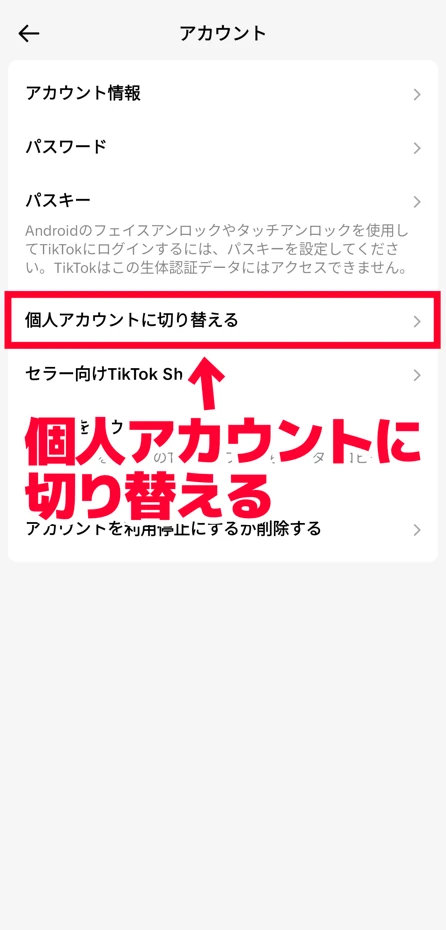
Now, you will be able to use the Hikakin voice on the editing screen of the TikTok app.
What are the points to note when using the Hikakin voice on TikTok?

Caution is also necessary when using the popular Hikakin voice on TikTok.
We will briefly explain what points you should be careful about.
Observe the Terms of Service when using the Hikakin voice on TikTok
When using the Hikakin voice, it is important to follow TikTok's Terms of Service.
The Hikakin voice is a feature provided for entertainment purposes and creative expression.
Usage that slanders others or makes the AI read inappropriate content is prohibited.
Of course, content that damages HIKAKIN's reputation, discriminatory expressions, and fraudulent content are also prohibited.
Be careful of copyright and personality rights when using the Hikakin voice
The Hikakin voice is an AI voice created with the cooperation of HIKAKIN himself.
When using the Hikakin voice, it is also important to respect copyright and personality rights.
Since the Hikakin voice is a feature unique to the TikTok app, using videos created with the Hikakin voice on video sites other than TikTok is prohibited.
In fact, HIKAKIN's synthesized voice was used without permission in video advertisements outside of TikTok, and in February 2023, HIKAKIN himself called for caution in a video.
Also, caution is required regarding commercial use.
The Hikakin voice is a feature exclusive to Personal Accounts and cannot be used with Business Accounts.
When you want to use AI text-to-speech for commercial purposes, or when a corporation such as a company or organization wants to use AI text-to-speech, we also recommend using AI text-to-speech services, sites, or apps other than the Hikakin voice.
[Free] How to use AI text-to-speech outside of TikTok? Recommended speech synthesis methods explained

The Hikakin voice can only be used on TikTok... what should I do...
Since the Hikakin voice is a feature exclusive to TikTok, it cannot be used on other video sites.
Also, there may be cases where you want to try AI voices other than the Hikakin voice.
From here, we will explain recommended text-to-speech methods for such cases!
If you want to read aloud with AI speech synthesis, "Ondoku" is recommended!
When you want to use AI voice on video sites other than TikTok, Ondoku is recommended!
Ondoku is a speech synthesis service that utilizes the latest AI technology.
Since it is a web app used from a browser, anyone can easily create high-quality reading voices from a smartphone.
Because it synthesizes speech with the latest AI, you can create a voice as natural as the Hikakin voice.
"Ondoku" allows AI reading for free!
A feature of Ondoku is that it can be used for free.
You can read up to 1,000 characters without account registration, and up to 5,000 characters after registration for free.
Furthermore, Ondoku allows commercial use.
It is safe to use even when you want to use AI reading voice with a TikTok Business Account.
*Detailed explanation of commercial use can be found here.

What you can do with Ondoku. About commercial use (business use) and prohibited acts.
Commercial use (business use) is possible with Ondoku. Use for the purpose of obtaining profits such as money directly or indirectly, regardless of whether it is an individual or a corporation, is commercial use. However, please note that prohibited acts are established in Ondoku. This time, we will explain what you can and cannot do with Ondoku...
It can be used simply by opening the top page from a smartphone, so no special app installation is required.
Why not try creating high-quality AI reading voices with the AI reading service Ondoku?
[Free] Explaining the flow of creating AI reading voice with "Ondoku"
The usage of Ondoku is very simple and easy.
First, open the Ondoku official website.
Enter or copy & paste the text you want to be read into the text input field on the top page.
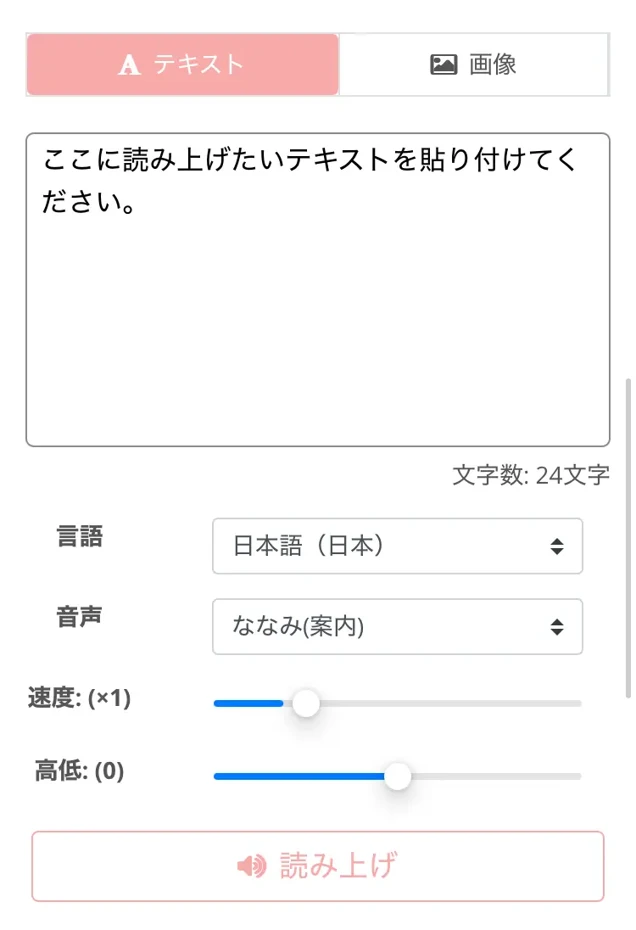
Next, choose the type of voice.
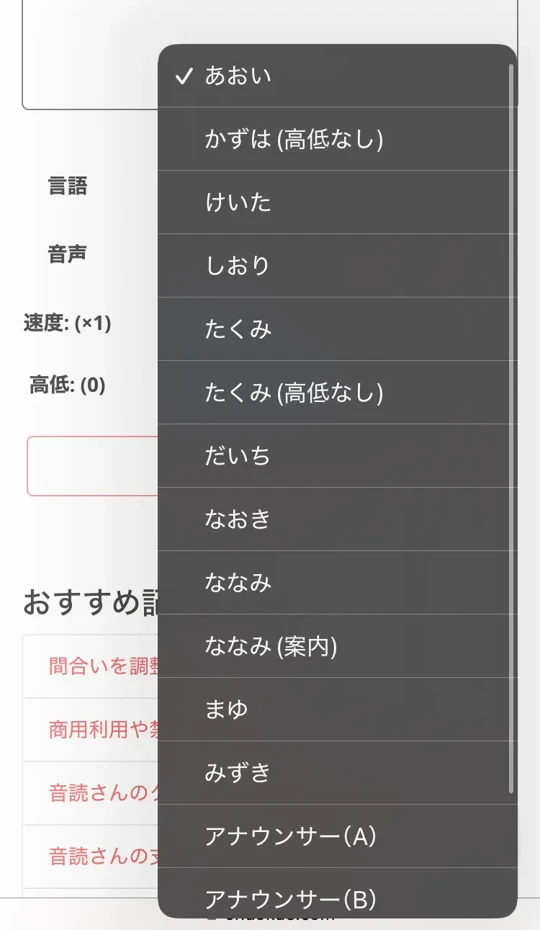
You can listen to samples of Japanese voices on this page, so please take a look.

Listen to 16 types of Japanese voices of the text-to-speech software Ondoku for free. Change impressions with pitch changes
Ondoku has 16 types of Japanese voices. Of course, male and female voices are available. We have made it possible to listen to 8 types of frequently used Japanese voices and the voices when the pitch of each voice is adjusted.
The speed and pitch of the voice can also be easily adjusted with sliders.

After completing the settings, press the "Read" button to start speech synthesis!
An audio file is generated in just a few seconds and played automatically.
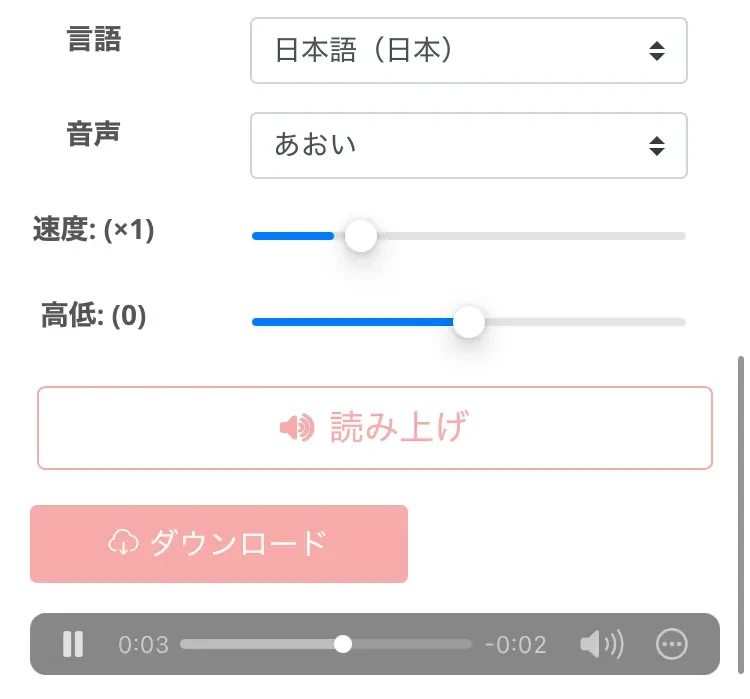
If there are no problems with the generated audio, press the "Download" button to save it to your smartphone or computer.
After that, just load the file on the app's video editing screen.
This completes the flow of creating AI synthesized speech using Ondoku.
Since you can read aloud for free very easily, why not try creating realistic audio with Ondoku?
Why not try making attractive videos with the Hikakin voice or AI audio?
The Hikakin voice is an AI text-to-speech feature available on TikTok.
It is loved by many users, but it cannot be used on services other than TikTok or by corporate accounts.
When you want to use AI voice on video sites other than TikTok or on corporate accounts, the AI reading service Ondoku is recommended.
Why not try making videos for TikTok or YouTube by utilizing Ondoku, which you can use for free?
■ AI voice synthesis software "Ondoku"
"Ondoku" is an online text-to-speech tool that can be used with no initial costs.
- Supports 81 languages and regions, including Japanese, English, Chinese, Korean, Spanish, French, and German
- Available from both PC and smartphone
- Suitable for business, education, entertainment, etc.
- No installation required, can be used immediately from your browser
- Supports reading from images
To use it, simply enter text or upload a file on the site. A natural-sounding audio file will be generated within seconds. You can use voice synthesis up to 5,000 characters for free, so please give it a try.

Text-to-speech software "Ondoku" can read out 5000 characters every month with AI voice for free.
You can easily download MP3s and commercial use is also possible.
If you sign up for free, you can convert up to 5,000 characters per month for free from text to speech.
Try Ondoku now.
HP:
ondoku3.com
Email: ondoku3.com@gmail.com
Email: ondoku3.com@gmail.com
Related posts
"Ondoku" is a Text-to-Speech service that anyone can use for free without installation. If you register for free, you can get up to 5000 characters for free each month. Register now for free
- What is Ondoku
- Start text-to-speech conversion
- Free registration
- Pricing
- Posts
- Try other free services














