Best Text-to-Speech Software: 7 Free & Paid Tools for Commercial Use
[2026 Latest] 4 Best AI Voice Apps with Older Men's Voices! Free Adult Male TTS
July 24, 2026
![[2026 Latest] 4 Best AI Voice Apps with Older Men's Voices! Free Adult Male TTS](https://storage.googleapis.com/ondoku3/image/middle_aged_man_tts_tmb_930.webp)

I wonder if there are any sites or apps that can read text aloud in a middle-aged man's voice.
When creating videos or narrations, there are times when you want a calm, middle-aged man's voice, isn't there?
However, it is often difficult to record a middle-aged man's voice that is clear and easy to hear.
In such cases, sites and apps that can read automated voices in a middle-aged man's voice are very convenient.
Thanks to advances in AI technology, it is now possible to easily create natural-sounding audio that sounds just like a real middle-aged man speaking.
What's more, sites and apps that can be used for free have also appeared!
In this article, we will carefully select and introduce automated voice creation sites and apps where you can use a middle-aged man's voice.
From free websites to high-quality apps utilizing AI technology, we will explain how to read text aloud with a voice perfect for your needs. Why not try using them for your video production and narration?
[Free] Recommended Automated Voice Apps for Free Reading in a Middle-Aged Man's Voice

For those who want to create an automated voice in a middle-aged man's voice, we recommend Ondoku.
Ondoku is a free automated voice app using the latest AI technology.
Since it is a web app used from the official site in your browser, it can be used easily without installation.
Its biggest attraction is that you can generate high-quality middle-aged man voices for free just by entering text.
From deep, cool voices to friendly middle-aged man voices, you can read text in a wide variety of tones!
What's more, Ondoku is free!
You can create automated voices in a middle-aged man's voice for free for up to 1,000 characters without registration, and up to 5,000 characters after registration.
Since commercial use is allowed, you can feel secure using it for video monetization or company business.
If you are looking for an automated voice app that offers middle-aged man voices, why not start by using Ondoku?
What are the characteristics of a middle-aged man's voice? Recommended points for automated voice apps

First, let's briefly explain the characteristics of a middle-aged man's voice and the recommended points for automated voice apps.
What are the benefits of using a middle-aged man's voice in video production and narration?
Why is a middle-aged man's voice used for video narration?

Actually, there are many benefits to using automated speech in a middle-aged man's voice.
The main characteristic of a middle-aged man's voice is that it can create a sense of security and friendliness.
A middle-aged man's voice can provide a stronger sense of security compared to a younger man's voice.
It is also suitable for situations requiring persuasiveness and reliability.
If you are making business-related videos or videos with formal content, a middle-aged man's voice is recommended!
It can calm the listener's mind and convey the message more effectively.
Free sites and apps are recommended for creating automated voices in a middle-aged man's voice
If you want to use a middle-aged man's voice for video production and narration, free text-to-speech sites and apps are recommended.
With advances in AI technology, sites and apps have appeared that can easily create automated voices just by entering text.
However, many paid AI text-to-speech programs focus on female characters or young male characters, and there are fewer options for middle-aged man voices.
For reading text in a middle-aged man's voice, free AI text-to-speech sites are recommended.
The AI text-to-speech site Ondoku allows for commercial use, including YouTube monetization and corporate use.
Why not try generating AI voices with a natural sound using a free automated voice app?
[Free Options Available] 4 Recommended Automated Voice Apps for Reading in a Middle-Aged Man's Voice
I want to try using an automated voice app that can read in a middle-aged man's voice!
Now, let's introduce the automated voice apps that offer middle-aged man voices in detail!
We will also explain what kind of voices are available to help you choose the right automated voice app.
1. Ondoku: A Free Automated Voice Web App for Creating Middle-Aged Man Voices
Ondoku is a free AI text-to-speech web app.
If you are looking to create an automated voice in a middle-aged man's voice, starting with Ondoku is recommended.
Its main feature is the ability to read text in a natural middle-aged man's voice using the latest AI technology.
From deep, cool voices to friendly tones, you can choose the most suitable voice for your purpose.
Since it is a web app used from a website, another key point is that it can be used easily for free without installation.
It works on any environment, including Windows, Mac, Linux, smartphones, and tablets!
Introducing Middle-Aged Man Automated Voices Available in Ondoku
In Ondoku's Japanese text-to-speech, you can use male, female, and child voices.
When you want to read in a middle-aged man's voice, the most recommended voices are:
- Keita
- Naoki
These are the ones.
Recommended Middle-Aged Man Voice 1: "Keita"
"Keita" is a male voice with a calm atmosphere.
Since it is a lower voice, it can be used as a middle-aged man's voice with a composed impression.
Settings
Audio
Pitch: 0
Pitch: 10
Pitch: -10
Recommended Middle-Aged Man Voice 2: "Naoki"
"Naoki" is also a calm male voice that can be used for high-end expressions and product explanation video narrations.
Settings
Audio
Pitch: 0
Pitch: 10
Pitch: -10
If you want to check other adult male or elderly male voices, please also see the article on new AI voice samples. It introduces 13 types of male voices and samples of "80-year-old voices."
Middle-aged man voices can be reproduced by adjusting the pitch
Furthermore, by adjusting the pitch when reading with Ondoku, other voices can also be used as middle-aged man voices.
In Ondoku, you can adjust the pitch and speed of the text-to-speech audio.
By lowering the pitch, you can make other male voices sound like middle-aged men.
Recommended Middle-Aged Man Voice 3: "Announcer (B)"
A recommended voice for lowering the pitch is "Announcer (B)," which can read like a professional announcer.
It works particularly well with the pitch adjustment function, allowing you to lower the voice pitch without it sounding unnatural.
Settings
Audio
Pitch: 0
Pitch: 10
Pitch: -10
This page provides a detailed introduction to the Japanese voices available in Ondoku.
Please take a look.

Free samples of 16 types of voices in Ondoku. Change impressions by adjusting pitch
Ondoku has 16 types of Japanese voices. Of course, both male and female voices are available. We have made it possible to listen to samples of the 8 most commonly used Japanese voices and how they sound when their pitch is adjusted.
Ondoku is a free web app. Create automated voices for free!
And Ondoku can be used for free!
Since it is a free automated voice web app, you can read and download up to 1,000 characters without registration, and up to 5,000 characters for free after registration.
Commercial use is also OK, and it supports monetization and corporate use (Click here for details on commercial use)!
You can feel secure using a middle-aged man's voice for monetization on video sites like YouTube, or for business purposes such as announcements or call centers.
Since it can be used for free from your browser without installation, why not try Ondoku's middle-aged man automated voices for free first?
2. A.I.VOICE Announcement Department: A Paid App for Reading in a Middle-Aged Man's Voice

A.I.VOICE Announcement Department is a paid AI text-to-speech software.
It is a paid software that you install on your computer, and it only supports Windows.
It is a product of the A.I.VOICE series, which features popular characters like Kotonoha Akane/Aoi and Yuzuki Yukari, and offers 4 types of characters.
(The A.I.VOICE series is also introduced in this article.)
A.I.VOICE2 Complete Guide! Features, Installation, and Usage of the successor to VOICEROID
Explaining the features and usage of A.I.VOICE2, where you can use Kotonoha Akane/Aoi and Yuzuki Yukari, familiar from VOICEROID videos. Detailed introduction from installation to audio export.
When you want to create automated voices with a middle-aged man's voice, "A.I.VOICE Announcement Department: Souichi Kazami" is recommended.

Set as a veteran announcer who has served on news programs for many years, he is the first mature male character in the A.I.VOICE series.
You can create automated voices with a reassuring middle-aged man's voice.
It also supports emotional expression and can read in four styles: calm, joy, anger, and sadness.
Depending on your needs, you can use a middle-aged man's voice to read automated speech with rich expression.
However, since the license is the same as other characters like Kotonoha Akane/Aoi or Yuzuki Yukari, you will need to purchase an additional corporate license for business use.
For individual use, monetization on YouTube is possible, but note that a personal commercial license may be required depending on the use case.
3. Kantan! AITalk5: An Automated Voice App for Easily Using a Middle-Aged Man's Voice
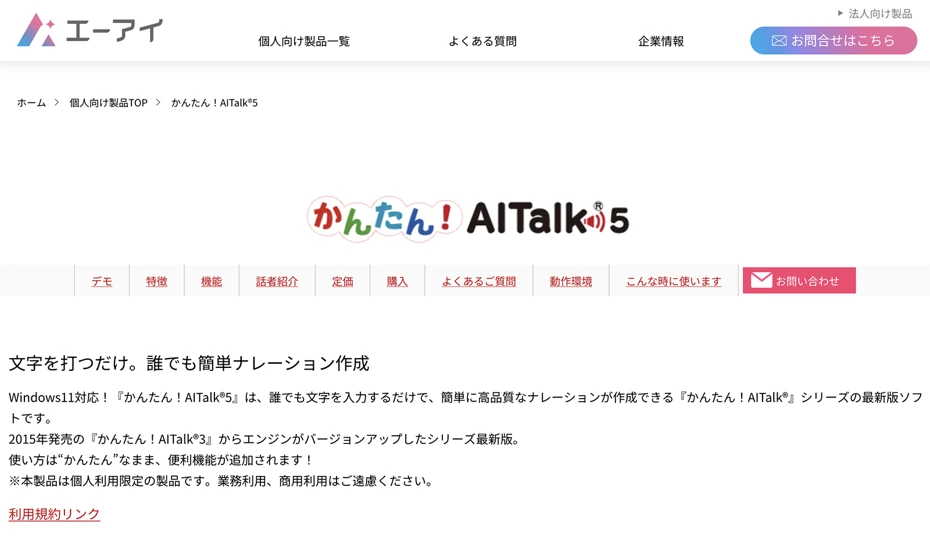
Kantan! AITalk5 is an automated voice app for easily reading in a middle-aged man's voice.
It is a paid software equipped with 5 types of character voices, allowing you to create automated audio that sounds like a real middle-aged man speaking.
It is software installed on a computer and only supports Windows.
For reading in a middle-aged man's voice, "Seiji" is recommended.

Based on the concept of a "sincere and calm male voice," you can read text with a reassuring low voice.
Since the voice does not have overly strong character traits, it can also be used for commentary videos on YouTube.
However, note that commercial use is prohibited for both individuals and corporations with Kantan! AITalk5.
Use is only permitted for video sites like YouTube or Niconico Douga, including use with advertisements and affiliates.
This is an automated voice app recommended for individuals who want to use a middle-aged man's voice for casual purposes.
4. VOICEPEAK: The character "Frimomen," popular in software talk, is available

VOICEPEAK is a paid AI text-to-speech software installed on a computer.
It supports Windows, Mac, and Linux.
As software that can read text in various character voices, it is widely used for VOICEROID-style videos on YouTube and Niconico Douga, alongside the A.I.VOICE and CeVIO series.
When you want to use a middle-aged man's voice in VOICEPEAK, the male character "Frimomen" is recommended.

Frimomen is a male character with the charm of a deep bass voice.
Created based on the voice of voice actor Akira Koga, it can read in various tones, from powerful expressions to gentle speaking.
In addition to normal automated speech, emotional expressions like "happy," "angry," "sad," and "show-off" are possible.
It can also be combined with other VOICEPEAK products to create dialogue-style automated audio.
He is a hidden popular middle-aged man character loved by creators of VOICEROID videos on YouTube and Niconico Douga.

What is the speech synthesis software VOICEPEAK? Detailed explanation of features and commercial use
A detailed explanation of the features of the speech synthesis software "VOICEPEAK." It also introduces commercial use terms, which vary greatly by character.
[Free] How to Create Automated Voices in a Middle-Aged Man's Voice? Explaining the flow of free AI reading
Next, using Ondoku as an example, we will explain in detail the flow of reading a middle-aged man's voice with an automated voice app!
Introducing How to Generate Middle-Aged Man Automated Voices with Ondoku
With the automated voice app Ondoku, anyone can easily perform AI reading in a middle-aged man's voice.
First, open the official Ondoku website in your computer or smartphone browser.
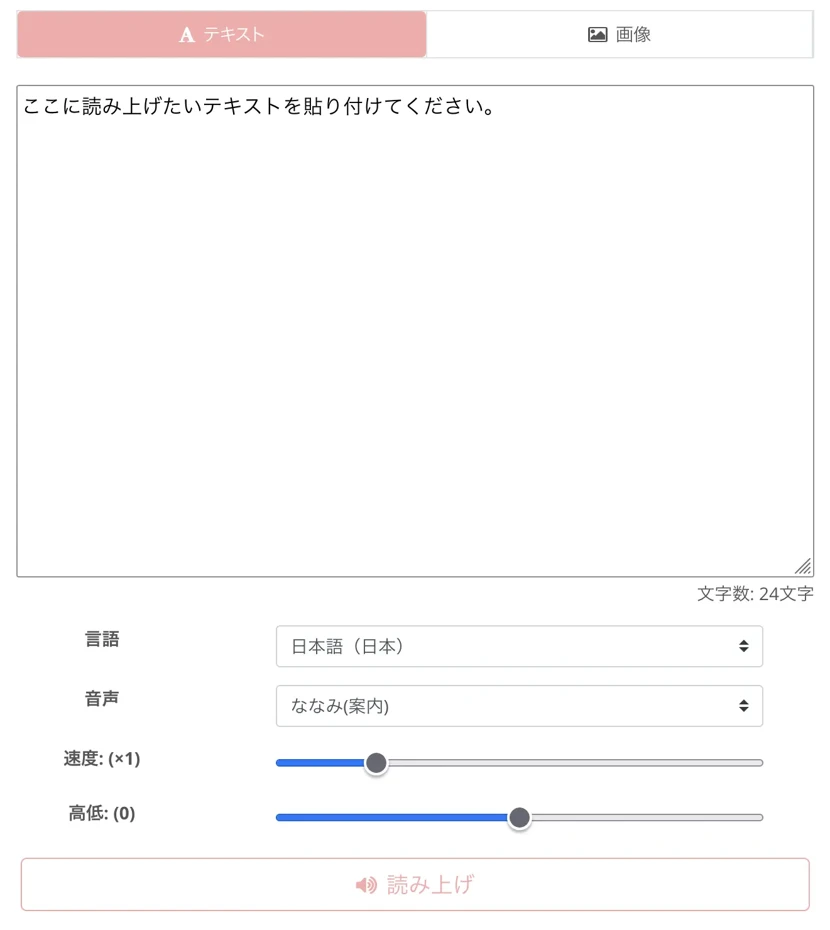
Once you open the top page, enter the text you want to read in a middle-aged man's voice into the text input field.
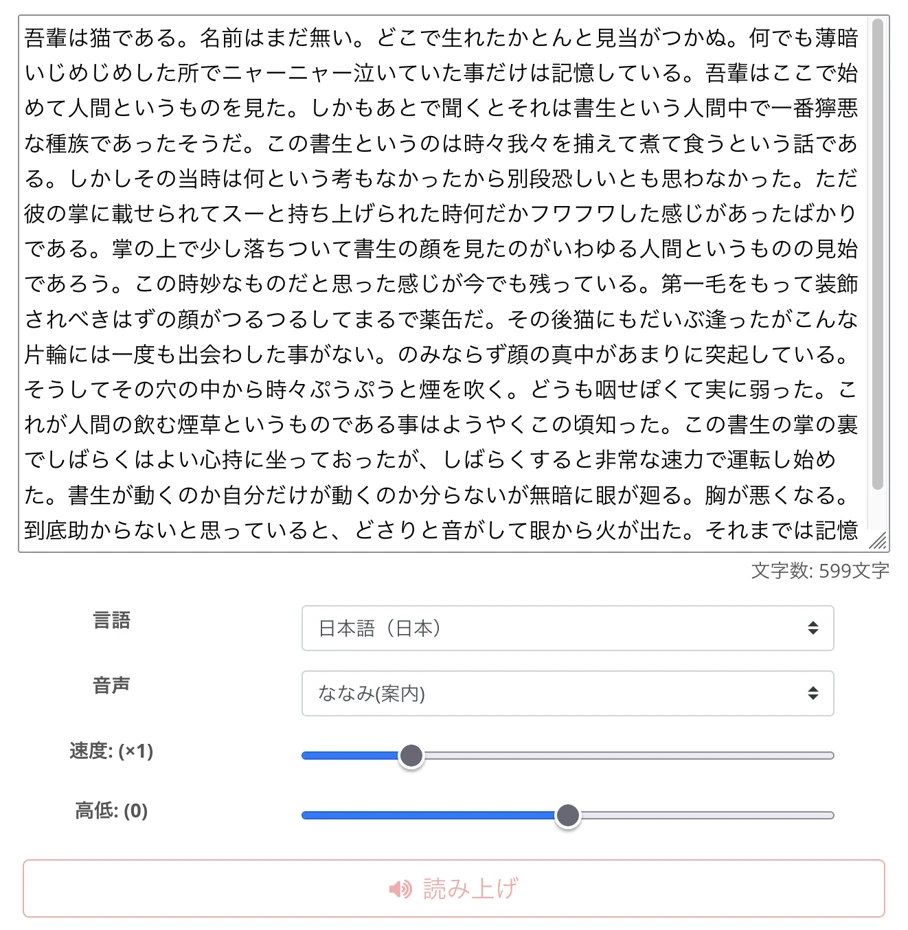
Next, select the voice type.
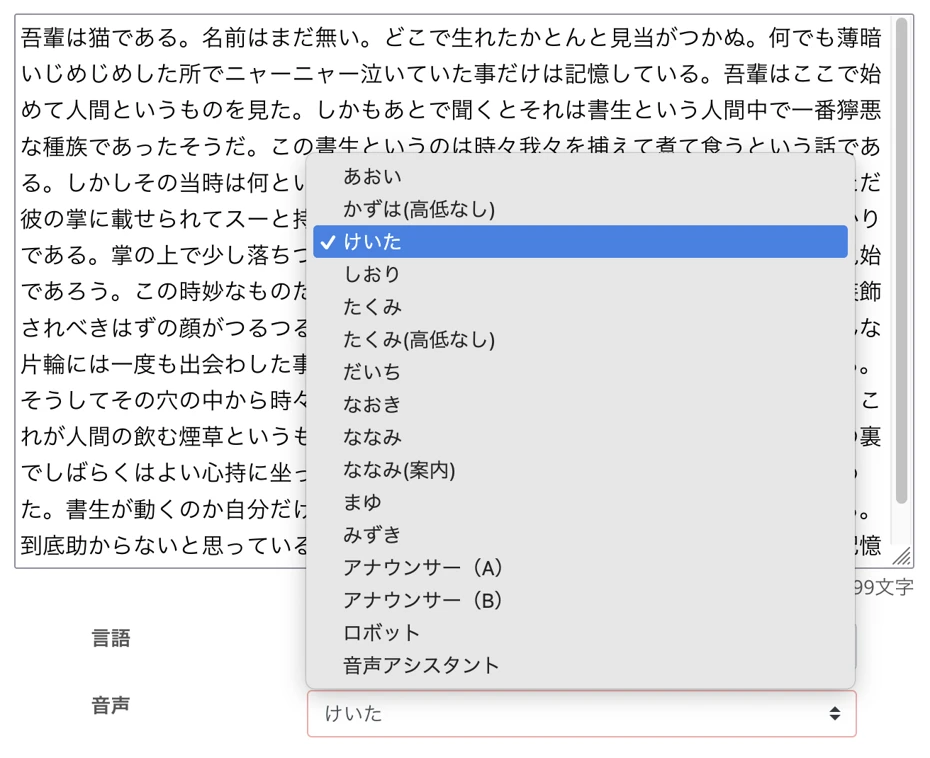
For reading in a middle-aged man's voice,
- Keita
- Naoki
- Announcer (B)
are recommended.
Since Ondoku allows you to adjust the reading speed and pitch, it is also recommended to adjust it to a slightly lower voice.

Now you are ready to read in a middle-aged man's voice.
Press the "Read Aloud" button to start reading.

The process of generating the automated voice is completed in just a few seconds.
The screen display will switch, and the audio of the middle-aged man's voice will be played.
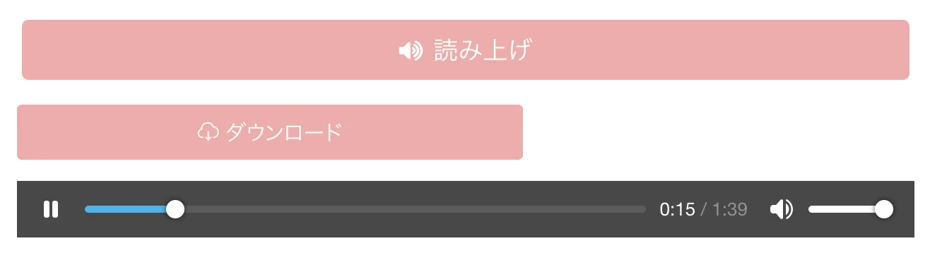
Check the audio and, if there are no problems, save the MP3 file with the "Download" button.
This completes the flow of creating a middle-aged man's automated voice for free using Ondoku.
In this way, with the free automated voice app Ondoku, anyone can easily create a middle-aged man's voice.
Why don't you try using Ondoku for free to create an automated voice in a middle-aged man's voice?
What are the tips for utilizing a middle-aged man's automated voice?

Middle-aged man automated voices can be used in a wide range of situations, such as video narration and in-store broadcasts.
To use middle-aged man voices more effectively, we will briefly explain what you should keep in mind.
How to create a more natural middle-aged man voice?
By paying attention to a few points, you can create even more natural automated voices using the free reading app Ondoku.
First, adjust the reading speed.
In Ondoku, the reading speed can be adjusted.
Normally, you don't need to change the settings, but by setting it slightly slower, you can reproduce a middle-aged man's voice with a more mature atmosphere.
Another point is to be creative with text breaks.
When creating the reading text, you can create audio with a calm impression by using punctuation to take appropriate pauses.
In this article, we explain how to take pauses when performing AI reading with Ondoku.
Please take a look.
![How to adjust pauses and blank time in Ondoku reading [2 types]](https://storage.googleapis.com/ondoku3/image/Line_930.webp)
How to adjust pauses and blank time in Ondoku reading [2 types]
One need for Ondoku users is "I want to open up the pauses a little more." To adjust pauses, there are two types of adjustment methods: 1. Punctuation and 2. SSML.
What types of videos are effective for middle-aged man voice narration?
When creating video narrations, there are video genres where a middle-aged man's voice is particularly effective.
First, commentary videos.
By including a middle-aged man's voice for commentary narration, you can convey information clearly while giving viewers a sense of trust.
Another point is that a middle-aged man's calm voice can strengthen persuasiveness.
Also, automated voices in a middle-aged man's voice are recommended for product review videos.
Using a calm middle-aged man voice can give the impression of a reliable video that introduces products objectively.
With free AI text-to-speech sites and apps, you can produce video narrations for free.
Why not try using automated speech in a middle-aged man's voice for your YouTube video narrations to increase views and subscribers more effectively?
Why don't you try utilizing an automated voice in a middle-aged man's voice?
In this article, we introduced automated voice apps and sites where you can use a middle-aged man's voice.
A middle-aged man's automated voice can create a calm impression and a sense of persuasiveness.
By using a middle-aged man's voice on video sites like YouTube, you can leave a stronger impression on viewers.
If you want to create an automated voice in a middle-aged man's voice, free reading sites that can perform speech synthesis with the latest AI are recommended!
With the AI text-to-speech site Ondoku, anyone can easily create automated voices using a middle-aged man's voice.
Why don't you try creating a middle-aged man's voice using the latest AI automated voice creation sites and apps?
■ AI voice synthesis software "Ondoku"
"Ondoku" is an online text-to-speech tool that can be used with no initial costs.
- Supports 81 languages and regions, including Japanese, English, Chinese, Korean, Spanish, French, and German
- Available from both PC and smartphone
- Suitable for business, education, entertainment, etc.
- No installation required, can be used immediately from your browser
- Supports reading from images
To use it, simply enter text or upload a file on the site. A natural-sounding audio file will be generated within seconds. You can use voice synthesis up to 5,000 characters for free, so please give it a try.

Text-to-speech software "Ondoku" can read out 5000 characters every month with AI voice for free.
You can easily download MP3s and commercial use is also possible.
If you sign up for free, you can convert up to 5,000 characters per month for free from text to speech.
Try Ondoku now.
HP:
ondoku3.com
Email: ondoku3.com@gmail.com
Email: ondoku3.com@gmail.com
Related posts
"Ondoku" is a Text-to-Speech service that anyone can use for free without installation. If you register for free, you can get up to 5000 characters for free each month. Register now for free
- What is Ondoku
- Start text-to-speech conversion
- Free registration
- Pricing
- Posts
- Try other free services
![[2026 Latest] 4 Best AI Voice Apps with Older Men's Voices! Free Adult Male TTS](https://storage.googleapis.com/ondoku3/image/irodori-tts_tmb_140.webp)
![[2026 Latest] 4 Best AI Voice Apps with Older Men's Voices! Free Adult Male TTS](https://storage.googleapis.com/ondoku3/image/tategaki-image-yomiage_howto_tmb_140.webp)
![[2026 Latest] 4 Best AI Voice Apps with Older Men's Voices! Free Adult Male TTS](https://storage.googleapis.com/ondoku3/image/iphone-video-narration_tmb_140.webp)
![[2026 Latest] 4 Best AI Voice Apps with Older Men's Voices! Free Adult Male TTS](https://storage.googleapis.com/ondoku3/image/chrome-reading-mode-pc_tmb_140.webp)
![[2026 Latest] 4 Best AI Voice Apps with Older Men's Voices! Free Adult Male TTS](https://storage.googleapis.com/ondoku3/image/pdf-to-mp3-howto_tmb_140.webp)









