[Ondoku] How to use easily from the home screen like an app on iPhone [No installation required]
How to Install the Recommended Text-to-Speech App Ondoku for Android [Android Device]
Jan. 26, 2026
![How to Install the Recommended Text-to-Speech App Ondoku for Android [Android Device]](https://storage.googleapis.com/ondoku3/image/%E3%82%B9%E3%83%9E%E3%83%9B%E3%82%92%E6%93%8D%E4%BD%9C%E3%81%99%E3%82%8B%E5%A5%B3%E6%80%A7_930.webp)
Hello, thank you for always using Ondoku.
Making Ondoku into an app is something many people have been looking forward to for a long time.
This is taking quite a while. There is a reason why it is taking so long.
Actually, this is my first time making an app.
There are many programming languages, and I have to set up the app in a completely different language from the one I am currently using for Ondoku.
Between needing to study and the various rules for making it an app..., I am swamped every day.
So there was such hard work behind the apps I've been using until now... *tears*
Everyone is amazing
Everyone is amazing

But little by little, the work to make it an app is progressing.
This time, since it is now possible to use it on Android devices, I will introduce how to download the app on Android devices.
How to download the Ondoku app
The method to download the Ondoku app is very easy.
- Access Ondoku on your smartphone or tablet (Android device).
At this time, please use Chrome as your browser.
https://ondoku3.com

- Tap "Add Ondoku to Home Screen" on the top page of Ondoku.
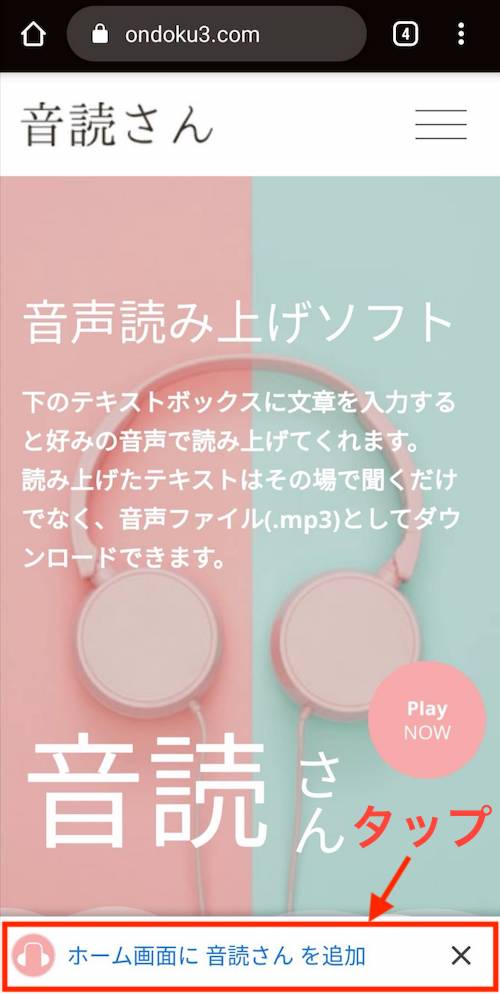
- A confirmation screen will appear, so tap "Add".
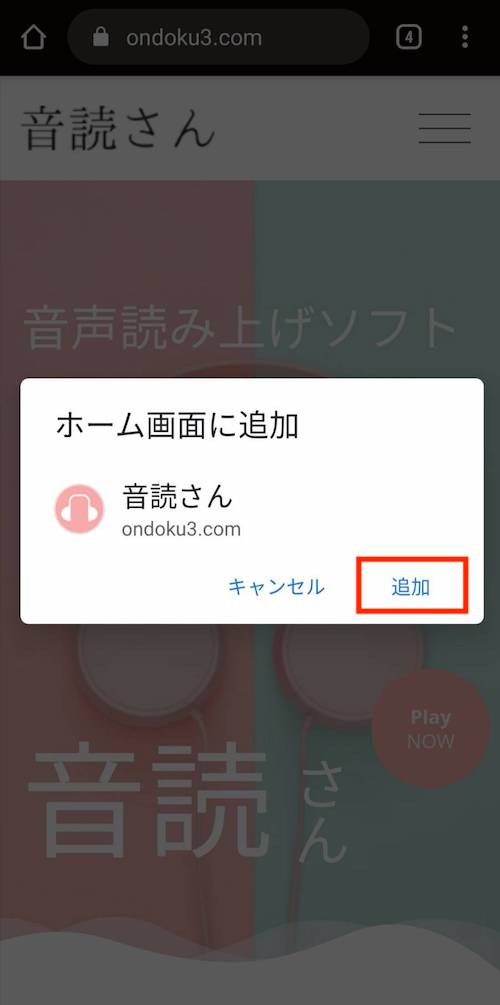
- It is complete if the Ondoku icon is displayed on the home screen.

It was very easy, wasn't it!
Having it on the home screen as an app makes accessing Ondoku much better.
It is very convenient to be able to open it quickly when you want to use it.
However, at the moment, you cannot download it on iPhone or iPad devices using this method.
Gunu-nunu... how frustrating. I thought it was a good way.
The screening process for the Apple Store and Google Play Store is also difficult due to the payment method mechanism, so it looks like it will take some time before passing the screening.
I will continue development so that it can pass the screening.
I hope the day comes soon when you can install Ondoku as an app on your smartphones and tablets!
Please come and visit the Ondoku site too.
I look forward to seeing you.
■ AI voice synthesis software "Ondoku"
"Ondoku" is an online text-to-speech tool that can be used with no initial costs.
- Supports 81 languages and regions, including Japanese, English, Chinese, Korean, Spanish, French, and German
- Available from both PC and smartphone
- Suitable for business, education, entertainment, etc.
- No installation required, can be used immediately from your browser
- Supports reading from images
To use it, simply enter text or upload a file on the site. A natural-sounding audio file will be generated within seconds. You can use voice synthesis up to 5,000 characters for free, so please give it a try.

Text-to-speech software "Ondoku" can read out 5000 characters every month with AI voice for free.
You can easily download MP3s and commercial use is also possible.
If you sign up for free, you can convert up to 5,000 characters per month for free from text to speech.
Try Ondoku now.
HP:
ondoku3.com
Email: ondoku3.com@gmail.com
Email: ondoku3.com@gmail.com
Related posts
"Ondoku" is a Text-to-Speech service that anyone can use for free without installation. If you register for free, you can get up to 5000 characters for free each month. Register now for free
- What is Ondoku
- Start text-to-speech conversion
- Free registration
- Pricing
- Posts
- Try other free services
![How to Install the Recommended Text-to-Speech App Ondoku for Android [Android Device]](https://storage.googleapis.com/ondoku3/image/irodori-tts_tmb_140.webp)
![How to Install the Recommended Text-to-Speech App Ondoku for Android [Android Device]](https://storage.googleapis.com/ondoku3/image/tategaki-image-yomiage_howto_tmb_140.webp)
![How to Install the Recommended Text-to-Speech App Ondoku for Android [Android Device]](https://storage.googleapis.com/ondoku3/image/iphone-video-narration_tmb_140.webp)
![How to Install the Recommended Text-to-Speech App Ondoku for Android [Android Device]](https://storage.googleapis.com/ondoku3/image/chrome-reading-mode-pc_tmb_140.webp)
![How to Install the Recommended Text-to-Speech App Ondoku for Android [Android Device]](https://storage.googleapis.com/ondoku3/image/pdf-to-mp3-howto_tmb_140.webp)









