Learn Japanese for Free! How to Use YouTube and Text-to-Speech Software
Audio Learning: How to Create Your Own Study Audio Files for Free
Sept. 9, 2026

Do you know the study method called "audio learning," where you study by listening to audio?
Audio learning is a method of studying by listening with your ears, and it is gaining attention as a revolutionary study method that allows you to study using gap time, regardless of location or time.
Audio learning is said to have various benefits, such as:
- Hands are free because it is audio
- You can make use of gap time
- The hurdle to start studying is low
- Study stress does not build up
- Repetition helps fix information in your memory
- Visualizing the audio activates the brain
Source: Oden Blog (Web Archive)
It is said that there are various benefits like these.
However, even if you want to start audio learning, the materials for the specific content you want to study are rarely available.
For example, even if you think, "I want audio teaching materials for certification exams to help me study for my qualification!", they are often not sold on audio learning sites.
Even if you know that audio learning is a very good study method, there is no way to study this way.
It is quite a waste, isn't it?
But what if you could create your own audio for audio learning?
So, this time, I will introduce "how to create audio files for audio learning of materials you want to study."
For audio learning! How to create your own audio
"Do I have to read it aloud myself to create an audio file?"
Some people might think so.
Certainly, it is possible to create audio learning materials by speaking them out loud yourself as output.
However,
- It might be embarrassing to study by listening to your own voice
- You might get distracted by worrying about speaking mistakes
There are also disadvantages.
That is where you should utilize text-to-speech services that use the latest AI!
The most recommended service for creating audio for audio learning is the text-to-speech service "Ondoku."

"Ondoku" is a service that can read aloud as audio just by entering text or uploading images.
Since the text-to-speech processing is done on the website, anyone can easily use it from any environment, such as an iPhone, Android, or computer, as long as there is an internet connection.
It supports various languages, including Japanese and English, and you can freely choose the type of voice, such as female, male, or child!

Listen to 16 types of voices from the text-to-speech software Ondoku for free. Change the impression with pitch variations.
Ondoku has 16 types of Japanese voices. Of course, both male and female voices are available. We have made it possible to listen to 8 commonly used Japanese voices and the sounds when the pitch of each voice is adjusted.
You can also adjust the pitch and speed of the voice, so it can read aloud in the voice that is easiest for you to hear.
Another great point is that it can be used for free.
The narration voice of "Ondoku" is so realistic and close to a human voice that you can hardly believe it is a machine voice.
There are many types of text-to-speech services, but the narration voice of "Ondoku" is particularly realistic.
It is highly popular because it is easy to hear, easy to operate, and can be used for free!
If you want to create audio for audio learning, why not start by using "Ondoku"?
With "Ondoku," it is also possible to turn images into audio!
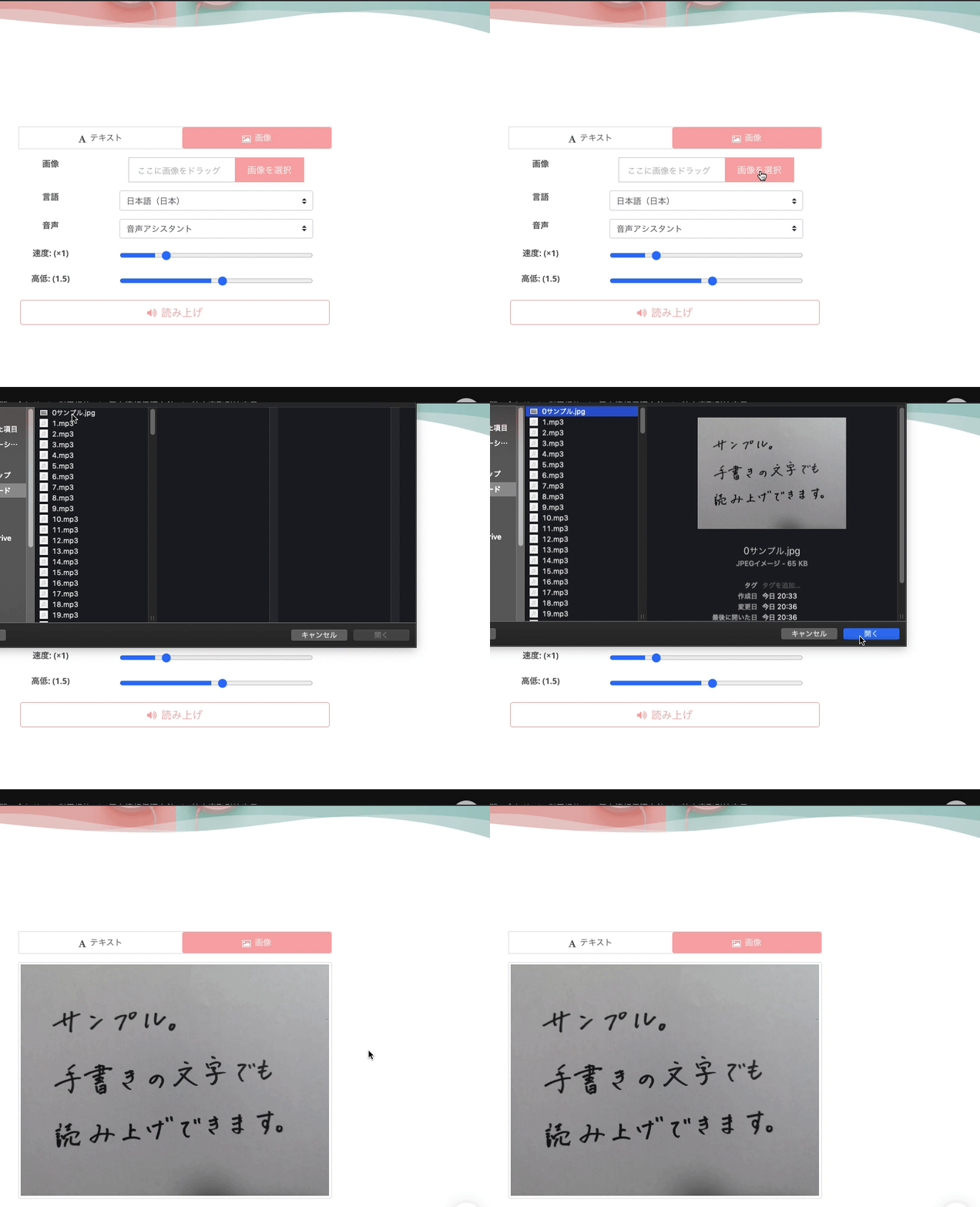
If entering text is a hassle, you can also have it read audio from images.
Try taking a photo of the part you want to be read and uploading it to Ondoku.
Then, you can easily have the audio read aloud.
The recognized characters are displayed in a text box and can be edited later.
Even if there is a mistake in character recognition from the image, you can rest assured that it can be easily corrected.

How to use image reading | How to use free OCR to turn text in photos into audio
Explaining the features of "Ondoku," which can read text from images and photos (OCR) and read it aloud. It can be used for free. On both PC and smartphone, reading is completed in just a few seconds simply by uploading an image.
There are already many people using Ondoku for learning purposes.
I've decided to memorize the descriptions of the key points by ear, and use my hands and eyes for other studies.
So, I made an audio file. This text-to-speech software is pretty good.
(This is an audio-only file) pic.twitter.com/aKWbjTya2s— Watchy @ R2 First-Class Architect Exam Account (@wachish1978) October 1, 2020
When the team at Ondoku finds tweets like this on Twitter, they can't help but get interested, follow the tweets, and support them.
Also recommended for audio learning of foreign languages such as English, Chinese, and Korean!

The types of voices are not limited to Japanese.
In Ondoku, text reading is possible in 81 languages and regions other than Japanese.
- Studying English
- Studying Korean
- Studying Chinese
It is also recommended for those studying various languages!
Especially in foreign language learning, it is very important to learn by listening to audio. It is very convenient to be able to create audio that suits your needs.
Moreover, the pronunciation is excellent!
Since it can read aloud in any language with native pronunciation, you can use it for listening and speaking.
![[Ondoku] Listen to the types of voices and sample audio for supported languages](https://storage.googleapis.com/ondoku3/image/%E5%A4%9A%E6%A7%98%E6%80%A7_930.webp)
[Ondoku] Listen to the types of voices and sample audio for supported languages
Here, we will introduce the supported languages and sample audio for Ondoku.
Why not utilize "Ondoku" for audio learning for free?
"Ondoku" is free for reading up to 5,000 characters per month. Reading beyond that requires payment.
Downloading audio is very easy. You can download mp3 files immediately just by clicking the download button.
- High school and university entrance exams
- Language tests including TOEIC and TOEFL
- Certification exams for skill improvement
Why not use "Ondoku" for these and advance your studies more effectively?
We would be happy if we could help you in your efforts through "Ondoku" even just a little bit.
■ AI voice synthesis software "Ondoku"
"Ondoku" is an online text-to-speech tool that can be used with no initial costs.
- Supports 81 languages and regions, including Japanese, English, Chinese, Korean, Spanish, French, and German
- Available from both PC and smartphone
- Suitable for business, education, entertainment, etc.
- No installation required, can be used immediately from your browser
- Supports reading from images
To use it, simply enter text or upload a file on the site. A natural-sounding audio file will be generated within seconds. You can use voice synthesis up to 5,000 characters for free, so please give it a try.

Text-to-speech software "Ondoku" can read out 5000 characters every month with AI voice for free.
You can easily download MP3s and commercial use is also possible.
If you sign up for free, you can convert up to 5,000 characters per month for free from text to speech.
Try Ondoku now.
HP:
ondoku3.com
Email: ondoku3.com@gmail.com
Email: ondoku3.com@gmail.com
Related posts
"Ondoku" is a Text-to-Speech service that anyone can use for free without installation. If you register for free, you can get up to 5000 characters for free each month. Register now for free
- What is Ondoku
- Start text-to-speech conversion
- Free registration
- Pricing
- Posts
- Try other free services














