[Update] How to Download Ondoku Audio Files in WAV Format
When downloading audio read by Ondoku, a different audio is downloaded
July 22, 2026

Hello, this is Ondoku.
At Ondoku, we receive various inquiries every day.
Today, we received an inquiry like this from a free member.
When I download the audio, the audio for the very first text I read aloud is downloaded, even though I want the audio for a different text.
Is this happening because I am a free member?
Perhaps you have also experienced the same trouble.
We will guide you on how to solve this, so please read until the end.
The wrong audio is downloaded when downloading
The content of the question is, in short,
"Even when trying to download a different text, the same text that was read aloud the first time is downloaded. New, different text is not being downloaded."
That is the issue.
-----
Example:
Read aloud "It is sunny today." → Download MP3 for "It is sunny today."
Read aloud "It is cloudy today." → Download MP3 for "It is sunny today."
Read aloud "It is raining today." → Download MP3 for "It is sunny today."The MP3 files for "It is cloudy today" and "It is raining today" cannot be downloaded.
-----
It is certainly strange for the same text to be downloaded repeatedly.
With Ondoku, whether you are a free or paid member, you can download audio files without any particular restrictions as long as it is within the character limit.
There is one most likely possibility in this case.
- Forgetting to press the Read Aloud button
This means that you are forgetting to read the text aloud first when downloading subsequent texts.
There are two solutions.
- Try pressing the Read Aloud button again before downloading
- Download the audio for the subsequent read-aloud texts from the History
Try pressing the Read Aloud button again before downloading
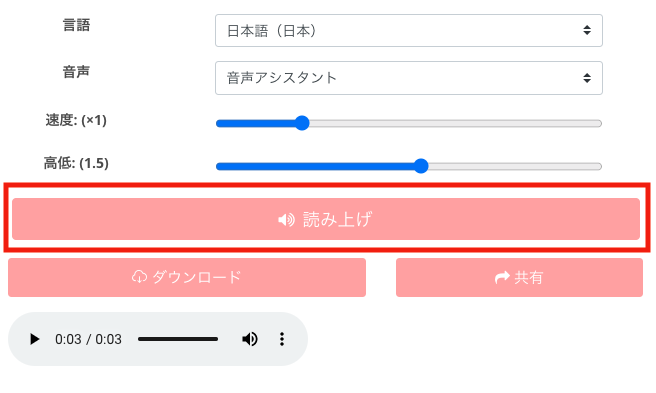
At Ondoku, you can download the text that has been read aloud.
Therefore, simply pasting the text into the text box does not allow you to download the audio for that pasted text.
Even if the download button is displayed, it is the download button for the text that was read aloud previously.
An audio file is created by pressing the Read Aloud button.
Download the audio for subsequent read-aloud texts from the History
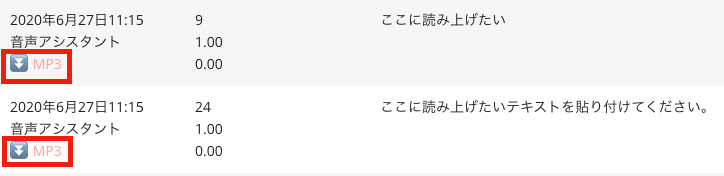
Also, it is possible to download from the History.
Looking at the History, there is an MP3 button under the date.
You can download it by clicking the MP3 button.
If downloading from the top page does not work, please download the desired audio of the read-aloud text from the History.
If it still does not work after trying these two methods
- When entering text, remember to press the Read Aloud button before downloading
- Check the History and download the audio for the desired text
If it still does not work even after trying this, there may be an error occurring with Ondoku.
We apologize for the inconvenience, but please contact Ondoku once more.
Ondoku is taking various initiatives every day to resolve issues.
We hope to be the best text-to-speech software for you.
Please come and visit Ondoku.
Thank you for your continued support of Ondoku!
■ AI voice synthesis software "Ondoku"
"Ondoku" is an online text-to-speech tool that can be used with no initial costs.
- Supports 81 languages and regions, including Japanese, English, Chinese, Korean, Spanish, French, and German
- Available from both PC and smartphone
- Suitable for business, education, entertainment, etc.
- No installation required, can be used immediately from your browser
- Supports reading from images
To use it, simply enter text or upload a file on the site. A natural-sounding audio file will be generated within seconds. You can use voice synthesis up to 5,000 characters for free, so please give it a try.

Text-to-speech software "Ondoku" can read out 5000 characters every month with AI voice for free.
You can easily download MP3s and commercial use is also possible.
If you sign up for free, you can convert up to 5,000 characters per month for free from text to speech.
Try Ondoku now.
HP:
ondoku3.com
Email: ondoku3.com@gmail.com
Email: ondoku3.com@gmail.com
Related posts
"Ondoku" is a Text-to-Speech service that anyone can use for free without installation. If you register for free, you can get up to 5000 characters for free each month. Register now for free
- What is Ondoku
- Start text-to-speech conversion
- Free registration
- Pricing
- Posts
- Try other free services