How to Embed Audio in PowerPoint: From Narration to Insertion
How to easily listen to web blogs and news. From reading to listening.
Aug. 7, 2026

Hello, thank you for always using Ondoku.
- Reading news or blog articles is a bit of a hassle
- It would be so much easier if someone read them out loud...
Have you ever felt this way?
I believe many people have had the experience of their "eyes skipping over" text while trying to follow long strings of characters.
When I read long texts, my eyes also tend to skip, making me think, "Wait, didn't I just read this sentence?"
Also, reading silently is difficult because you have to focus solely on that task.
- While commuting
- While doing housework
- While running errands
There are times when you want text to be read aloud like a radio broadcast while you are doing other things.
It is quite difficult to read text when you want to "multitask."
However, if you are listening to audio of someone reading it out loud, it is easy to listen even while doing something else.
Actually, there is a service called "audiobooks" that reads books aloud to solve such problems.
So, are there no services that read news or blogs aloud?
In this article, we will introduce how you can easily have blogs and news read aloud.
How to easily have blogs and news on the web read aloud
What would you do to have blogs and news on the web read aloud easily?
Would you ask a friend or acquaintance to read the text for you?
But that is very troublesome, and it can also be a nuisance to the other person.
There is already something very convenient in the world.
That is text-to-speech software and speech synthesis tools.
By using text-to-speech software or speech synthesis tools, you no longer need human help when you want text read aloud.
Text-to-speech software is software that converts text into speech and reads it aloud simply by inputting or copying the text into a designated area.
Anyone can use it very easily.
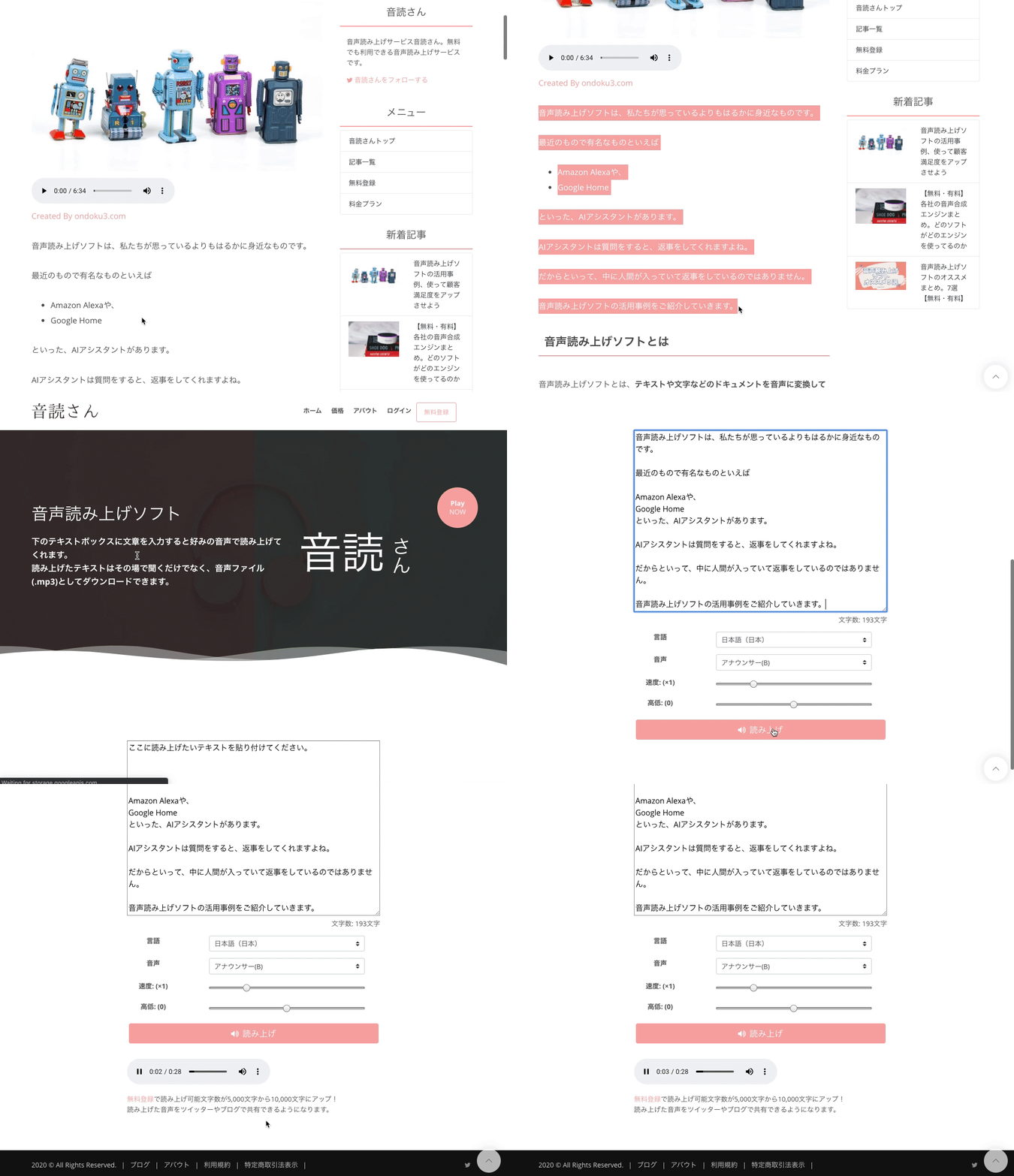
Previously, there was an impression that text-to-speech tools were primarily for the visually impaired or the elderly.
But in reality, that is not the case.
Text-to-speech software is now used in a very wide range of fields.
- TV program narration
- App narration
- Video narration
- AI assistant voices
The areas where it is utilized are expanding rapidly.
Recommended text-to-speech software for reading text aloud

Although we say "text-to-speech software," many different types are currently available to the public.
Which one is best and the purpose for using it varies from person to person.
Let's find the text-to-speech software that suits you.
We introduce recommended text-to-speech software in other articles and this video.
Please use it for reference.
"Ondoku" Recommended text-to-speech software

We particularly recommend "Ondoku".
"Ondoku" is a high-performance text-to-speech software that can be used on a website.
You can use a high-quality text-to-speech service for free.
Why don't you try using "Ondoku" for yourself?
Ondoku is also available as a Google Chrome extension
If you have any requests for features you would like, please feel free to suggest them.
Making the service better is our greatest pleasure.
One of the recently added features is a plugin.
At Ondoku, we are developing an extension for those who use Google Chrome.
Using this makes it possible to read text aloud even more easily.
We introduce the Google Chrome extension in this article.
Please take a look.

Ondoku's Google Chrome Extension | Explanation of Installation Procedures and Usage with Images
By installing the Ondoku Google Chrome extension, you can read aloud on the spot just by selecting the area of the web page you want to read. We explain everything from installation procedures to access token settings, shortcut keys, and voice changes with images.
Enrich Your Life Using Text-to-Speech Software

Recently, it seems some people are experiencing "video fatigue" from watching too much of the abundant video content available.
The appeal of "audio content" is being re-evaluated by such people.
The monthly average usage time for watching videos from smartphones was 7 hours and 13 minutes in June 2019. Since it was 1 hour and 15 minutes in the same month of 2015, it has increased about fourfold in these five years. However, with this expansion in viewing time, some users seem to be getting "video fatigue."
Source: "The appeal of audio content that people who are 'tired of videos' ended up at"
As introduced in this article, audio content has its own unique charm.
Things that already existed are being recognized for their quality again or are undergoing further evolution.
By using text-to-speech software, you can turn text into audio.
I believe that this holds great potential.
Moreover, you can use that great power with just a smartphone or computer without needing human help.
This is exactly the world of the future that people in the past imagined.
Perhaps we have taken a step into the world of dreams depicted in movies and novels.
Why don't you make convenient use of the dream-like technology of "text-to-speech software"?
■ AI voice synthesis software "Ondoku"
"Ondoku" is an online text-to-speech tool that can be used with no initial costs.
- Supports 81 languages and regions, including Japanese, English, Chinese, Korean, Spanish, French, and German
- Available from both PC and smartphone
- Suitable for business, education, entertainment, etc.
- No installation required, can be used immediately from your browser
- Supports reading from images
To use it, simply enter text or upload a file on the site. A natural-sounding audio file will be generated within seconds. You can use voice synthesis up to 5,000 characters for free, so please give it a try.

Text-to-speech software "Ondoku" can read out 5000 characters every month with AI voice for free.
You can easily download MP3s and commercial use is also possible.
If you sign up for free, you can convert up to 5,000 characters per month for free from text to speech.
Try Ondoku now.
HP:
ondoku3.com
Email: ondoku3.com@gmail.com
Email: ondoku3.com@gmail.com
Related posts
"Ondoku" is a Text-to-Speech service that anyone can use for free without installation. If you register for free, you can get up to 5000 characters for free each month. Register now for free
- What is Ondoku
- Start text-to-speech conversion
- Free registration
- Pricing
- Posts
- Try other free services














