How to inquire about the best plan and usage for Ondoku
How to cancel or delete your Ondoku account
July 22, 2026

We will explain the steps for withdrawing (deleting the account) from Ondoku with images.
** Precautions when withdrawing **
- Once you withdraw, you will no longer be able to log in to the management screen at all.
- Re-registration with the same email address is not possible.
- Please note that you will not be able to check the history created with your account, nor will you be able to check past payment history, invoices, or receipts.
- Withdrawn accounts cannot be restored.
- It is also possible to keep your Ondoku account without withdrawing and just stop email delivery.
If there is a possibility that you will resume using Ondoku in the future, such as "stopped using for a while" or "won't use for a bit,"
please use the "Stop Email Delivery" function.
Please see this article for how to stop email delivery.
If you wish to delete your Ondoku account, you can do so from the settings screen by following the steps below.
How to withdraw from Ondoku (delete account)
1. Access the settings page

Ondoku: Settings page
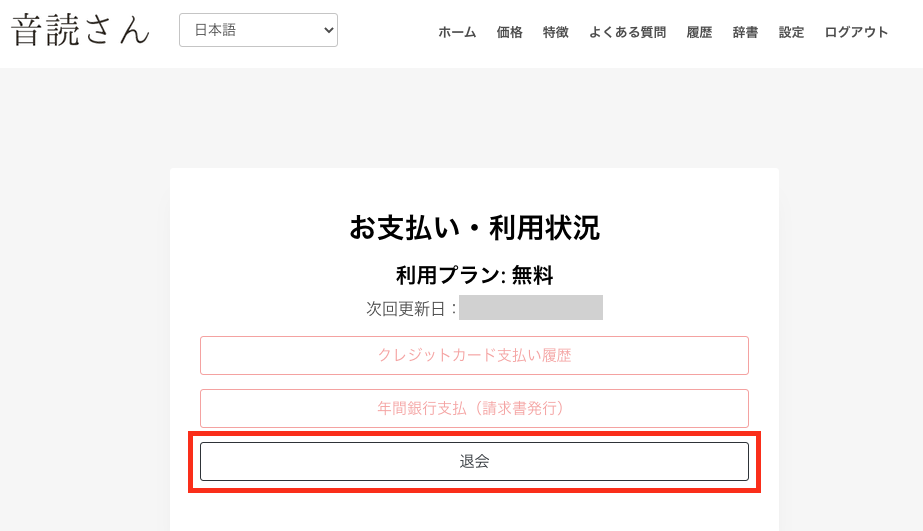
2. Click "Withdrawal"
3. To withdraw or delete your account, fill in the reason for withdrawal and click "Submit"
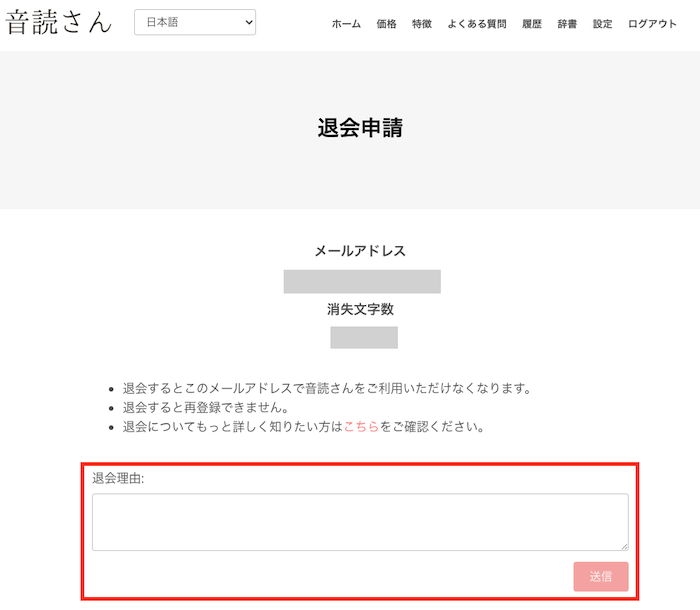
Once you press submit, the withdrawal and account deletion will be complete.
Thank you for using Ondoku.
The history of what you have read so far will be automatically deleted 30 days after withdrawal.
If you would like to delete it beforehand, please perform a bulk deletion.
Please see this article for the bulk deletion method.

If you have used a paid plan and still have characters remaining, you can still withdraw or delete your account, but the remaining characters will no longer be available for use.
Please note this in advance.
If you are currently subscribed to a paid plan, please "cancel" the paid plan first.
Please see this article for how to cancel a paid plan.

How to cancel a paid plan for Ondoku | Text-to-speech software Ondoku
We will explain how to cancel a paid plan for Ondoku with images.
If you have any other questions, please contact Ondoku Customer Support.
— Ondoku Contact —
Log in to Ondoku
■ AI voice synthesis software "Ondoku"
"Ondoku" is an online text-to-speech tool that can be used with no initial costs.
- Supports 81 languages and regions, including Japanese, English, Chinese, Korean, Spanish, French, and German
- Available from both PC and smartphone
- Suitable for business, education, entertainment, etc.
- No installation required, can be used immediately from your browser
- Supports reading from images
To use it, simply enter text or upload a file on the site. A natural-sounding audio file will be generated within seconds. You can use voice synthesis up to 5,000 characters for free, so please give it a try.

Text-to-speech software "Ondoku" can read out 5000 characters every month with AI voice for free.
You can easily download MP3s and commercial use is also possible.
If you sign up for free, you can convert up to 5,000 characters per month for free from text to speech.
Try Ondoku now.
HP:
ondoku3.com
Email: ondoku3.com@gmail.com
Email: ondoku3.com@gmail.com
Related posts
"Ondoku" is a Text-to-Speech service that anyone can use for free without installation. If you register for free, you can get up to 5000 characters for free each month. Register now for free
- What is Ondoku
- Start text-to-speech conversion
- Free registration
- Pricing
- Posts
- Try other free services