How to easily listen to web blogs and news. From reading to listening.
[Easy] Tips for Reading English Faster from a US Resident
Aug. 30, 2026
![[Easy] Tips for Reading English Faster from a US Resident](https://storage.googleapis.com/ondoku3/image/Read_while_listeing_to_english_930.webp)
I want to read English faster! But for those of us who are not native speakers, the difficulty level of speed-reading English is very high.
However, speed-reading is **necessary for English tests and exams**, and
**speed-reading news and books increases the amount of information** you can acquire.
When you search the internet for "tips for reading English faster," you find:
- Read aloud more than 50 times
- Understand word order
- Read through books without a dictionary
They all seem like quite difficult study methods...
When I think "Let's study!" and search results like these come up, am I the only one who finds it hard to get started?
In the midst of that,
I found a tip for reading English faster introduced in a YouTube video that was very interesting and seems easy for anyone to imitate, so I'd like to share it.
AIUEO Phonics Video
Allie, Fuzzy, and Super Fuzzy, who live in Los Angeles, provide detailed explanations of English "Phonics" and
the absolute basics of English. It's a channel where anyone from children to adults can study in an easy-to-understand and fun way.
Each video is about 5 minutes long, so another attraction is that you can watch them anytime in your spare moments.
It is also the YouTube channel I watch the most for my English studies.

Introduced in the AIUEO Phonics video "[I Didn't Know This] Tips for Reading English Faster! Training with this method will change your English reading speed - Adult Phonics [#308],"
this is the tip for reading English faster!
Read while listening to the audio
Read English text while listening to the audio

Many research results have been published stating that when humans read text, they read while pronouncing the words in their heads.
This method **utilizes this inherent human characteristic and applies it to English study**.
By actually listening to the pronunciation while looking at the English text, you don't have to vocalize it in your own head, so you can read faster than by just reading silently.
I actually tried it
In fact, I also tried reading a news site for kids introduced in the video while listening to the English audio.
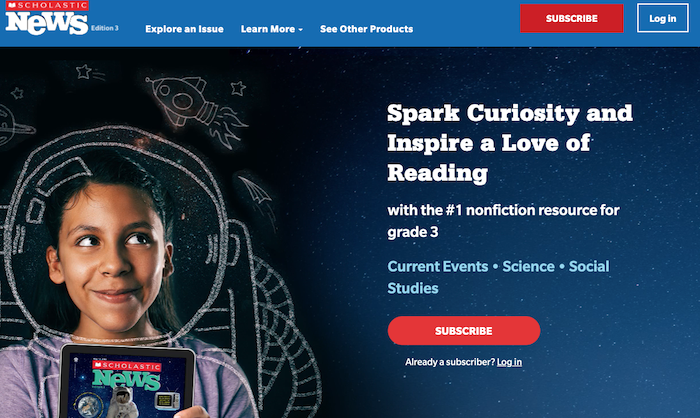
$5.39/year
First time: Reading text without audio - Finished in **12 minutes**
Listening to the audio 3 times while reading the text
Second time: Reading text without audio - Finished in **5 minutes**
That was the result.
Certainly, part of it might be because it was the same text the second time, but I felt that as I repeat this, the time it takes to read text without audio the first time will also get shorter.
When I read the text while listening to the audio, I was able to read twice as fast as my original reading speed, and I could understand the content smoothly.
Personally, I was more surprised that **my understanding of the content improved more than the fact that I could read faster** by listening while reading.
There were also these opinions and comments!
There were also comments like these in the video's comment section.
This video's content was a total blind spot! I used to do a correspondence course called "Kodomo Challenge," and **back when I was in 1st grade of elementary school, I remember solving Japanese language text problems while listening to cassette tapes (that dates me, lol), but from 2nd grade, the cassette tapes stopped coming and I had to read on my own, which I remember struggling with.** This was the exact moment I realized the truth of this video's content.
Quote from body less (excerpt)
I tried using audiobooks (Flowers for Algernon and Holes) and **while reading while listening to the narration, my reading speed changed to a degree that surprised even myself.** It felt like the sensory switch in the brain mentioned in this video was connected. For those who have knowledge but somehow can't read, or for those who didn't see results with existing reading aloud methods, I highly recommend reading while listening to audio.
Quote from Hideishida (excerpt)
There were comments like these as well.
By repeatedly listening to the audio while looking at the text, or by reading an entire book with an audiobook while listening to the English, you will gradually get used to reading faster.
Then, you will become able to read the text itself faster even without listening to the audio.
What should I do when the speed exceeds my understanding?
The important thing is to listen to text being read at a level that suits you.
If the text is full of unknown English words, no matter how much you listen to the English audio, you won't be able to understand the meaning of what is being said.
If you can't understand the meaning, your reading speed will inevitably drop.
What should I do if my understanding can't keep up with the reading speed...
Quote from Wasabi Furikake
Regarding this comment, AIUEO Phonics gave this advice:
Apps like speechify allow you to **slow down the speed** (and **if there are too many words you don't know, it simply might not be at your level**)
Quote from "AIUEO Phonics" English Pronunciation
Wouldn't it be better to read aloud myself?
Wouldn't reading aloud myself kill two birds with one stone?
I thought the same thing, and there was someone asking a similar question in the comment section.
Does it have the same effect as reading aloud?
Quote from Kenji Nani-tabe
I believe you should do this before reading aloud. (**If you memorize your own incorrect pronunciation through reading aloud, it's very hard to relearn the correct pronunciation later**—speaking from experience)
Quote from "AIUEO Phonics" English Pronunciation
I see...! If I read aloud myself before I've mastered the pronunciation, **there's a risk of memorizing it with my own incorrect pronunciation**!!
Indeed, there are several words I learned in junior high school that I've memorized with a very phonetic Japanese reading.
I'm sharing this method because I felt that by learning how to read text while listening to audio, along with increasing basic English vocabulary, it seems like "I'll be able to read English faster!"
How can I listen to English audio for free?
The kids' news site is good, but I'd like to start for free if possible.
You can listen to English text being read aloud in many ways other than kids' news sites.
- English news sites
- Google Translate
- Ondoku, etc.
Ondoku is especially recommended.
With Ondoku, **you can listen to the audio of the English text you want to have read aloud**.
Many English learners also recommend Ondoku.
[Teaching Materials/Learning Tools] #Ondoku is a tool that converts various languages from text to speech. It reads aloud not only in American and British English but also in Indian and Australian English. Additionally, various voice qualities like Amy, Emma, and Brian are available. Amazing! #TeachersBaton #Englishhttps://t.co/NmhRLNuya1
— High School English Teacher (@high_school_JTE) August 2, 2022
For those who are not good at presentations in English... I recommend the automatic text-to-speech service "Ondoku." If you enter English text, it will read it aloud with natural intonation.
— Ko Harada (@Ko__Harada) August 24, 2022
When giving a presentation in English or at an academic conference, it might be effective to have Ondoku read the English draft you created and practice with shadowing. pic.twitter.com/PSKQl3zmR2
Ondoku is recommended by many English learners and instructors
Ondoku is a strong ally for learners studying English. It has many convenient functions.
- Free up to 5,000 characters every month
- 92 English speakers
- Read text from images
- Can save audio as MP3
- Conversation function for male/female or multi-person conversations, or
creating your own listening audio in English/Japanese.
Free up to 5,000 characters every month.
For Ondoku,
In the case of the Free Plan
- Without registration: 1,000 characters
- With registration: 5,000 characters
In the case of Paid Plans
- Basic: 200,000 characters
- Value: 450,000 characters
- Premium: 1,000,000 characters
This character count is updated every month.
Characters are counted even if you change settings or modify the text slightly, so be careful when using it for free!
English uses many characters, so if you study seriously, 5,000 characters will be gone in no time.
In such cases, it's also an option to pay for just one month.
Ondoku has 92 English speakers.
Even though reading aloud is so popular, aren't there many people who don't know "Ondoku"? As the name suggests, it reads the entered text aloud. You can use up to 5,000 characters with free registration, and up to 200,000 characters for 980 yen per month. You can select English dialects, multi-language support, and choose voice types and speeds. Reading aloud is only effective when you hear the correct sound. It's useful when your English diary or example sentences don't have audio. pic.twitter.com/ZqxTl65duB
— Ellieఌ (@ColorOfEllie) October 18, 2022
English in various dialects, and voices from children to adults. Multiple males and females.
You can choose the reading style you like, so if you think "this voice is hard to hear," you can change it to another voice.
Furthermore, you can slow down or speed up the reading. The ability to create something that fits your level is also an attraction.
You can listen to samples of Ondoku's English voices on this page, so please make use of it.

For English learning listening! Native pronunciation, listen to samples of 92 speakers. Voices for women, men, girls, and boys too!
Ondoku is a text-to-speech service that can pronounce words from all over the world. You can listen to samples of Ondoku's 92 types of English voices.
Read text from images
This feature is incredibly convenient.
Media like textbooks on paper are annoying to input because you can't copy and paste.
However, if you take a photo with your smartphone and upload it to Ondoku, you can instantly turn it into audio. You can easily turn the materials you have on hand into audio.

How to use image reading | How to turn text in photos into audio using free OCR
Explaining the function of "Ondoku" that can read text from images and photos (OCR) and read it aloud. It's free to use. On both PC and smartphone, reading is completed in just a few seconds simply by uploading the image.
For example, when you try to copy text from an English problem and... huh?
You can't...
Actually, you can't copy-paste because the PDF is protected.
But no worries, the great thing about Ondoku is that it automatically analyzes the text just by taking a screenshot and uploading it. This is amazing.
Source: The English text-to-speech software is too amazing|Kazuya Takahashi | Kazuya Takahashi, a practical learning theory and brain science column that can be read in 3 minutes! @kz8_takahashi
With Ondoku, you can even create your own original audiobooks.
![[Free] Let's make an audiobook with speech synthesis! Summary of self-publishing methods using text-to-speech services](https://storage.googleapis.com/ondoku3/image/20240815-audiobook06_930.webp)
[Free] Let's make an audiobook with speech synthesis! Summary of self-publishing methods using text-to-speech services
Explaining in detail the process and flow of making audiobooks using free AI text-to-speech services and software, as well as recommended services and software.
Can save audio as MP3
The audio read aloud can be downloaded as an MP3, so you can listen to it offline anytime, anywhere.
A strong ally for those who study.
Conversation function for male/female or multi-person conversations, or creating your own listening audio in English/Japanese
You can create audio exactly as you want, such as alternating male/female conversations like in textbooks or audio for English word listening.
This is a feature that's highly recommended but not very well known. Please use it.
Between you and me, it's even used in English listening tests at schools! ❗
![[A Must-See for Teachers] Create English listening problems for free! Thorough explanation of how to do it without recording.](https://storage.googleapis.com/ondoku3/image/girl-read-book_930.webp)
[A Must-See for Teachers] Create English listening problems for free! Thorough explanation of how to do it without recording.
For teachers struggling with listening tests, there is a very easy way to create audio for listening tests that I want you to try. No bothersome recording, microphones, or filming is required. It's free and easy to try, so please make use of it! I will introduce it in detail.
Learn tips for reading English faster and use them in your studies
The tip for reading English faster is to read the text while listening to English audio being read aloud.
By repeating this and building it up steadily every day, you can reach your goal.
I will also do my best in my English studies. Let's work hard on our English studies together!
■ AI voice synthesis software "Ondoku"
"Ondoku" is an online text-to-speech tool that can be used with no initial costs.
- Supports 81 languages and regions, including Japanese, English, Chinese, Korean, Spanish, French, and German
- Available from both PC and smartphone
- Suitable for business, education, entertainment, etc.
- No installation required, can be used immediately from your browser
- Supports reading from images
To use it, simply enter text or upload a file on the site. A natural-sounding audio file will be generated within seconds. You can use voice synthesis up to 5,000 characters for free, so please give it a try.

Text-to-speech software "Ondoku" can read out 5000 characters every month with AI voice for free.
You can easily download MP3s and commercial use is also possible.
If you sign up for free, you can convert up to 5,000 characters per month for free from text to speech.
Try Ondoku now.
HP:
ondoku3.com
Email: ondoku3.com@gmail.com
Email: ondoku3.com@gmail.com
Related posts
"Ondoku" is a Text-to-Speech service that anyone can use for free without installation. If you register for free, you can get up to 5000 characters for free each month. Register now for free
- What is Ondoku
- Start text-to-speech conversion
- Free registration
- Pricing
- Posts
- Try other free services
![[Easy] Tips for Reading English Faster from a US Resident](https://storage.googleapis.com/ondoku3/image/irodori-tts_tmb_140.webp)
![[Easy] Tips for Reading English Faster from a US Resident](https://storage.googleapis.com/ondoku3/image/tategaki-image-yomiage_howto_tmb_140.webp)
![[Easy] Tips for Reading English Faster from a US Resident](https://storage.googleapis.com/ondoku3/image/iphone-video-narration_tmb_140.webp)
![[Easy] Tips for Reading English Faster from a US Resident](https://storage.googleapis.com/ondoku3/image/chrome-reading-mode-pc_tmb_140.webp)
![[Easy] Tips for Reading English Faster from a US Resident](https://storage.googleapis.com/ondoku3/image/pdf-to-mp3-howto_tmb_140.webp)









