[Free] Native English Text-to-Speech and MP3 Download Services
English Slow Reading Site with Native Pronunciation [Free MP3 Downloads]
Aug. 30, 2026
![English Slow Reading Site with Native Pronunciation [Free MP3 Downloads]](https://storage.googleapis.com/ondoku3/image/Reading-book-in-sunset_930.webp)
Google Translate has a feature that reads English text aloud. It's very convenient when you want to listen to audio quickly. We live in great times!
But when you're listening to Google Translate's audio, do you ever feel that the reading speed is a bit fast?
If you have just started studying English and are not used to it, the audio from Google Translate might be too fast, making it difficult to understand...
- Could it read English a bit more slowly?
- Is there an app that reads English slowly?
Many people must be troubled by this.
That's why we would like to recommend an AI text-to-speech service that reads English slowly with native pronunciation.
Furthermore, it can be used for free.
We will introduce in detail this recommended service that we want everyone working hard on English learning to utilize.
Google Translate only allows changing the English reading speed in 3 levels
Google Translate has a function that reads aloud the English you enter when you press the speaker button.
However, on Google Translate and major English dictionary sites:
- Voice type (female, male, child)
- Voice pitch (high or low)
You cannot adjust such detailed settings.
The reading speed can only be selected from three levels: "Normal," "Slightly slow," and "Slow."
When trying to use it for English study, this is actually quite inconvenient.
- I want it to read English a bit more slowly
- I want it to read in a male or female voice
Many of you probably feel this way.
Recommended site that reads English slowly with native pronunciation

That's where the text-to-speech site Ondoku comes in.
It is very easy to use.
- Enter the text you want read into the text box on the site.
- Press the read-aloud button.
With just this, it will read it aloud in English with native pronunciation.
You can also adjust the reading speed, voice type, and voice pitch to your liking.
If you are looking for a way to read English slowly, why not try Ondoku first?
Audio samples of actual English text read by Ondoku
Here are some English sentences actually read aloud slowly.
The speed is set to 0.5x for all of them. You can clearly hear it reading slowly.






The reading speed can be adjusted from 0.3x to 4x.
You can adjust it in 0.1 increments, from very slow to very fast, through many levels according to your preference.
So you can do things like "start by reading English slowly and then move to normal speed once you get used to it."
It can be used in various scenes, such as when you want to listen carefully and check each sound, or when you are shadowing while checking English text that contains difficult words!
Voice types include:
- Male
- Female
- Girl
- Boy
- Genderless
There is a wide variety of voice types. It also supports accents, and you can choose British English or American English.
Being able to choose the voice that is easiest for you to hear is also a great point.
You can listen to English voices in this article, so please take a look!

For English learning listening! Listen to native pronunciation from 92 speakers, including female, male, girl, and boy voices!
Ondoku is a text-to-speech service that can pronounce languages from all over the world. You can listen to 92 different types of English voices from Ondoku.
Textbooks and printouts can also be read aloud
Ondoku has other hidden convenient features!
That is the "upload image and read aloud" function.
This is a function that can read aloud images taken with a smartphone or similar device.
You can take pictures of picture books, books, textbooks, etc., and have Ondoku read them aloud.
By utilizing this function, the worry of "not knowing how to read it" when teaching English to children at home or reading English textbooks is solved at once!
Moreover, it is very convenient because you don't have to enter words one by one yourself.
【How to use the Image → Text-to-Speech function】
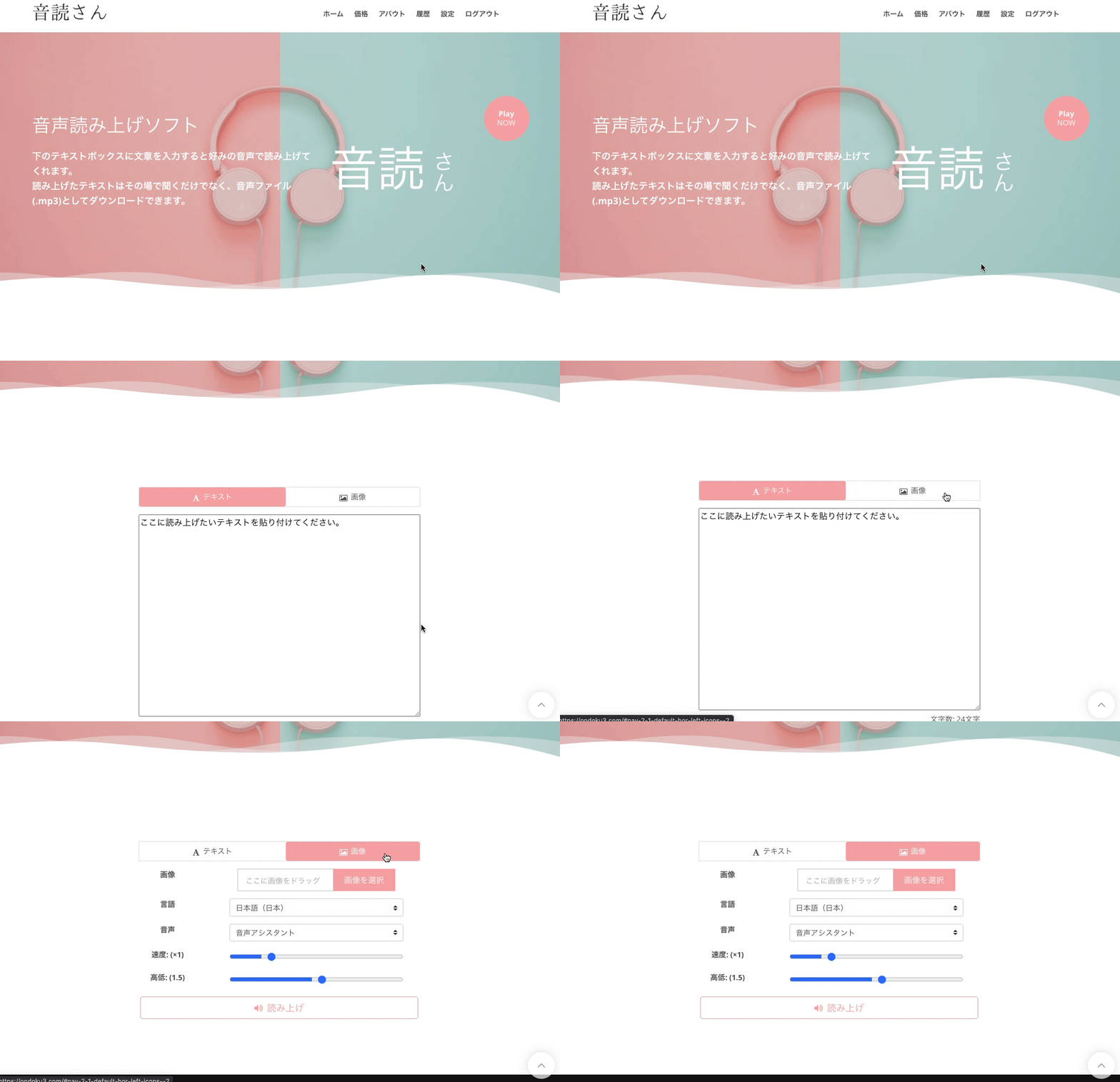
- Access the Ondoku top page
- There are "Text" and "Image" tabs above the text box
- Click the "Image" tab
- Click image upload and select your preferred image
*In the case of a smartphone, you can also launch the camera here and take a photo directly. - After selecting the image, adjust the reading speed and pitch.
- Click the read-aloud button
Then, the image will be analyzed in a few seconds and can be read aloud.
After loading the image, the recognized characters will be displayed in the text box.
If there are recognition errors and the reading sounds strange, you can edit it here.
Detailed usage is introduced here.

How to use image reading | How to perform free OCR on photo text and turn it into audio
Explaining the features of "Ondoku" which can read text from images and photos (OCR) and read it aloud. It can be used for free. On both PC and smartphone, reading is completed in just a few seconds by simply uploading an image.
Why not utilize Ondoku for your English study?
Pronunciation practice is essential for English learning.
By utilizing the text-to-speech service "Ondoku," your English study will progress even further.
Please try the feature that reads English slowly on Ondoku!
■ AI voice synthesis software "Ondoku"
"Ondoku" is an online text-to-speech tool that can be used with no initial costs.
- Supports 81 languages and regions, including Japanese, English, Chinese, Korean, Spanish, French, and German
- Available from both PC and smartphone
- Suitable for business, education, entertainment, etc.
- No installation required, can be used immediately from your browser
- Supports reading from images
To use it, simply enter text or upload a file on the site. A natural-sounding audio file will be generated within seconds. You can use voice synthesis up to 5,000 characters for free, so please give it a try.

Text-to-speech software "Ondoku" can read out 5000 characters every month with AI voice for free.
You can easily download MP3s and commercial use is also possible.
If you sign up for free, you can convert up to 5,000 characters per month for free from text to speech.
Try Ondoku now.
HP:
ondoku3.com
Email: ondoku3.com@gmail.com
Email: ondoku3.com@gmail.com
Related posts
"Ondoku" is a Text-to-Speech service that anyone can use for free without installation. If you register for free, you can get up to 5000 characters for free each month. Register now for free
- What is Ondoku
- Start text-to-speech conversion
- Free registration
- Pricing
- Posts
- Try other free services
![English Slow Reading Site with Native Pronunciation [Free MP3 Downloads]](https://storage.googleapis.com/ondoku3/image/irodori-tts_tmb_140.webp)
![English Slow Reading Site with Native Pronunciation [Free MP3 Downloads]](https://storage.googleapis.com/ondoku3/image/tategaki-image-yomiage_howto_tmb_140.webp)
![English Slow Reading Site with Native Pronunciation [Free MP3 Downloads]](https://storage.googleapis.com/ondoku3/image/iphone-video-narration_tmb_140.webp)
![English Slow Reading Site with Native Pronunciation [Free MP3 Downloads]](https://storage.googleapis.com/ondoku3/image/chrome-reading-mode-pc_tmb_140.webp)
![English Slow Reading Site with Native Pronunciation [Free MP3 Downloads]](https://storage.googleapis.com/ondoku3/image/pdf-to-mp3-howto_tmb_140.webp)









