[Convert Images to Speech for Free] How to Use the Feature to Read Text from Images and Read it Alo…
Sites that read English slowly with native pronunciation 【Free / MP3 download available】
Jan. 26, 2026

Google 翻訳 has a feature that reads English text aloud. It is very convenient when you want to listen to the audio quickly. We live in a great time!
However, when listening to the audio from Google 翻訳, do you ever feel that the reading speed is a bit fast?
If you have just started studying English and are not used to it yet, the speed of the Google 翻訳 audio might be too fast, making it difficult to understand...
- I wish it would read English a little more slowly.
- Are there any apps that read English slowly?
Many people must be troubled by these thoughts.
That is why we would like to recommend an AI text-to-speech service that reads English slowly with native pronunciation.
Furthermore, you can use it for free.
We will introduce this recommended service in detail, which we hope everyone working hard on English learning will take advantage of.
Google 翻訳 Won't Read English Slowly
Google 翻訳 has a feature where you can enter English text and press the speaker button to have the entered English read aloud.
However, on Google 翻訳 or major English dictionary sites,
- Voice type (female, male, child)
- Voice pitch (high or low)
- Reading speed
you cannot adjust detailed settings such as these.
This is quite inconvenient when trying to use it for English study.
- I want it to read English a bit more slowly
- I want it to read in a male or female voice
Many people likely feel this way.
Recommended Sites for Reading English Slowly with Native Pronunciation

That is why we recommend the text-to-speech site Ondoku.
It is very easy to use.
- Enter the text you want to read into the site's text box.
- Press the read button.
With just this, it will read it for you in English with native pronunciation.
You can also adjust the reading speed, voice type, and pitch to suit your preference.
If you are looking for a way to read English slowly, why not try Ondoku first?
Audio Samples of English Text Read by Ondoku
We actually had several English sentences read slowly.
All speeds are set to 0.5x speed. You can clearly hear that it is reading slowly.






Reading speed can be adjusted from 0.3x to 4x speed.
You can adjust it in increments of 0.1, from slow reading to very fast reading, across many levels according to your preference.
This allows you to do things like "read English slowly at first and then read at normal speed once you get used to it."
It can be used in various situations, such as when you want to listen carefully to each sound or when shadowing while checking English text that contains difficult words!
Voice types include:
- Male
- Female
- Girl
- Boy
- Genderless
There is a wide variety of voice types. It also supports accents, allowing you to choose between British English or American English.
Being able to choose a voice that is easy for you to hear is also a great point.
You can listen to English audio samples in this article, so please take a look!

Textbooks and Printouts Can Also Be Read Aloud
Ondoku has other hidden convenient features as well!
One such feature is the "Upload Image and Read Aloud" function.
This is a function that allows images taken with a smartphone or other device to be read aloud.
You can take photos of picture books, books, textbooks, etc., and have them read aloud by Ondoku.
By utilizing this feature, problems like "I don't know how to read this" when teaching children English at home or reading English textbooks are solved instantly!
Moreover, it is very convenient because you don't have to enter words one by one yourself.
[How to Use the Image-to-Text-to-Speech Function]
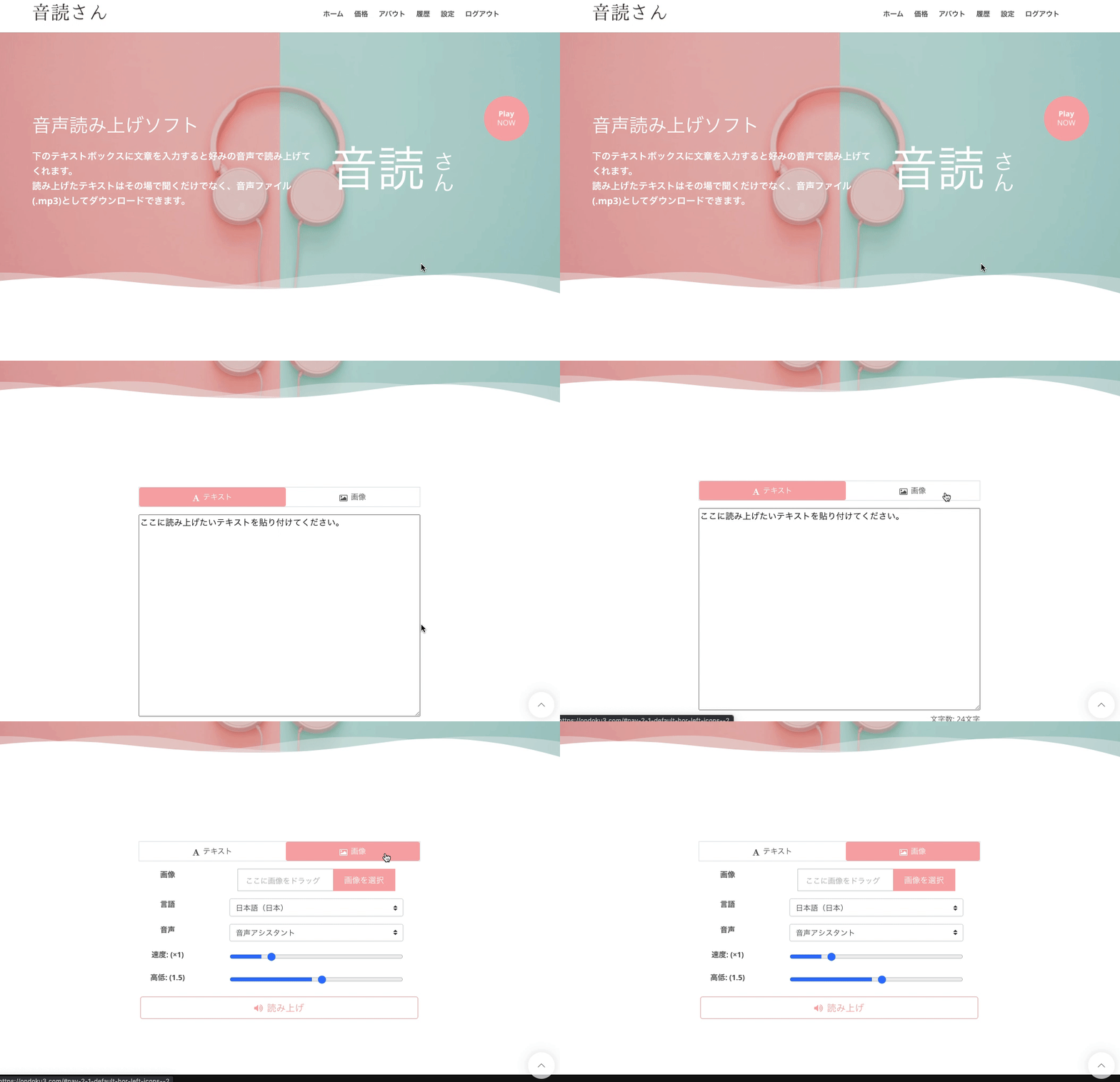
- Access the Ondoku top page
- There are "Text" and "Image" tabs above the text box
- Click the "Image" tab
- Click "Upload Image" and select the image you like
*On a smartphone, you can also start the camera and take a photo directly here. - After selecting the image, adjust the reading speed and pitch.
- Click the "Read" button
Then, the image will be analyzed in a few seconds and can be read aloud.
After loading the image, the recognized text is displayed in the text box.
If the reading is strange due to recognition errors, etc., you can edit it here.
Detailed usage is introduced here.

Why Not Use Ondoku for Your English Studies?
Pronunciation practice is essential for English learning.
By utilizing the text-to-speech service "Ondoku," your English studies will progress even further.
Please try the feature to read English slowly on Ondoku!
■ AI voice synthesis software "Ondoku"
"Ondoku" is an online text-to-speech tool that can be used with no initial costs.
- Supports approximately 50 languages, including Japanese, English, Chinese, Korean, Spanish, French, and German
- Available from both PC and smartphone
- Suitable for business, education, entertainment, etc.
- No installation required, can be used immediately from your browser
- Supports reading from images
To use it, simply enter text or upload a file on the site. A natural-sounding audio file will be generated within seconds. You can use voice synthesis up to 5,000 characters for free, so please give it a try.

Text-to-speech software "Ondoku" can read out 5000 characters every month with AI voice for free.
You can easily download MP3s and commercial use is also possible.
If you sign up for free, you can convert up to 5,000 characters per month for free from text to speech.
Try Ondoku now.
HP:
ondoku3.com
Email: ondoku3.com@gmail.com
Email: ondoku3.com@gmail.com
Related posts
"Ondoku" is a Text-to-Speech service that anyone can use for free without installation. If you register for free, you can get up to 5000 characters for free each month. Register now for free