【Ondoku】How to issue and print receipts for credit cards and debit cards (Stripe)
Ondoku payment methods (credit cards, debit cards, bank transfers) and receipts
Nov. 24, 2026
Hello, and thank you for using Ondoku.
This article explains the payment methods available for Ondoku and how receipts work.
Ondoku's invoices and receipts all comply with the Invoice System (Qualified Invoice Issuer registration number) (please also see the related article).

Notice of Qualified Invoice Issuer Registration Number (Invoice System Compliance)
Regarding the Invoice System, we have completed our registration application as a Qualified Invoice Issuer and would like to notify you of our registration number.
[Contents]
- Credit cards and debit cards (Stripe)
- Bank transfer with an issued quote and invoice (annual contracts only)
- If you are unsure which plan to choose
- About the Business Plan
- About receipts for each payment method
Payment methods available on Ondoku
- Credit card payment
- Debit card payment
- Bank transfer with an issued quote and invoice (annual contracts only)
Credit cards and debit cards (Stripe)
Ondoku's monthly plans can be paid for with:
- a credit card
- a debit card
These are the two payment methods available.
Purchase an Ondoku monthly plan here
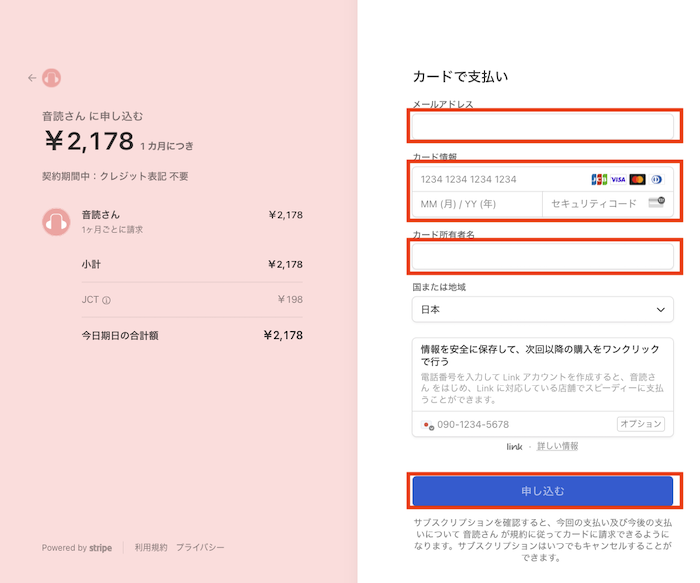
If you would like an annual contract paid by credit card or debit card, you can purchase it from the link below.
Card payment: Ondoku annual contract

About receipts
If you need a receipt for a credit card or debit card (Stripe) payment, the following
- The receipt email
- The Statement and Receipt issued by Ondoku
serve as your receipt.
Receipt email

When your purchase on Ondoku is complete, a receipt email like the one above is sent to the email address you specified.
(To be safe, please allow emails from the domain "stripe.com", which the receipts are sent from.)
Stripe also sends you an email from which you can download the invoice and receipt. When you download the invoice, it looks like this.
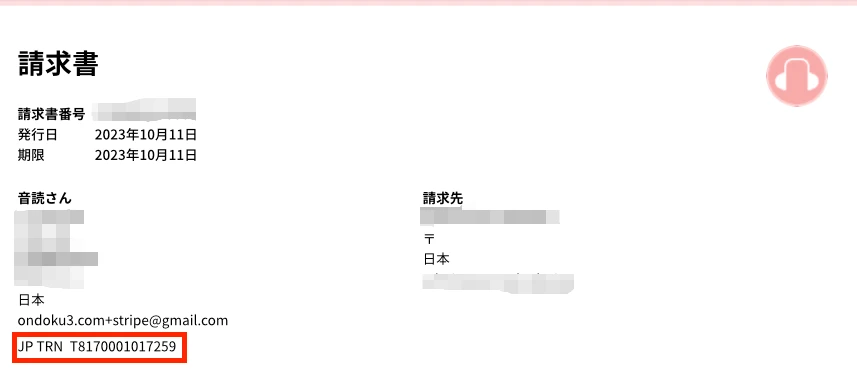
The invoices and receipts comply with the Invoice System.
The recipient name, address, and other details on the receipt reflect what you entered at the time of payment.
Because of how the payment service Stripe works, even if you change this information later, you cannot download an invoice or receipt with the revised information.
From your next payment onward, you can download invoices and receipts that reflect the updated information.
On the invoices and receipts you can download from the Stripe email, the registration number appears as shown in the red frame.
- JP TRN
The item that begins with this code is the "registration number."
This number depends on Stripe's settings, so it cannot be changed.
If you need a receipt that includes the "registration number" item, please log in to Ondoku and download it from the Card Statement and Receipt page.
Statement and Receipt issued by Ondoku
You can easily get a receipt issued by Ondoku by logging in to Ondoku and going to Settings → Card Statement and Receipt.
- Log in to Ondoku
- Go to Settings
- Click Card Statement and Receipt
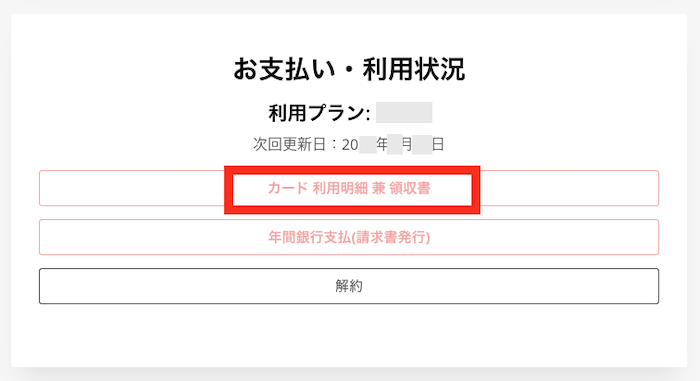
- In the history, click "View" for the date you want
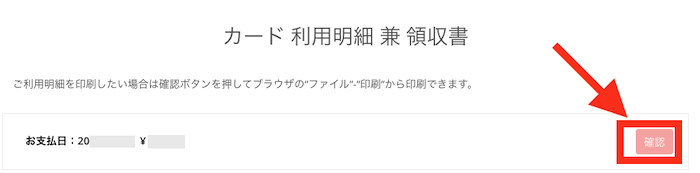
- Download or print the Statement and Receipt PDF
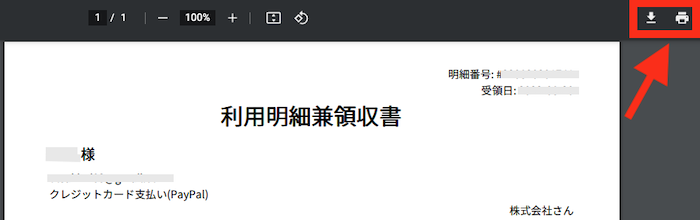
It's that easy to get one. It's very convenient, so be sure to use it.
For details, please see the following article.
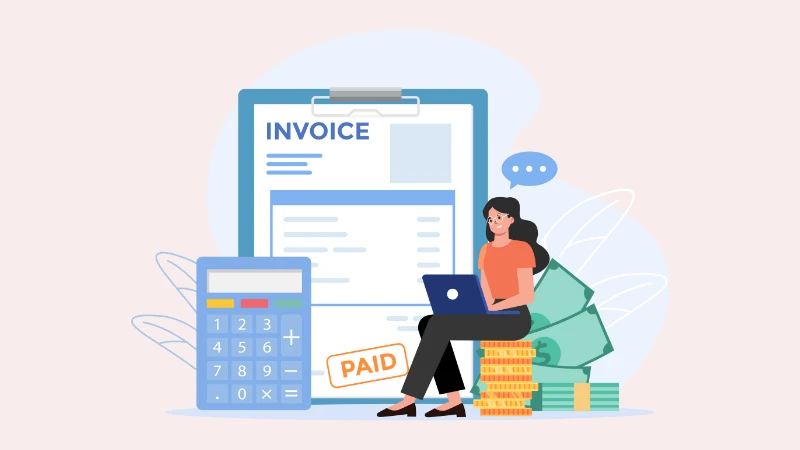
【Ondoku】How to issue and print receipts for credit cards and debit cards (Stripe)
We will guide you on how to issue receipts for credit card and debit card payments. For those who require a receipt, the receipt email or the usage statement and receipt issued by Ondoku will serve as the receipt.
Bank transfer with an issued quote and invoice (annual contracts only)

If you find Ondoku hard to use because "you have no credit card in the name of a company, school, or organization, and you cannot prepare a debit card," we recommend:
- bank transfer from an invoice
This is the method we recommend. Bank transfer is available to anyone, whether an individual, a company, or a school.
Please note the following points when paying for Ondoku by bank transfer.
- Your plan is activated within 24 hours after we confirm your payment.
- If the username and the name of the person making the transfer differ, your plan will not be activated unless you contact us.
- Bank transfer is available for annual payment only.
- There is no discount for annual payment.
- We cannot issue refunds for cancellations during the contract period.
- We cannot accept plan changes during the contract period.
- Quotes and invoices for which we receive no payment or contact for three months or more are treated as expired and deleted.
- Bank transfer does not renew automatically.
If you wish to continue into a second year or later, please issue an invoice again and make the payment.
In that case as well, your plan is activated within 24 hours after we confirm your payment. Please note that this is not a renewal from the expiration date.
If you want the renewal to start from the expiration date, please contact us in advance through the inquiry form.
Before you start, please consider carefully which plan or Business Plan you will choose.

I can't decide which plan to use...
If you are unsure which plan to choose >>Ask about the best plan and how to use it


I want to share it with several people in my company...
To find out whether several people can share an account at a company or school, please see this blog article.
Related article >>When using Ondoku for business, may several employees share one company account?
Replenishing characters with an annual contract
With an annual contract, the monthly character allowance multiplied by 12 months is added to your account at once.
(With the Premium Plan, you can use 12 million characters over one year.)
When your account runs out of characters, you can pay for another year
and use 12 million characters for one year from the date of payment.
The price per year is as follows.
[Prices]
- Basic Plan: $9.99 × 12 months = $119.88
Annual characters: 2.4 million - Value Plan: $19.99 × 12 months = $239.88
Annual characters: 5.4 million - Premium Plan: $29.99 × 12 months = $359.88
Annual characters: 12 million
If you would like an annual contract paid by credit card or debit card, you can purchase it from this link.
Card payment: Ondoku annual contract
* With credit card or debit card payment, your plan and character allowance are reflected in about 1 to 3 minutes.
* Credit card and debit card payments renew automatically every year. If you do not want automatic renewal, please cancel after paying.
How to start an annual contract by bank transfer
If you would like an annual contract paid by bank transfer, please contact us following these steps.
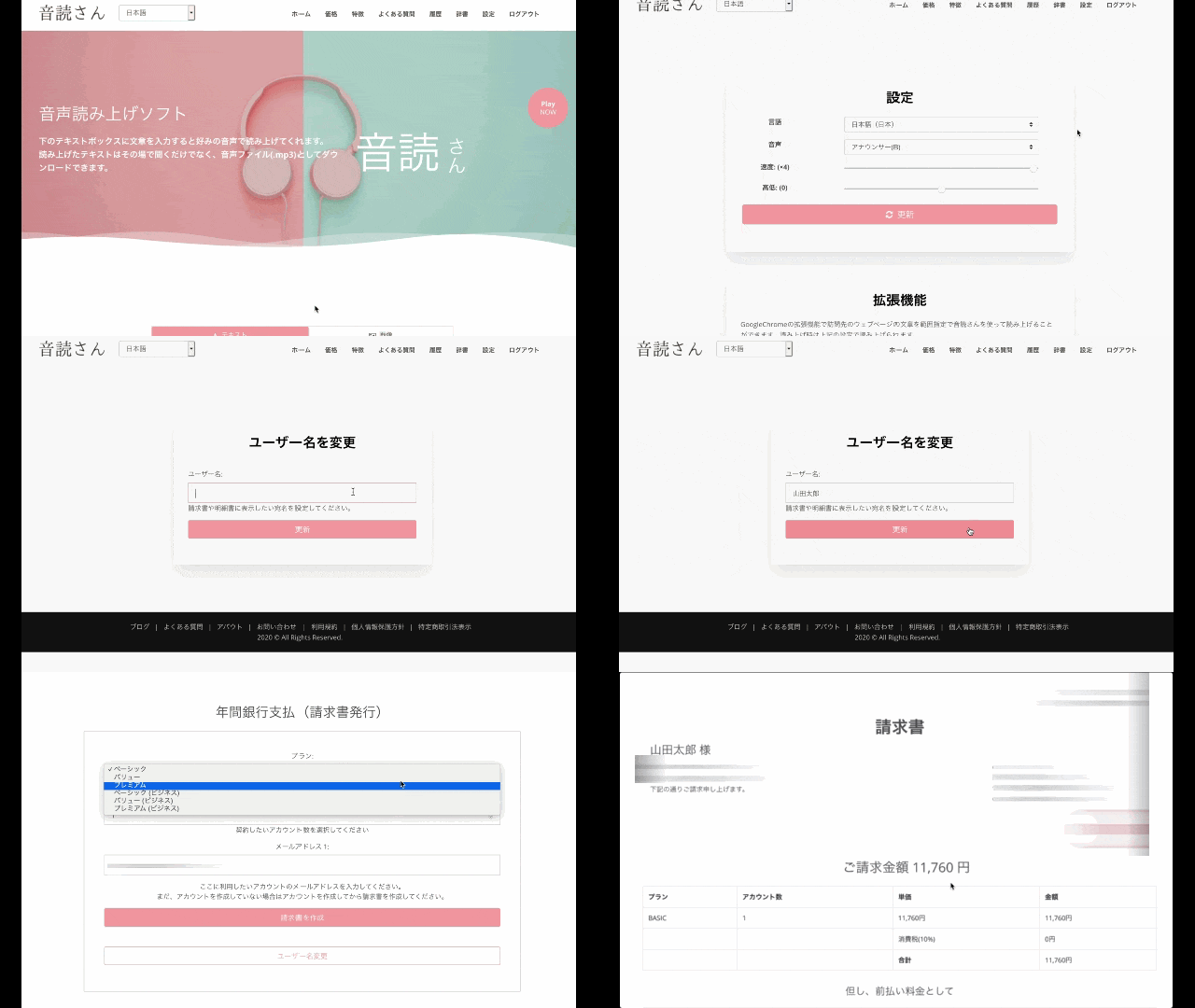
- Sign up for a free Ondoku account
- From Ondoku's Settings, you can issue an invoice under "Payment → Annual Bank Payment".
- After checking the contents of the invoice, please transfer the invoiced amount to the designated account.
* Invoices can be issued only when the site is displayed in Japanese.
* Bank transfer fees are paid by the customer.
* If you already have a monthly contract, please cancel it before making the transfer.
If it remains active, you will be charged twice.
After we confirm your transfer, your plan is activated within 24 hours in principle.
If the username and the name of the person making the transfer differ, we cannot confirm your payment. Please be sure to tell us through the inquiry form.
* If you are in a hurry, we can activate your plan even before the money arrives if you tell us the approximate payment date.
In that case, please issue an invoice and then contact us through the inquiry form.
Note that if we cannot confirm your payment even 3 days after the payment date you gave us, we will suspend your account.
* If your desired start date is later than the payment date, please notify us by email at least 3 business days beforehand. If the notice and the payment are made in the wrong order, we cannot accommodate your request.
(Example) Payment on March 20 → desired start date of April 1
Please notify us by email at least 3 business days before March 20.
We cannot accommodate your request if you notify us by email on March 20 itself.
For more details on issuing invoices, please see the following article.

Ondoku | How to Pay for a Paid Plan by Bank Transfer: Quotes, Invoices, and Receipts
Ondoku lets you easily issue invoices and quotes from settings. Learn how to issue invoices, quotes, and receipts.
Template for inquiries about your "desired start date"
Subject: Desired start date for annual contract
I am writing to let you know my desired start date for my Ondoku annual contract.
Invoice number:
Desired start date: [month] [day], [year]
Scheduled payment date: [month] [day], [year]
* Normally the plan starts after payment, but if you tell us your scheduled payment date, you can start using it earlier, on a desired date before the payment.
* If your desired start date is later than the payment date, please notify us by email at least 3 business days beforehand. If the notice and the payment are made in the wrong order, we cannot accommodate your request.
About receipts
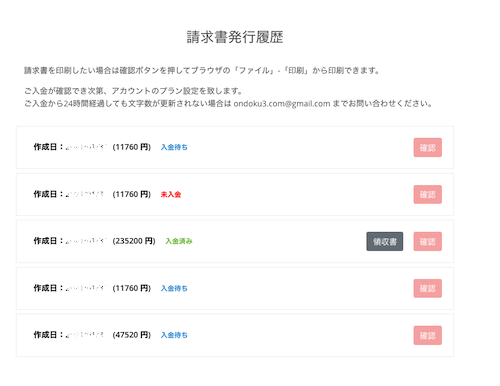
After your plan is activated, you can download your receipt from the invoice issuance history.
About the Business Plan
Ondoku offers a Business Plan to support a wide range of uses.
What is the Business Plan?
With the Business Plan,
- you can create and provide audio on behalf of third parties.
- you can keep using the audio as it is, without credit notation, even after your contract ends.
The Business Plan is a plan for sole proprietors and corporations.
It is recommended if you do not want to display a credit or you want to keep using the audio.
The Business Plan is outlined below.
Business Plan overview
- License valid for one year
- Can be used for commissioned and contracted work
- Can be used in broadcast media
- Can be used in teaching materials and similar works that use Ondoku audio
- Audio can be used in goods and products intended for sale, leasing, or commercial use
- Audio created during the contract period can continue to be used without credit notation after the license period ends
For more details, please see the following article.

Ondoku | Business Plan Details: Features, Pricing, and More
A Business plan exempts some uses otherwise prohibited. Learn what you can do with Ondoku's Business plan.
Business Plan prices
- 2.4 million characters per year → 120,000 yen (JPY) plus tax
- 5.4 million characters per year → 240,000 yen (JPY) plus tax
- 12 million characters per year → 360,000 yen (JPY) plus tax
To purchase by credit card or debit card, go here → https://ondoku3.com/pricing/business/
* With credit card or debit card payment, your plan and character allowance are reflected in about 1 to 3 minutes.
* Credit card and debit card payments renew automatically every year. If you do not want automatic renewal, please cancel after paying.
How to start an annual contract by bank transfer
If you would like an annual contract paid by bank transfer, please contact us following these steps.
- Sign up for a free Ondoku account
- From Ondoku's Settings, you can issue an invoice under "Payment → Annual Bank Payment".
- After checking the contents of the invoice, please transfer the invoiced amount to the designated account.
* Invoices can be issued only when the site is displayed in Japanese.
* Bank transfer fees are paid by the customer.
* If you have a monthly contract, please cancel it in advance, before making the transfer.
If it remains active, you will be charged twice.
After we confirm your transfer, your plan is activated within 24 hours in principle.
If the username and the name of the person making the transfer differ, we cannot confirm your payment. Please be sure to tell us through the inquiry form.
Quotes and invoices for which we receive no payment or contact for three months or more are treated as expired and deleted.
* If you are in a hurry, we can activate your plan even before the money arrives if you tell us the approximate payment date.
In that case, please issue an invoice and then contact us through the inquiry form.
Note that if we cannot confirm your payment even 3 days after the payment date you gave us, we will suspend your account.
* If your desired start date is later than the payment date, please notify us by email at least 3 business days beforehand. If the notice and the payment are made in the wrong order, we cannot accommodate your request.
(Example) Payment on March 20 → desired start date of April 1
Please notify us by email at least 3 business days before March 20.
We cannot accommodate your request if you notify us by email on March 20 itself.
For more details on issuing invoices, please see the following article.
Ondoku | How to Pay for a Paid Plan by Bank Transfer: Quotes, Invoices, and Receipts
Ondoku lets you easily issue invoices and quotes from settings. Learn how to issue invoices, quotes, and receipts.
Template for inquiries about your "desired start date"
Subject: Desired start date for annual contract
I am writing to let you know my desired start date for my Ondoku annual contract.
Invoice number:
Desired start date: [month] [day], [year]
Scheduled payment date: [month] [day], [year]
* Normally the plan starts after payment, but if you tell us your scheduled payment date, you can start using it earlier, on a desired date before the payment.
* If your desired start date is later than the payment date, please notify us by email at least 3 business days beforehand. If the notice and the payment are made in the wrong order, we cannot accommodate your request.
About receipts
After your plan is activated, you can download your receipt from the invoice issuance history.
About receipts for each Ondoku payment method
Credit cards and debit cards
If you need a receipt, the following
- The Statement and Receipt issued by Ondoku
- The receipt email (please allow emails from the domain "stripe.com", which the receipt emails are sent from)
serve as your receipt.
For details, please see the following article.
【Ondoku】How to issue and print receipts for credit cards and debit cards (Stripe)
We will guide you on how to issue receipts for credit card and debit card payments. For those who require a receipt, the receipt email or the usage statement and receipt issued by Ondoku will serve as the receipt.
Bank transfer
After your payment is confirmed and your plan is activated, you can download your receipt from the invoice issuance history.
If you have any other questions, please feel free to contact us.
Thank you for your continued support of Ondoku.
■ AI voice synthesis software "Ondoku"
"Ondoku" is an online text-to-speech tool that can be used with no initial costs.
- Supports 81 languages and regions, including Japanese, English, Chinese, Korean, Spanish, French, and German
- Available from both PC and smartphone
- Suitable for business, education, entertainment, etc.
- No installation required, can be used immediately from your browser
- Supports reading from images
To use it, simply enter text or upload a file on the site. A natural-sounding audio file will be generated within seconds. You can use voice synthesis up to 5,000 characters for free, so please give it a try.

Text-to-speech software "Ondoku" can read out 5000 characters every month with AI voice for free.
You can easily download MP3s and commercial use is also possible.
If you sign up for free, you can convert up to 5,000 characters per month for free from text to speech.
Try Ondoku now.
HP:
ondoku3.com
Email: ondoku3.com@gmail.com
Related posts
"Ondoku" is a Text-to-Speech service that anyone can use for free without installation. If you register for free, you can get up to 5000 characters for free each month. Register now for free