[Ondoku] Fix Audio Download and Playback Issues
[Update] How to Download Ondoku Audio Files in WAV Format
July 22, 2026
![[Update] How to Download Ondoku Audio Files in WAV Format](https://storage.googleapis.com/ondoku3/image/%E3%82%AB%E3%82%BB%E3%83%83%E3%83%88%E3%83%86%E3%83%BC%E3%83%95_930.webp)
Ondoku's download function has been powered up.
It is now possible to download in WAV format as well.
However, you cannot download in WAV format just by downloading normally.
- How to download in WAV format
- How to utilize the WAV format, etc.
We will introduce the details of the powered-up Ondoku download function.
How to download in WAV format on Ondoku
Previously on Ondoku, audio could only be downloaded in MP3 format.
However, thanks to the update, it is now possible to download in WAV format as well.
WAV format files can be downloaded from the History.
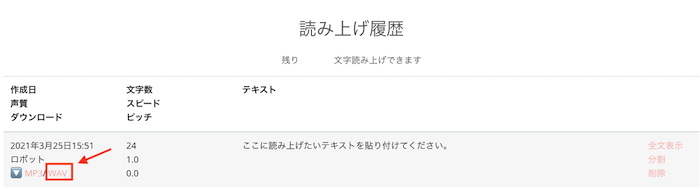
Within the "Created Date, Voice, Download" items in the text-to-speech history list, there are links to MP3 / WAV.
If you want to download in WAV format, please click on WAV here.
That’s all it takes to download audio in WAV format!
Until now, only MP3 was supported, so if you needed WAV format audio, you had to convert it on separate sites one by one.
But from now on, by:
- Reading aloud with Ondoku
- Downloading the WAV format from the History
The need to convert on other sites is gone, saving you time and effort!
You can still download in MP3 format from the download button on the top page as before.
How to use Ondoku's WAV format audio download

WAV format is one of the audio data formats.
Compared to MP3, its characteristic is that it does not compress the sound, so the data size tends to be large, with a 5-minute audio file being about 50MB.
However, because WAV is the standard audio data format for Windows, it has the advantage of being highly compatible with many Windows software applications.
For example, PowerPoint.
When you insert and play an MP3 format audio file in PowerPoint, an error may occur where slide transitions do not work properly.
This is an error that occurs because the compatibility between PowerPoint and MP3 is not good.
It can be resolved by using a WAV format audio file instead of MP3.
Also, outside of Microsoft Office, for example, when editing videos with Adobe Premiere, problems such as the audio being cut off at the beginning or end may occur when inserting MP3 files.
This can also be resolved by using WAV files.
Since the MP3 format is widely used, in most cases, you can use the audio conveniently enough even in MP3 format.
However, some people find that "it doesn't work well unless it's in WAV format."
Please make use of the newly available WAV format download for your intended purpose.
We are happy to be the best text-to-speech site for you.
■ AI voice synthesis software "Ondoku"
"Ondoku" is an online text-to-speech tool that can be used with no initial costs.
- Supports 81 languages and regions, including Japanese, English, Chinese, Korean, Spanish, French, and German
- Available from both PC and smartphone
- Suitable for business, education, entertainment, etc.
- No installation required, can be used immediately from your browser
- Supports reading from images
To use it, simply enter text or upload a file on the site. A natural-sounding audio file will be generated within seconds. You can use voice synthesis up to 5,000 characters for free, so please give it a try.

Text-to-speech software "Ondoku" can read out 5000 characters every month with AI voice for free.
You can easily download MP3s and commercial use is also possible.
If you sign up for free, you can convert up to 5,000 characters per month for free from text to speech.
Try Ondoku now.
HP:
ondoku3.com
Email: ondoku3.com@gmail.com
Email: ondoku3.com@gmail.com
Related posts
"Ondoku" is a Text-to-Speech service that anyone can use for free without installation. If you register for free, you can get up to 5000 characters for free each month. Register now for free
- What is Ondoku
- Start text-to-speech conversion
- Free registration
- Pricing
- Posts
- Try other free services
![[Update] How to Download Ondoku Audio Files in WAV Format](https://storage.googleapis.com/ondoku3/image/irodori-tts_tmb_140.webp)
![[Update] How to Download Ondoku Audio Files in WAV Format](https://storage.googleapis.com/ondoku3/image/tategaki-image-yomiage_howto_tmb_140.webp)
![[Update] How to Download Ondoku Audio Files in WAV Format](https://storage.googleapis.com/ondoku3/image/iphone-video-narration_tmb_140.webp)
![[Update] How to Download Ondoku Audio Files in WAV Format](https://storage.googleapis.com/ondoku3/image/chrome-reading-mode-pc_tmb_140.webp)
![[Update] How to Download Ondoku Audio Files in WAV Format](https://storage.googleapis.com/ondoku3/image/pdf-to-mp3-howto_tmb_140.webp)









